Free trial
The first session analysis is free, according to the homepage.
Learn moreTurns recorded TTRPG sessions into organized notes, NPCs and recaps
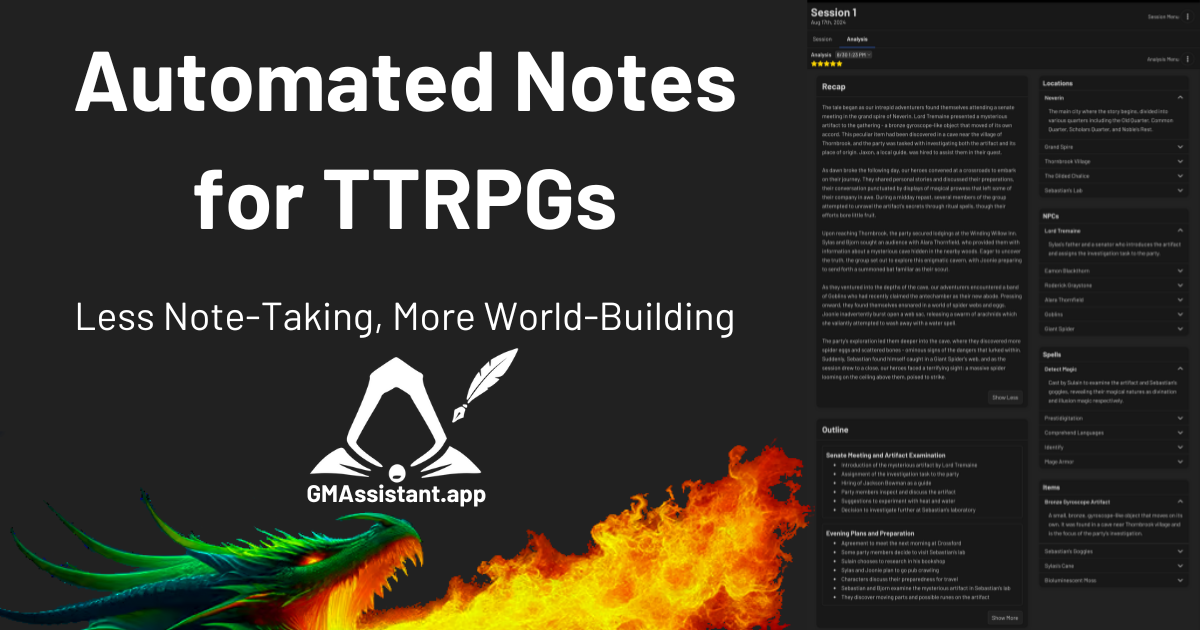
GM Assistant is a note maker tool that turns recorded TTRPG sessions into organized notes, NPCs and recaps. GM Assistant turns uploaded audio from tabletop RPG sessions into structured notes, including recaps, memorable moments, outlines, locations and NPCs. It targets D&D, Pathfinder and other game masters, and the first session is free.
GM Assistant is a web service that converts audio recordings of tabletop role-playing sessions into structured campaign notes. A game master records a session in whatever way suits the table, uploads the audio, and receives written material covering the story so far, without having to take notes during play. It is aimed at Dungeons & Dragons, Pathfinder and other tabletop RPG groups. The output goes well beyond a plain transcript. The homepage shows an example built from a 2.75 hour homebrew D&D 5e session recorded in Discord with the Craig bot. The result includes a recap offered in full, short and stylized versions, a list of memorable moments sorted into funny, dramatic and epic entries, and a section-by-section outline of the session. It also extracts locations and NPCs, each with a descriptive entry, such as a village with its inn and governor or a cave system with its inhabitants. A detail-level control switches between brief and comprehensive analysis, so a GM can choose between a quick summary and a thorough record. In practice the workflow is short: record, upload, wait a few minutes, then review the notes. The site states the first session is free and reports usage figures of over 6,000 users, 31,896 analyzed sessions and support for 13 languages. Because the example notes are labeled unedited, buyers can judge raw output quality before signing up, though the generated text still deserves a read-through before it becomes campaign canon. Among alternatives, GM Assistant sits between general-purpose transcription and meeting-summary tools and manual wikis or note apps. General transcribers produce text but do not understand NPCs, quests or in-world locations. A TTRPG-specific tool trades breadth for output that is already shaped like campaign material. It suits long-running campaigns where continuity matters and where the GM would otherwise spend hours after each session writing recaps for the players.
The first session analysis is free, according to the homepage.
Learn moreThe homepage states that the first session is free. No further plan names or prices appear in the provided content.
Learn moreNo formal integrations are listed. The homepage example uses audio recorded in Discord with the Craig bot and then uploaded manually.
Converts session audio into recaps (full, short, stylized), memorable moments, a section outline, locations and NPC entries, with a brief or comprehensive detail setting. Supports 13 languages and works for D&D, Pathfinder and other tabletop RPGs.
 AI Angels400+ customizable AI girlfriends for NSFW chat, voice calls, and roleplay
 Candy AIExperience the future of companionship with AI friends who chat, role-play, and connect with you on a human level.
 ourdream.aiA vast AI roleplay platform with millions of characters for chat, images, video and voiceAI Angels400+ customizable AI girlfriends for NSFW chat, voice calls, and roleplayCandy AIExperience the future of companionship with AI friends who chat, role-play, and connect with you on a human level.ourdream.aiA vast AI roleplay platform with millions of characters for chat, images, video and voice