Free trial
The homepage says the tool is free to try, with the editor available without a stated time limit. Some exports, papers, fonts and quality levels are locked behind paid plans.
Learn moreTurn typed text into printable, realistic handwritten pages
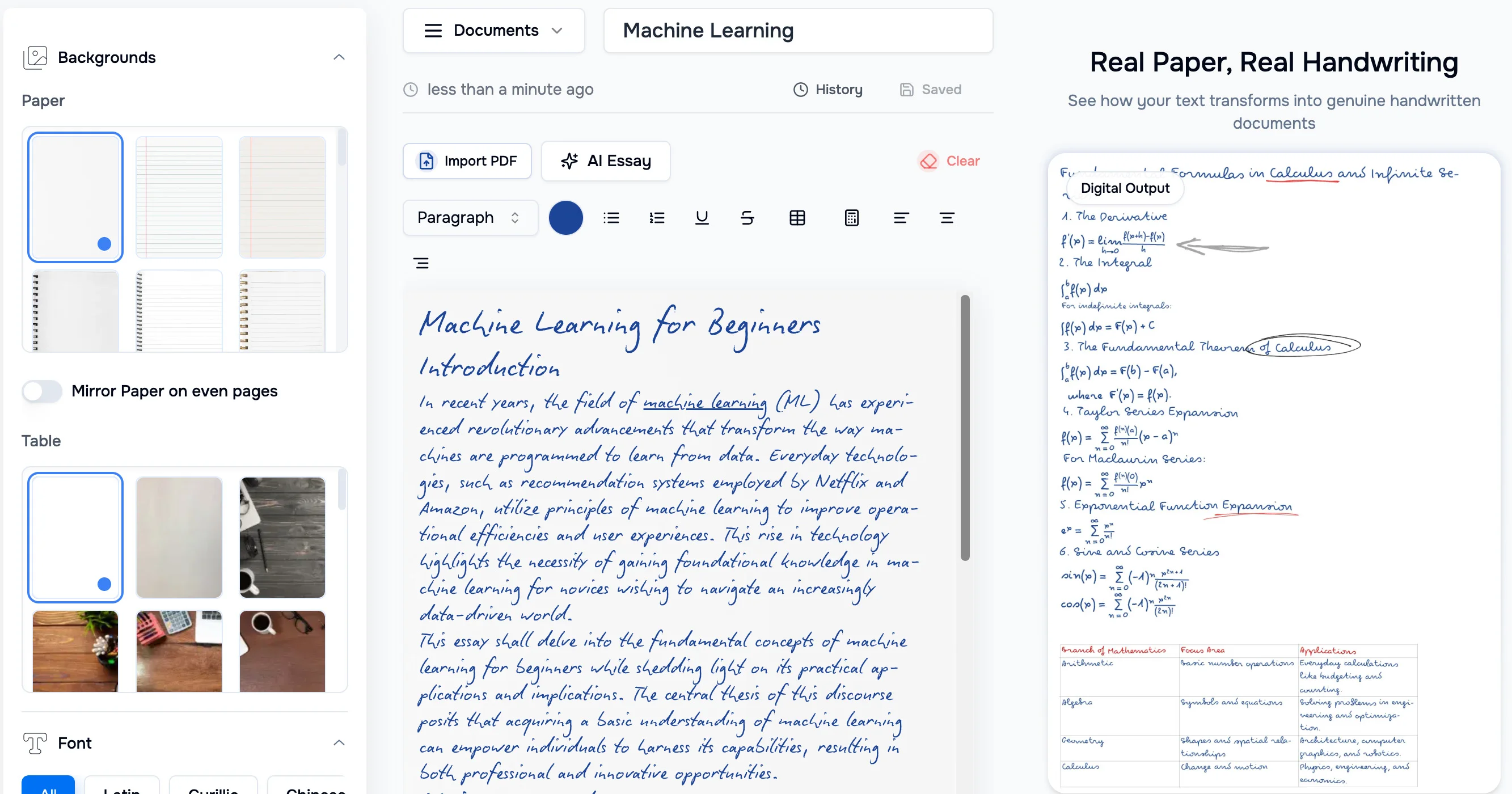
HandtextAI is a font generator tool that turns typed text into printable, realistic handwritten pages. HandtextAI converts typed, pasted or imported text into realistic handwritten pages with selectable fonts, papers and realism effects. It exports printable files or notebook-style photos, and offers a separate API for business print workflows.
HandtextAI is a browser-based handwriting generator for people who already have text and need it to look written by hand. The editor accepts typed or pasted content, imported files such as PDF and DOCX, and text copied from ChatGPT with its headings, lists, tables and maths intact. The result is rendered onto paper in a chosen handwriting font, ready to download or print. In practice the workflow is short. A user writes or pastes the document, picks one of the built-in handwriting fonts, then chooses a paper style, page size, ink colour and a realism level. Typography controls cover font size, line height, letter and word spacing and margins, while optional effects add ink flow variation, paper texture, blur and shading. Generate produces a preview, and adjustments can be made before exporting. Two output modes exist: Print mode produces clean, flat pages suited to PDFs and printing, and Photo mode places the handwriting into a notebook or desk scene. Hand-drawn marks such as circling, underlining, highlighting and crossing out words can be added, and tables, images and handwritten maths are supported. The site lists stated limits: up to 1,000,000 characters per document and PDF downloads of up to 500 pages. ZIP export is available to everyone, while JPEG, PNG and PDF export, some papers, fonts and quality levels depend on the plan. A Premium plan allows uploading a font made from the user's own handwriting. Multilingual text works when the selected font supports the characters. The audience is mostly students producing homework and study notes, along with people printing letters or personalized notes. A separate, approval-based API (POST /api/v1/generate) targets business print jobs such as postcards, envelopes and batch personalization with variables. Compared with general document editors or font-only tools, HandtextAI is narrower but offers more control over the finished look of the page, including paper and scene choices. Because the output is meant to pass as handwriting, users should check the rules of any course or workplace before submitting such pages.
The homepage says the tool is free to try, with the editor available without a stated time limit. Some exports, papers, fonts and quality levels are locked behind paid plans.
Learn moreThe editor is free to try, and plan badges mark locked features. ZIP export is open to everyone, while JPEG, PNG and PDF exports, some papers, fonts and quality levels depend on the plan. Custom font upload needs Premium. Prices are not stated on the homepage.
Learn moreA user guide covers quick start, use cases, Print versus Photo, limits, exports and FAQ. Two video tutorials and a blog of guides are also available.
Learn moreA print-focused developer API (POST /api/v1/generate) produces PNG and PDF output for approved business workflows such as postcards, letters, envelopes and batch personalization. No third-party integrations are listed.
Learn moreText to handwriting with Print and Photo modes, built-in fonts, custom font upload, papers and scenes, realism effects, typography controls, hand-drawn marks, tables, images, handwritten maths, cursive, multi-page documents, multilingual text, PDF and DOCX import, and PDF or image export.
Learn more AI Angels400+ customizable AI girlfriends for NSFW chat, voice calls, and roleplay
 Candy AIExperience the future of companionship with AI friends who chat, role-play, and connect with you on a human level.
 ourdream.aiA vast AI roleplay platform with millions of characters for chat, images, video and voiceAI Angels400+ customizable AI girlfriends for NSFW chat, voice calls, and roleplayCandy AIExperience the future of companionship with AI friends who chat, role-play, and connect with you on a human level.ourdream.aiA vast AI roleplay platform with millions of characters for chat, images, video and voice


