ImageToAI.Video

Turn still images into MP4 clips using Seedance, Veo, Kling and more

Beginner
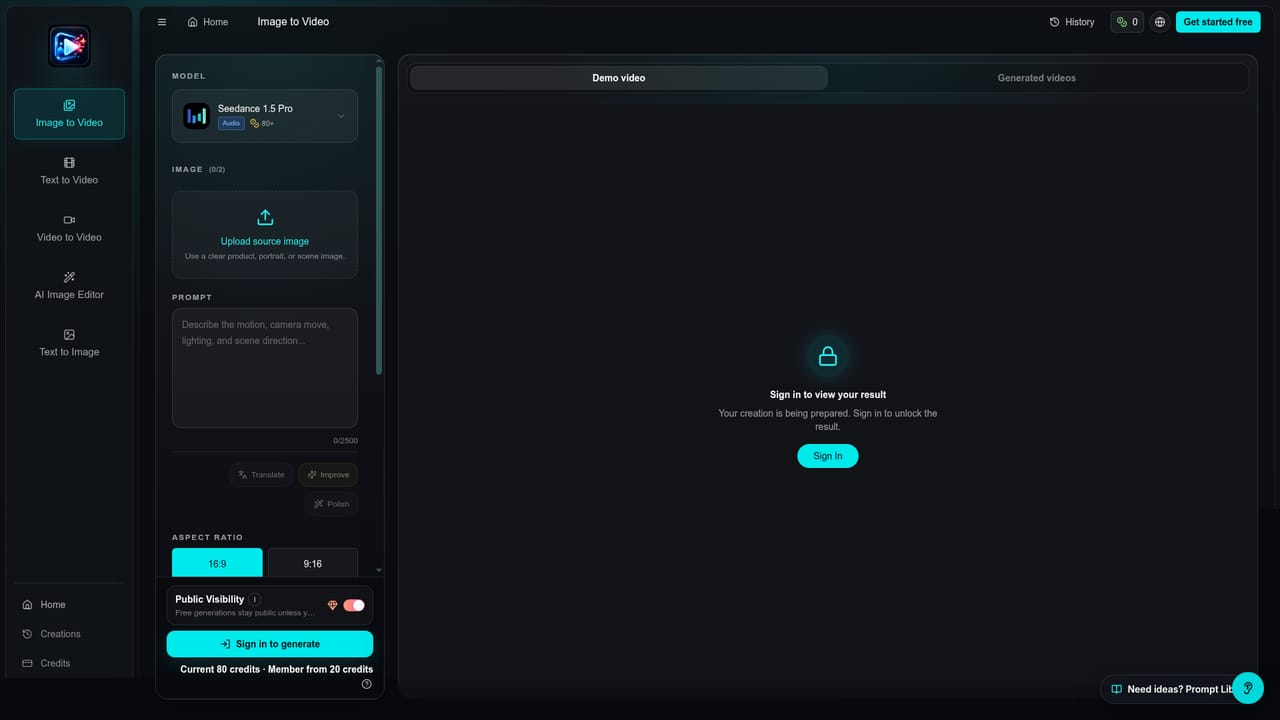
Screenshot of ImageToAI.Video, Turn still images into MP4 clips using Seedance, Veo, Kling and more

What is ImageToAI.Video?

ImageToAI.Video is a generative video tool that turns still images into MP4 clips using Seedance, Veo, Kling and more. ImageToAI.Video animates a reference image into MP4 clips with prompt-guided motion, offering models such as Seedance, Veo, Kling and Wan. It uses credit packs with a commercial license and no watermark, aimed at marketers and creators.

ImageToAI.Video is a browser-based workspace for turning a still image into a short MP4 clip. The user uploads a reference image, writes a prompt describing camera movement, lighting, mood or scene changes, picks a model, and generates the video. Rather than tying users to one engine, the service bundles many third-party models in one place, including Seedance, Veo, Kling, Wan, HappyHorse and Runway Gen 4, alongside image models such as Nano Banana, Seedream, Flux and GPT Image. The audience is mostly marketers, ecommerce sellers, creators and small studios who need motion content without organizing a shoot. The listed use cases include launch teasers, ad hook testing, product walkthroughs, seasonal shop clips and short narrative pieces. A reference image keeps the subject, product details or art direction recognizable while the model adds movement, which matters for teams trying to keep a campaign visually consistent across many clips. In practice, the workflow is built around credits. Each model has its own credit cost, and format, length, resolution and credit usage are shown before generation starts. Clips run five, ten or fifteen seconds, with landscape, vertical, square and classic ratios, and three quality tiers let users draft cheaply before rendering a publishable version. The homepage also offers prompt templates that can be loaded with one click, plus a gallery of example clips to preview results before spending anything. Pricing is sold as one-time credit packs that stay valid for twelve months, with no subscription required for those packs. Paid packs are described as watermark-free, private and covered by a commercial license, with higher tiers allowing more concurrent generations. Among alternatives, the service sits between single-vendor tools such as the model makers' own apps and broader aggregator platforms. Its appeal is breadth of model choice and transparent per-clip costs, while output quality still depends on whichever underlying model is chosen.

How do you use ImageToAI.Video?

  1. 1Open the image to video tool
    Go to the image to video page, where the generator, model picker and prompt box are located.
    ImageToAI.Video — Open the image to video tool
  2. 2Upload a reference image
    Add the still image of the product, person or scene that the video should stay faithful to.
  3. 3Describe the motion
    Write a prompt covering camera movement, lighting, mood and scene changes, or start from one of the example prompts.
  4. 4Choose a model and settings
    Pick a model, aspect ratio, length and resolution, then check the credit cost shown before generating.
  5. 5Generate and download the MP4
    Run the generation, review the result, and download the MP4 for ads, product pages or social posts.

Pros and cons

Pros

  • Many video models (Seedance, Veo, Kling, Wan, Runway) are available in one workspaceAI
  • Format, length, resolution and credit cost are shown before generatingAI
  • One-time credit packs need no subscription and stay valid for 12 monthsAI
  • Paid packs are watermark-free, private and include a commercial licenseAI
  • Reference image mode helps keep products and styles consistent across clipsAI

Cons

  • Credit costs vary widely by model, so premium options like Veo 3.1 Premium use credits quicklyAI
  • Clip lengths are limited to short durations of five to fifteen secondsAI
  • Output quality depends on the chosen third-party model rather than the service itselfAI
  • Lower packs allow only one concurrent generation, which slows batch testingAI

How much does ImageToAI.Video cost?

Pricing

Sold as one-time credit packs with no subscription: Starter at $39.99 for 4,000 credits, Pro at $199.99 for 23,500 credits, and Agency at $499.99 for 60,000 credits. Credits last 12 months, and per-clip cost varies by model. A limited-time annual offer is also advertised.

Learn more

Features

Prompt-guided image to video, text to video, and video-to-video motion control. Access to many models, three quality tiers, 5, 10 or 15 second clips, landscape, vertical, square and classic ratios, MP4 export, private generation, no watermark, and a commercial license on paid packs.

Learn more

Frequently asked questions about ImageToAI.Video

  • How much does ImageToAI.Video cost?
    Sold as one-time credit packs with no subscription: Starter at $39.99 for 4,000 credits, Pro at $199.99 for 23,500 credits, and Agency at $499.99 for 60,000 credits. Credits last 12 months, and per-clip cost varies by model. A limited-time annual offer is also advertised.
  • How do you use ImageToAI.Video?
    The walkthrough on this page covers 5 steps: 1. Open the image to video tool 2. Upload a reference image 3. Describe the motion 4. Choose a model and settings 5. Generate and download the MP4.
  • What platforms does ImageToAI.Video support?
    ImageToAI.Video is available on Web App.
  • What are the limitations of ImageToAI.Video?
    Credit costs vary widely by model, so premium options like Veo 3.1 Premium use credits quickly. Clip lengths are limited to short durations of five to fifteen seconds. Output quality depends on the chosen third-party model rather than the service itself.

Status

StatusActive
Views0
Outbound clicks0
Added10/18/2026

Platforms

Web App

Pricing

Paid