Kurby

AI neighborhood reports for any US address

Beginner API
Screenshot of Kurby, AI neighborhood reports for any US address

What is Kurby?

Kurby generates AI-written neighborhood reports for any US address, combining crime, school, walkability, demographic, climate and property trend data from 14+ government and industry sources into shareable, branded PDFs for agents and homebuyers.

Kurby is a real estate research tool that turns a street address or a neighborhood name into a written report covering the things buyers usually have to dig for across a dozen websites. Enter a location and the platform pulls crime statistics, school ratings, walkability scores, demographic data, climate risk, property value trends and nearby amenities into a single document. The audience is dual: agents who want branded, client-ready material that makes them look like the local expert, and individual buyers or investors doing their own due diligence before an offer. The reports are assembled from 14 or more public sources rather than model guesswork. Census Bureau figures cover demographics and income, FBI Crime Data Explorer supplies violent and property crime rates, Walk Score provides walk, transit and bike scores, NCES feeds school data, and FEMA, EPA, HUD, BLS and FRED round out risk, environmental, housing and economic context. Kurby states that coverage spans more than 150 million residential properties across all 50 states, refreshed from source APIs daily. Each report includes maps with flood zones and points of interest, interactive charts for price history and sales volume, AI-written neighborhood summaries, and a green flags and red flags section that highlights both strengths and warnings. In practice the workflow is short: search an address, review the generated charts and summaries, then export a PDF or share a custom report under the agent's own branding. A Chrome extension overlays Kurby insights directly on Zillow, Trulia and Redfin listings, so agents browsing properties can pull context without leaving the tab. Pricing runs on a monthly subscription with report caps, from a free tier limited to one AI report per day up to a $39.99 plan that adds API access and custom presets. Where it fits: Kurby sits between consumer neighborhood sites and full MLS analytics platforms. It is not a comparative market analysis engine or a listing database, so agents still need their existing transaction tools. Its edge is packaging public-record context into something presentable quickly, which matters most for buyer consultations and relocation conversations.

How do you use Kurby?

  1. 1Search an address or neighborhood
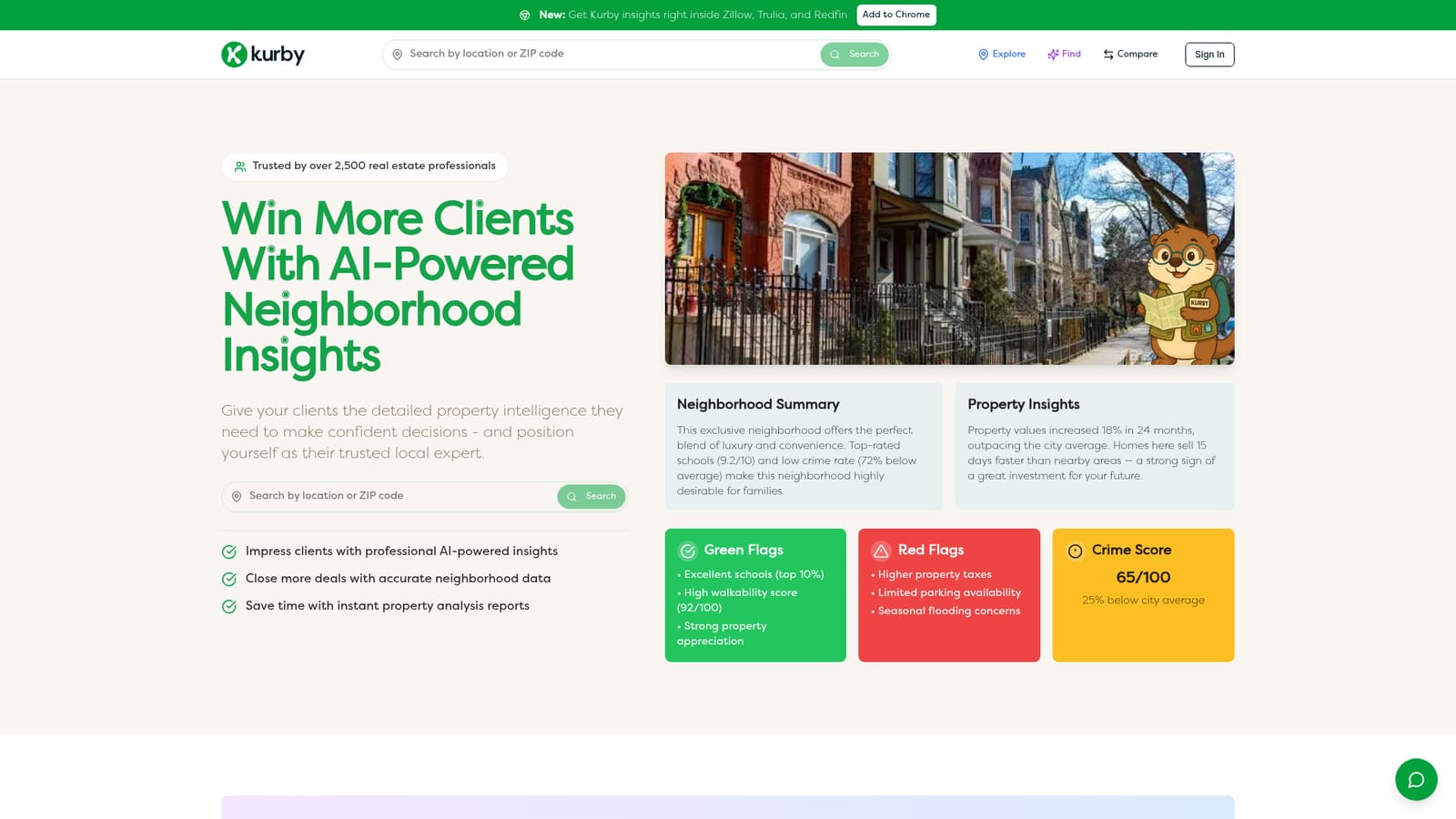
    Open the site and enter a specific property address or a neighborhood name in the search field. Kurby generates the report for that location on demand.
    Kurby — Search an address or neighborhood
  2. 2Review the neighborhood summary and flags
    Read the AI-written neighborhood description, then check the green flags and red flags lists for strengths and warnings such as tax levels, parking or flooding concerns.
  3. 3Inspect charts, maps and scores
    Work through the interactive visualizations: price history and sales volume, walkability and transit scores, crime trends, school ratings, and the map layer showing flood zones and nearby amenities.
  4. 4Export or share the report
    Generate a PDF or a shareable custom report carrying your own branding. Both property-specific analyses and broader neighborhood overviews can be sent to a client.
  5. 5Add the Chrome extension for listing browsing
    Install the Kurby extension from the Chrome Web Store so insights appear alongside listings on Zillow, Trulia and Redfin while you browse.
  6. 6Pick a plan that matches your report volume
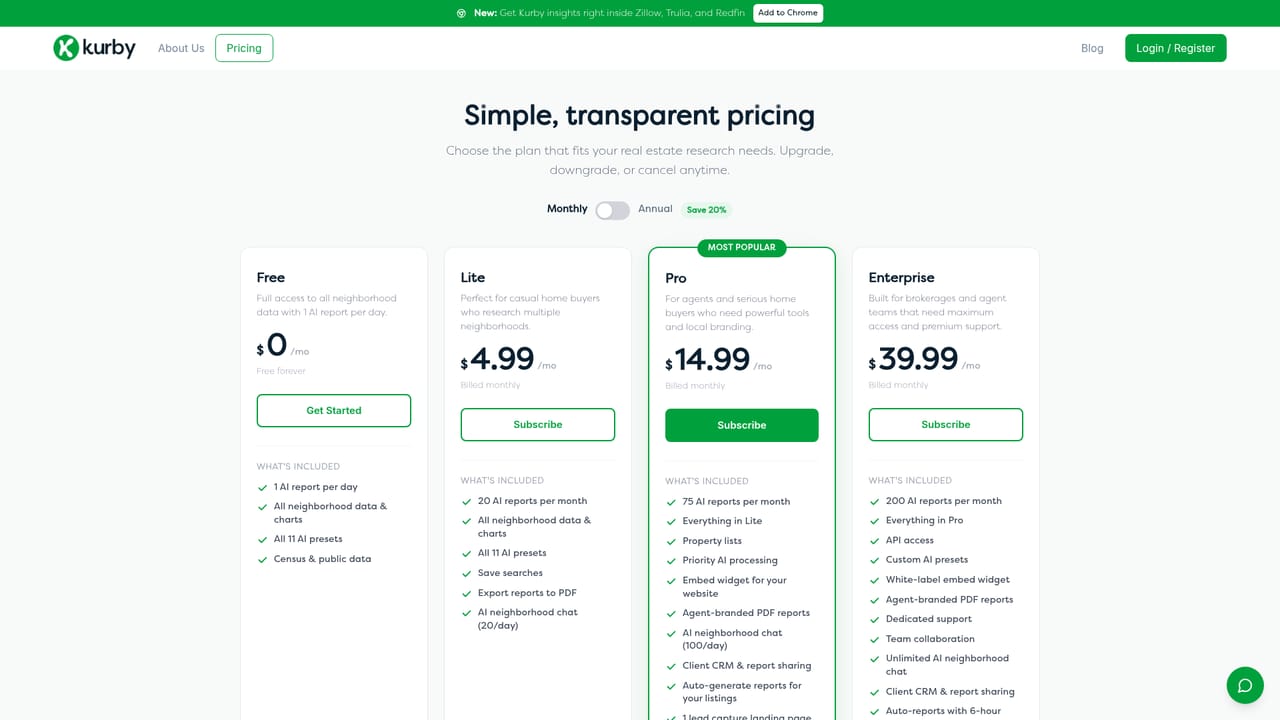
    Compare the tiers on the pricing page and choose based on monthly report counts, PDF export, property lists and API access.
    Kurby — Pick a plan that matches your report volume

Pros and cons

Pros

  • Pulls from named government sources including Census, FBI, FEMA and NCES instead of relying on model estimatesAI
  • Covers value trends, crime, schools, walkability and climate risk in a single reportAI
  • Chrome extension surfaces insights directly inside Zillow, Trulia and Redfin listingsAI
  • Branded PDF export and client sharing suit agent workflows out of the boxAI
  • Free tier and a $4.99 entry plan keep casual buyer use affordableAI

Cons

  • Coverage is limited to US residential property, so no international or commercial useAI
  • Report caps are tight: 20 reports per month on Lite and 75 on ProAI
  • No CRM, MLS or transaction management integration, so it stays a standalone research toolAI
  • Agent performance claims such as closing 30% more deals are marketing statements without published methodologyAI
  • Enterprise features like API access and custom presets sit behind the $39.99 tierAI

How much does Kurby cost?

Pricing

Four tiers, cancel anytime. Free at $0 with 1 AI report per day and all 11 presets. Lite at $4.99/mo includes 20 reports, saved searches and PDF export. Pro at $14.99/mo gives 75 reports, property lists and priority processing. Enterprise at $39.99/mo adds 200 reports, API access, custom presets and dedicated support.

Learn more

Support

Dedicated support is listed as a feature of the $39.99 Enterprise plan. Lower tiers have no stated support commitment.

Integrations

A Chrome extension overlays Kurby insights inside Zillow, Trulia and Redfin listings. API access is listed on the Enterprise plan.

Features

Reports combine market trends, interactive property maps, demographics, school ratings, crime and safety scores, walkability, lifestyle amenities and AI neighborhood summaries. Green flags and red flags sections call out strengths and risks. Data draws on 14+ sources including Census, FBI, EPA, FEMA, Walk Score, NCES, BLS, FRED, HUD and Google Places, covering 150M+ properties updated daily.

Frequently asked questions about Kurby

  • How much does Kurby cost?
    Four tiers, cancel anytime. Free at $0 with 1 AI report per day and all 11 presets. Lite at $4.99/mo includes 20 reports, saved searches and PDF export. Pro at $14.99/mo gives 75 reports, property lists and priority processing. Enterprise at $39.99/mo adds 200 reports, API access, custom presets and dedicated support.
  • Does Kurby have an API?
    Yes, Kurby offers an API.
  • How do you use Kurby?
    The walkthrough on this page covers 6 steps: 1. Search an address or neighborhood 2. Review the neighborhood summary and flags 3. Inspect charts, maps and scores 4. Export or share the report 5. Add the Chrome extension for listing browsing 6. Pick a plan that matches your report volume.
  • What platforms does Kurby support?
    Kurby is available on Web App and Browser extension.
  • What does Kurby integrate with?
    A Chrome extension overlays Kurby insights inside Zillow, Trulia and Redfin listings. API access is listed on the Enterprise plan.
  • What are the limitations of Kurby?
    Coverage is limited to US residential property, so no international or commercial use. Report caps are tight: 20 reports per month on Lite and 75 on Pro. No CRM, MLS or transaction management integration, so it stays a standalone research tool.

Status

StatusActive
Views0
Outbound clicks0
Added10/22/2026

Platforms

Web AppBrowser extension

Pricing

FreemiumSubscription