
Loric.ai

Production-native AI film studio that keeps characters and scenes consistent

Intermediate
Screenshot of Loric.ai, Production-native AI film studio that keeps characters and scenes consistent

What is Loric.ai?

Loric.ai is a production-oriented AI filmmaking workspace that bundles top video and image models (Veo 3.1, Kling 3.0, Seedance 2.0, Nano Banana Pro and others) with Codex entries, a scene library, LoRA training and prompt storage so characters and style stay consistent across a whole project.

Loric.ai is an AI filmmaking workspace built around the idea that a film is a continuous project, not a pile of disconnected generations. Instead of prompting one clip at a time in separate tools, the platform organizes characters, locations, objects and visual anchors as reusable Codex entries, then references them across scenes so the look and cast stay recognizable from shot to shot. Scenes can be built from beats, dialogue, actions and media references, giving the project a working structure that later generations draw on. A bundled model catalog sits at the center of the workflow: Veo 3.1 for cinematic footage, Kling 3.0 for directed camera movement, Seedance 2.0 as a flagship, plus GPT Image 2, Nano Banana Pro, LTX, Luma Dream Machine, Wan and Flux 2 Klein for image work and concepting. The pitch is that switching between image and video models does not require rebuilding the shot; the prompt stays in place and project entries remain clickable so they can be applied to whichever model is active. A prompt library stores the constraints and style systems that keep a project coherent, and LoRA training lives inside the same workspace rather than a separate lab. Around generation, Loric bundles finishing tools: reference-aware image edits, a Comp Maker for assembling shots into a timed sequence, and an upscaler for enlarging frames for review, pitch decks or delivery prep without exporting elsewhere. Control options include lip sync, motion and camera moves, modular prompts, audio and aspect ratio settings, shot timing, style transfer and scene memory. The tool suits short film makers, directors and small production teams who want long-format consistency without stitching several subscriptions together. Beginners may still need to learn prompt structure and model behavior, but the interface assumes a production mindset rather than a one-off image generator. Pricing is compute-based, so heavier premium model usage costs more, and the yearly billing toggle sits alongside the monthly rates.

How do you use Loric.ai?

  1. 1Create an account and pick a plan
    Sign up and choose Starter, Pro or Studio. Each tier grants a monthly compute allowance that premium video generations draw from.
    Loric.ai — Create an account and pick a plan
  2. 2Build Codex entries for your cast and world
    Add reusable entries for characters, locations and recurring objects so every later shot can reference the same visual identity.
    Loric.ai — Build Codex entries for your cast and world
  3. 3Lay out scenes from your script
    Use the Scene Library to convert beats, dialogue and actions into a working structure the rest of the project reuses.
  4. 4Generate shots in Studio
    Pick a model such as Veo 3.1, Kling 3.0 or Seedance 2.0, keep your prompt in the box and switch models without rebuilding the shot.
  5. 5Assemble and finish the sequence
    Use Comp Maker to order shots with timing, apply reference-aware edits, then upscale frames for review or delivery.
  6. 6Train a LoRA for tight consistency
    Train custom consistency tools in the training lab and keep the result tied to project memory rather than a separate tool.

Pros and cons

Pros

  • Codex entries for characters, locations and objects target continuity drift across an entire projectAI
  • Multiple premium video and image models are bundled, so switching models does not reset the shotAI
  • Scene library turns beats, dialogue and actions into a reusable structural backboneAI
  • Prompt library preserves style constraints so separate generations feel like one filmAI
  • In-workspace editing, Comp Maker and upscaler reduce round trips to other softwareAI

Cons

  • Compute-based credits mean costs scale with premium model usage rather than staying predictableAI
  • Model catalog and features are aimed at production workflows, so casual users face a steep learning curveAI
  • No free tier or trial terms are stated on the homepage; entry cost is $19 per monthAI
  • No published API or third-party integration details, which limits pipeline automationAI
  • Long-format consistency still depends on disciplined Codex and prompt upkeep, not a one-click fixAI

How much does Loric.ai cost?

Pricing

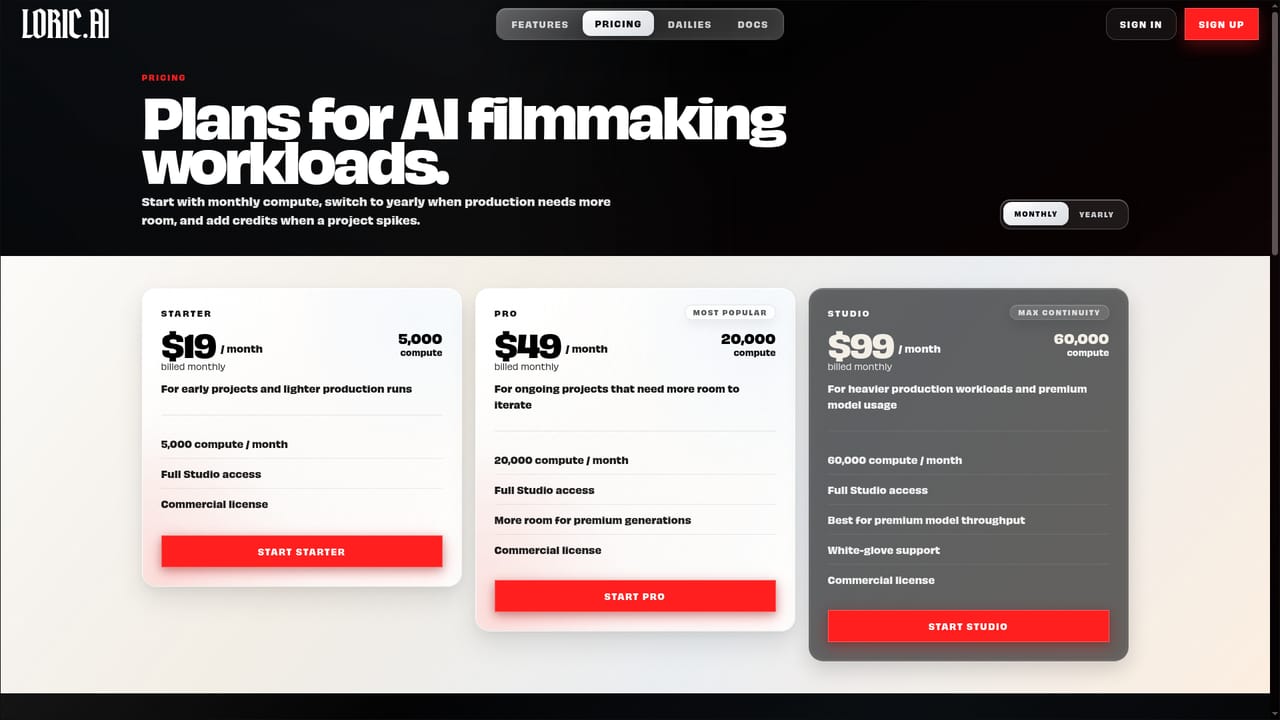
Three monthly tiers: Starter at $19 for 5,000 compute, Pro at $49 for 20,000 compute, and Studio at $99 for 60,000 compute. All include full Studio access and a commercial license; Studio adds white-glove support. A yearly billing toggle is listed.

Learn more

Support

White-glove support is listed on the Studio plan. No broader help centre or documentation details are given on the homepage.

Features

Codex entries for continuity, a Scene Library for structure, custom LoRA training, a Prompt Library, a Studio for switching models mid-shot, reference-aware image edits, Comp Maker for sequencing, and an upscaler. Controls cover lip sync, motion, camera moves, audio, aspect ratios, style transfer, shot timing and scene memory.

Learn more

Frequently asked questions about Loric.ai

  • How much does Loric.ai cost?
    Three monthly tiers: Starter at $19 for 5,000 compute, Pro at $49 for 20,000 compute, and Studio at $99 for 60,000 compute. All include full Studio access and a commercial license; Studio adds white-glove support. A yearly billing toggle is listed.
  • How do you use Loric.ai?
    The walkthrough on this page covers 6 steps: 1. Create an account and pick a plan 2. Build Codex entries for your cast and world 3. Lay out scenes from your script 4. Generate shots in Studio 5. Assemble and finish the sequence 6. Train a LoRA for tight consistency.
  • What platforms does Loric.ai support?
    Loric.ai is available on Web App.
  • What are the limitations of Loric.ai?
    Compute-based credits mean costs scale with premium model usage rather than staying predictable. Model catalog and features are aimed at production workflows, so casual users face a steep learning curve. No free tier or trial terms are stated on the homepage; entry cost is $19 per month.

Status

StatusActive
Views0
Outbound clicks0
Added10/22/2026

Platforms

Web App

Pricing

PaidSubscription