Free trial
New users receive free credits to produce a first anime short, including the full 60-second generation mode, before needing to upgrade for more credits.
Learn moreOne prompt, one complete 60-second anime short with audio.
Own Nereo AI Anime Shorts? Verify ownership to get a dofollow link

Nereo AI Anime Shorts is an anime tool. A prompt-to-video generator that produces complete 60-second anime shorts with consistent characters, synchronized audio and a finished narrative, formatted for Shorts, TikTok and Reels.
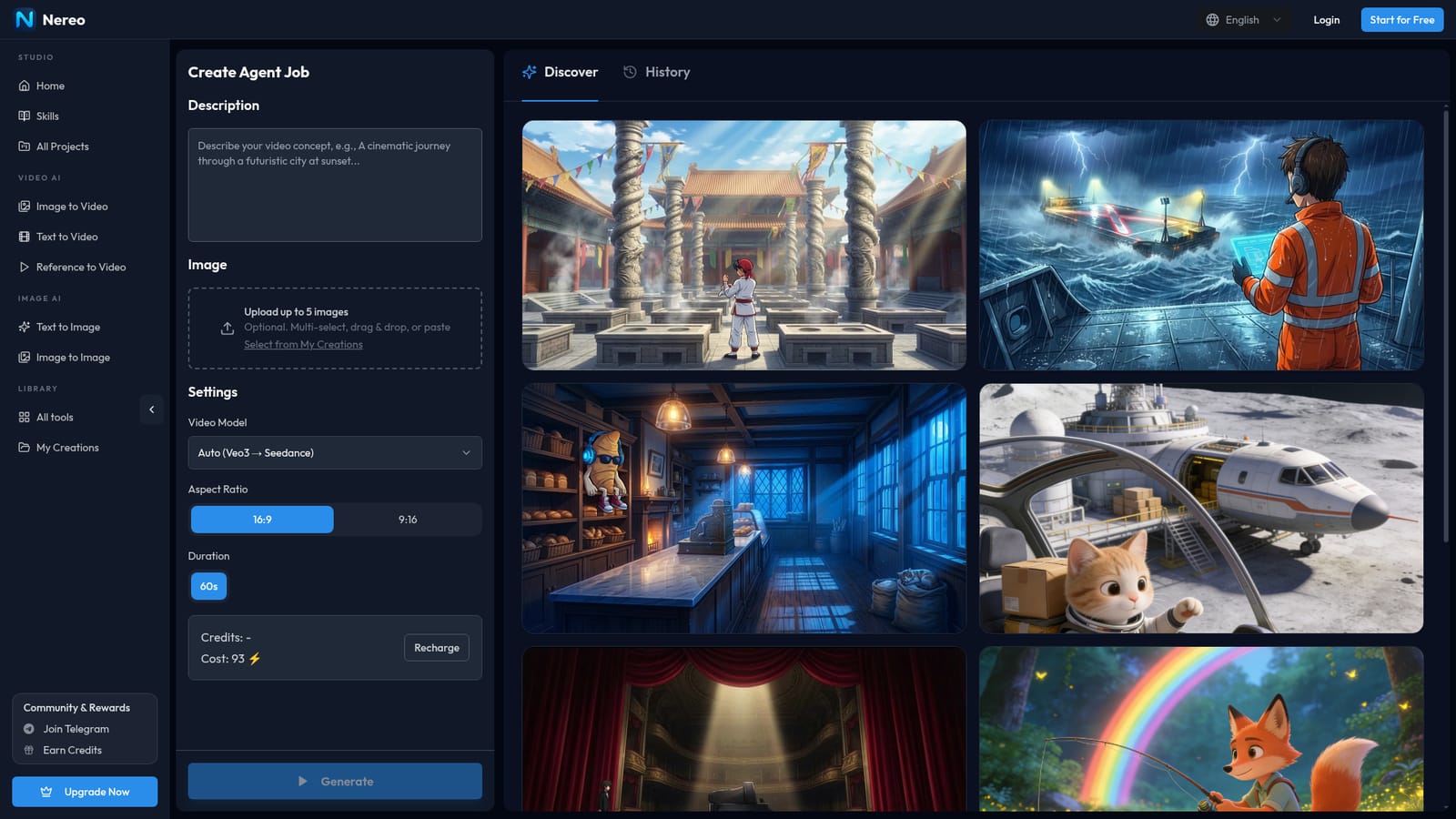
Nereo AI Anime Shorts is a web-based generator that turns a written prompt into a finished 60-second anime video. The pitch rests on completeness: rather than returning a five or ten second clip that has to be stitched together later, the platform handles story structure, scene generation and final assembly in a single pass. Output includes a beginning, middle and end, characters that keep the same appearance across scenes, and background music plus sound effects matched to the action. The workflow is prompt-first. A user describes characters, setting and plot, picks a model (Veo 3.1 or Seedance 1.5, or an automatic mode that routes to Veo first and falls back to Seedance), selects a 9:16 vertical or 16:9 horizontal frame, and optionally attaches up to five reference images to lock character design. Generation typically finishes in three to eight minutes, and a dedicated field in the creation form shows the credit cost before committing. Regeneration with a refined prompt is available when a result misses the mark. Style coverage is broad within the anime lane: shonen action, 90s classics, slice-of-life, chibi and mecha are all named, and the style can be requested in the prompt or left for the model to infer. Aspect ratio choices map directly onto distribution: vertical for YouTube Shorts, TikTok and Reels, horizontal for standard YouTube uploads and compilations. Nereo states that outputs can be used commercially, with the caveat that licensing terms follow the subscription tier. Against general text-to-video tools, the differentiator is duration and narrative continuity rather than shot quality alone. The tradeoff is that Nereo is not a timeline editor: there is no frame-level control, no manual cut assembly, and the anime house style is the product. Teams wanting live-action or granular editing will look elsewhere; creators who want a publishable short from one prompt are the target user.
New users receive free credits to produce a first anime short, including the full 60-second generation mode, before needing to upgrade for more credits.
Learn moreNereo runs on a credit system. A single 60-second anime generation is listed at 93 credits in the creation panel, and credits are topped up through paid upgrades. Premium membership adds priority processing. Exact plan prices are not stated on the page.
Learn moreFull 60-second story generation with a beginning, middle and end; anime art styles spanning shonen, 90s classic, slice-of-life, chibi and mecha; character and narrative consistency across scenes; auto-synchronized music and sound effects; Veo 3.1 and Seedance 1.5 model options; 9:16 and 16:9 output; renders in about 3 to 8 minutes.
 AI Angels400+ customizable AI girlfriends for NSFW chat, voice calls, and roleplay
 Candy AIExperience the future of companionship with AI friends who chat, role-play, and connect with you on a human level.
 ourdream.aiA vast AI roleplay platform with millions of characters for chat, images, video and voiceAI Angels400+ customizable AI girlfriends for NSFW chat, voice calls, and roleplayCandy AIExperience the future of companionship with AI friends who chat, role-play, and connect with you on a human level.ourdream.aiA vast AI roleplay platform with millions of characters for chat, images, video and voice