Free trial
New accounts receive $1 in credit on signup, which can be spent on any metered feature. No time limited trial period is described.
Learn moreChat with videos, web pages, documents and images in one space

OgtAI is an audio analysis tool that chats with videos, web pages, documents and images in one space. OgtAI is a conversational AI workspace for chatting with YouTube videos, web pages, PDFs, office documents, spreadsheets, images, audio and video, plus prompt-based image generation and a browser extension that pulls live web data into the chat.
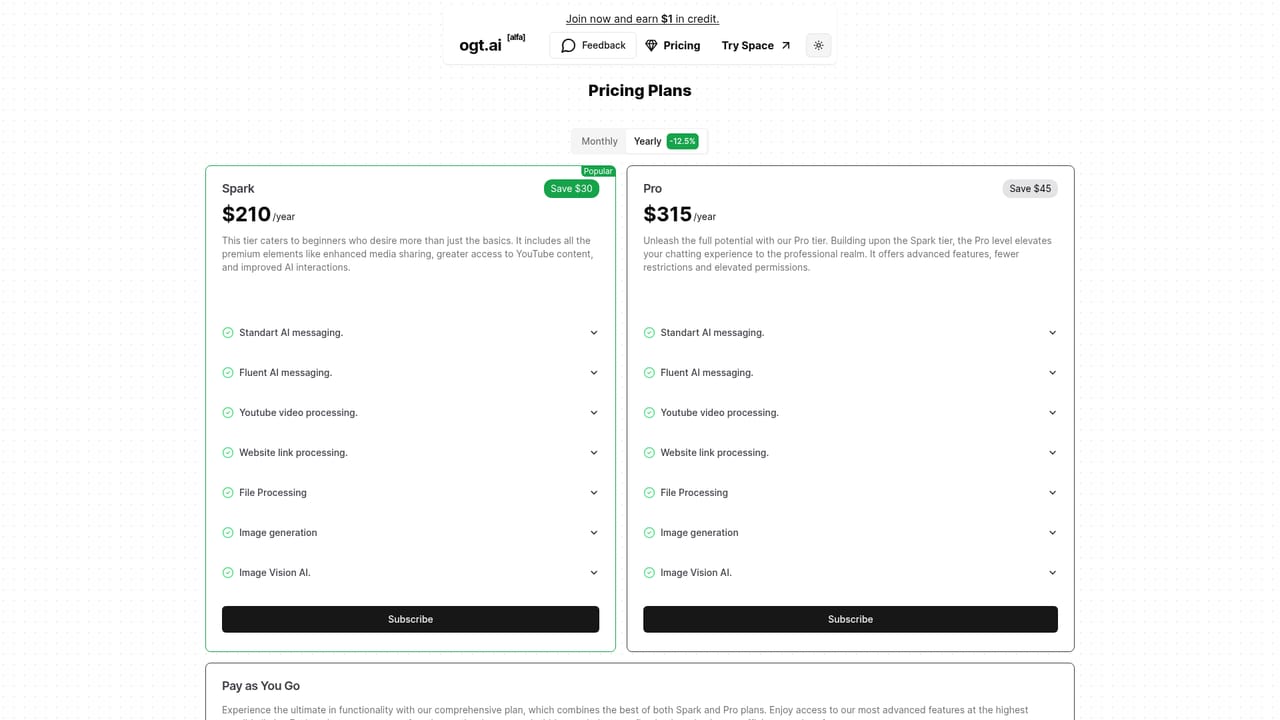
OgtAI is a conversational workspace built around a simple premise: a chat box should be able to read more than text. The web app accepts YouTube links, web pages, PDFs, DOCX, PPTX, CSV, JSON, plain text, images, audio and video, then answers questions against that material. A single thread can move from a summary of a long video to a clarification about a spreadsheet to an image generated from a written prompt. In practice the product is aimed at people who digest a lot of mixed material and want one place to interrogate it. Researchers can drop a stack of papers into a conversation. Analysts can hand over a CSV and ask what changed. Marketers can paste a competitor page or a YouTube competitor spot and query it. Students get a study companion that reads the assigned reading and the lecture recording. Image vision covers stills, transcription covers audio and video, and a browser extension pulls live web data into the chat when a question needs current information rather than a stored answer. Pricing splits into two subscriptions and a credit model. Spark at $210 per year (marked as saving $30) is positioned for newcomers who want the media features beyond basic messaging. Pro at $315 per year (saving $45) adds fewer restrictions and higher permissions on the same feature list. Pay as you go charges per unit instead: standard messaging at $0.002 per 1K input tokens, fluent messaging at $0.02 per 1K input and $0.06 per 1K output, transcription at $0.006 per minute, web scraping at $0.01 per page, image generation at $0.12 per image, image vision at $0.002 per image, and embedding or memory at $0.0002 per 1K tokens. New accounts receive $1 in credit. The natural comparison is with general chat assistants that have added file upload, and with dedicated PDF chat or video summarizer tools. OgtAI's differentiator is breadth in one thread plus metered access to the underlying operations, which suits users who want cost visibility. Those who only need text answers will find cheaper options, and heavy image generation quickly adds up at the stated per-image rate.
New accounts receive $1 in credit on signup, which can be spent on any metered feature. No time limited trial period is described.
Learn moreSpark costs $210 per year (saving $30), Pro costs $315 per year (saving $45), and pay as you go meters each operation: standard messaging $0.002 per 1K input and $0.004 per 1K output, fluent messaging $0.02 input and $0.06 output, transcription $0.006 per minute, web scrape $0.01 per page, image generation $0.12 per image, image vision $0.002 per image, embeddings $0.0002 per 1K tokens.
Learn moreSupport runs through support@ogt.ai and contact@ogt.ai, with a Discord server offering #support, #feedback and #general channels, plus a FAQ page and social accounts on Instagram, Twitter and YouTube.
Learn moreA browser extension supplies live web context, and YouTube links and web pages can be pulled into a chat. A Discord community and a GitHub repository are linked from the site.
Chat with YouTube videos and web links, PDFs, DOCX, PPTX, text, CSV and JSON files, images, audio and video. Includes AI image generation from prompts, image vision, transcription, embedding and memory, web scraping, and a browser extension that gathers real-time web data as chat context.
 AI Angels400+ customizable AI girlfriends for NSFW chat, voice calls, and roleplay
 Candy AIExperience the future of companionship with AI friends who chat, role-play, and connect with you on a human level.
 ourdream.aiA vast AI roleplay platform with millions of characters for chat, images, video and voiceAI Angels400+ customizable AI girlfriends for NSFW chat, voice calls, and roleplayCandy AIExperience the future of companionship with AI friends who chat, role-play, and connect with you on a human level.ourdream.aiA vast AI roleplay platform with millions of characters for chat, images, video and voice


