OnePanel

Read manga one panel at a time, spoiler-safe.

Beginner
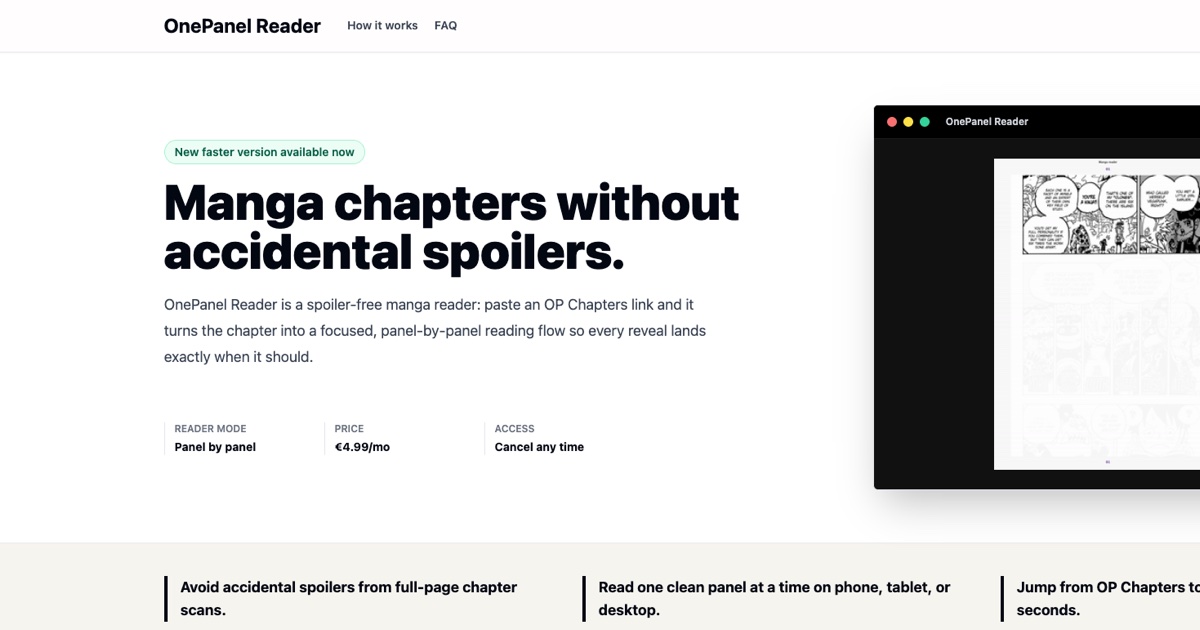
Screenshot of OnePanel, Read manga one panel at a time, spoiler-safe

What is OnePanel?

OnePanel is an AI manga reader tool. OnePanel Reader splits manga chapter pages into single panels and displays them one per screen, keeping future reveals off screen. It works with OP Chapters and TCB links for free, while Pro adds GPT-5.6 Layout for complex pages and CBZ, CBR or PDF uploads.

OnePanel Reader turns a manga chapter link into a panel-by-panel reading flow. Instead of showing a full page with every reveal visible at once, it cuts the layout into individual panels and presents them one per screen, in the order the artist drew them: left to right, top to bottom. The site's own framing is the problem with a page scan, not the scan quality but the layout, which puts the ending and the beginning in front of your eye at the same moment. The flow is deliberately minimal. Paste a chapter URL from OP Chapters or TCB One Piece Chapters, and the reader detects panels on the spot so reading starts immediately. Arrow keys advance on desktop, taps advance on phone. No account is needed for link reading, and there is nothing to install. An account is only required for file uploads or a Pro subscription. Uploads accept CBZ, CBR, ZIP, RAR, PDF and image files, and the site states uploaded files are deleted after analysis, with only the panel layout retained. Two tiers separate simple from complex pages. Standard, free, handles chapters drawn on a normal grid, which the site says is most of them. Pro costs 4.99 EUR per month (cancel any time) and adds GPT-5.6 Layout processing for pages that break the grid: splash spreads, diagonal cuts, panels nested inside other panels. Pro also unlocks the file uploads. The tool fits readers who follow serialized manga weekly and want to preserve the pacing of a reveal, rather than people who want a general comic library manager. Coverage is narrow by design. Only OP Chapters and TCB links are supported today, and the site runs a request form so readers can ask for other sources. It targets existing manga readers on phone, tablet or desktop, and the pitch is timing: one beat per screen, nothing past the current panel visible.

How do you use OnePanel?

  1. 1Paste the chapter URL you already use
    Copy a chapter link from OP Chapters or TCB One Piece Chapters and paste it into the chapter URL field on the homepage. No account or install is needed for link reading.
  2. 2Let OnePanel detect the panels
    The reader scans the page and splits it into panels in reading order, left to right and top to bottom, as the artist laid them out.
  3. 3Advance one panel at a time
    Use arrow keys on desktop or tap on a phone to move through the chapter. Nothing past the current panel appears on screen.
  4. 4Sign in if you want to upload files
    File uploads for CBZ, CBR, ZIP, RAR, PDF or images require an account. Uploads are deleted after analysis, leaving only the panel layout.
  5. 5Upgrade to Pro for complex layouts
    Subscribe to Pro to use GPT-5.6 Layout on splash spreads, diagonal cuts and nested panels, plus personal file uploads.
  6. 6Request a source that is missing
    If a site you read is not supported, share a link from it in the request form; requests decide which sources are added next.

Pros and cons

Pros

  • Spoiler-safe reading: only the current panel is on screen, so later reveals stay hidden.AI
  • No account or install needed to read a pasted chapter link.AI
  • Free tier covers most chapters drawn on a standard grid, with unlimited chapters.AI
  • Works across phone, tablet and desktop with simple keys or taps.AI
  • Uploaded files are deleted after analysis, with only the layout retained.AI

Cons

  • Chapter source support is limited to OP Chapters and TCB One Piece Chapters today.AI
  • Only 4.99 EUR per month Pro tier unlocks GPT-5.6 Layout and personal file uploads.AI
  • Best results depend on the layout model, so unusual pages may still need Pro.AI
  • No pricing detail beyond the single monthly Pro price is stated on the homepage.AI
  • The reading model suits serialized weekly chapters, not large offline comic libraries.AI

How much does OnePanel cost?

Pricing

Standard is free with no account and covers unlimited chapters from OP Chapters and TCB on phone, tablet or desktop. Pro costs 4.99 EUR per month, cancel any time, and adds GPT-5.6 Layout for complex pages plus CBZ, CBR or PDF uploads.

Learn more

Support

An FAQ page covers accounts, supported sources and data handling, and a request form lets readers ask for new chapter sources.

Learn more

Integrations

Paste-in support for OP Chapters and TCB One Piece Chapters links, with a request form for adding other sources.

Features

Spoiler-safe panel-by-panel reading, automatic panel detection in drawing order, OP Chapters and TCB link support, keyboard and tap navigation, Pro GPT-5.6 Layout for splash spreads, diagonal cuts and nested panels, and personally uploaded CBZ, CBR, ZIP, RAR, PDF or image files that are deleted after analysis.

Frequently asked questions about OnePanel

  • How much does OnePanel cost?
    Standard is free with no account and covers unlimited chapters from OP Chapters and TCB on phone, tablet or desktop. Pro costs 4.99 EUR per month, cancel any time, and adds GPT-5.6 Layout for complex pages plus CBZ, CBR or PDF uploads.
  • How do you use OnePanel?
    The walkthrough on this page covers 6 steps: 1. Paste the chapter URL you already use 2. Let OnePanel detect the panels 3. Advance one panel at a time 4. Sign in if you want to upload files 5. Upgrade to Pro for complex layouts 6. Request a source that is missing.
  • What platforms does OnePanel support?
    OnePanel is available on Web App.
  • What does OnePanel integrate with?
    Paste-in support for OP Chapters and TCB One Piece Chapters links, with a request form for adding other sources.
  • What are the limitations of OnePanel?
    Chapter source support is limited to OP Chapters and TCB One Piece Chapters today. Only 4.99 EUR per month Pro tier unlocks GPT-5.6 Layout and personal file uploads. Best results depend on the layout model, so unusual pages may still need Pro.

Status

StatusActive
Views0
Outbound clicks0
Added10/21/2026

Platforms

Web App

Pricing

FreemiumSubscription