Peek AI

One menu bar window for ChatGPT, Gemini, Perplexity, Claude and more

Beginner
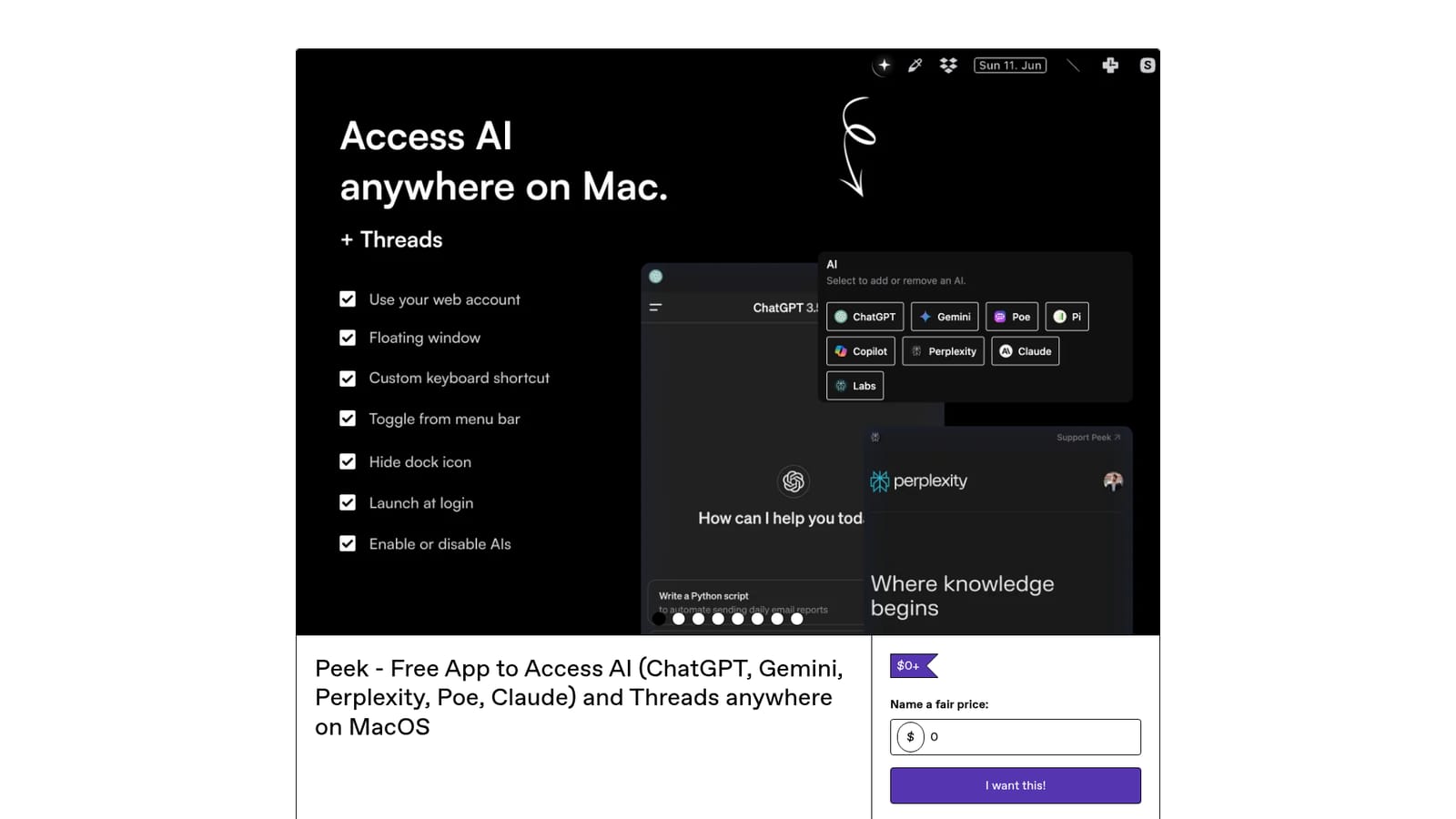
Screenshot of Peek AI, One menu bar window for ChatGPT, Gemini, Perplexity, Claude and more

What is Peek AI?

Peek AI is an AI chat bot tool. Peek is a free macOS menu bar app that hosts ChatGPT, Gemini, Perplexity, Claude, Poe, Pi, Copilot and Threads in one floating window, with no API keys required. The developer has stopped maintaining it.

Peek is a macOS menu bar utility that puts several conversational AI services inside a single small window that floats above whatever else is on screen. Rather than juggling browser tabs for ChatGPT, Gemini, Perplexity, Claude, Poe, Perplexity Labs, Pi and Copilot, you pick a bot from a dropdown and keep working. An update also added Threads by Instagram to the same roster. The design leans on a webview approach: Peek renders each platform's own web interface, so there are no API keys to generate and no separate account to create. You sign in with the credentials you already use, and because the sessions live with the providers, conversation history stays synced across your other devices. The developer states that no data passes through the app itself, since traffic goes directly to the platforms being displayed. That makes it a convenience layer, not a proxy or a data processor. Day to day it behaves like a keyboard tool. A shortcut (Command plus J by default, remappable in settings) summons or hides the floating window, so it never gets buried behind other apps. Command plus Shift plus S grabs a screenshot of the current chat and saves it locally, while Command plus S copies it straight to the clipboard. A settings panel controls dock icon visibility, the floating behaviour, and which bots appear in the list. Dark mode and a menu bar icon round out the package. It suits people who already pay for or regularly use several assistants and want them one keystroke away: developers keeping a model alongside an editor, writers drafting in docs or Notion, students working through material. The caveat is prominent on the product page: Peek is no longer actively maintained. It is distributed as-is, with no guarantee of compatibility with future macOS releases or changes to the AI platforms it wraps, and it requires macOS 13 or later. Anyone choosing between Peek and a maintained menubar client should weigh that risk before relying on it daily.

How do you use Peek AI?

  1. 1Download and install the app
    Get the zip file from the product page at the price you choose, unzip it, and drag Peek into your Applications folder. Launch it from there. macOS 13 or later is required.
    Peek AI — Download and install the app
  2. 2Sign in to the bots you use
    Open each service from the dropdown and log in with your normal account. No API keys are needed, and sessions stay in the platforms themselves rather than in Peek.
  3. 3Set your shortcut and visible bots
    Open the settings menu to define a custom toggle shortcut, enable the floating window, hide the dock icon, and choose which chatbots appear in the dropdown.
  4. 4Summon the window while you work
    Press Command plus J (or your own shortcut) to bring Peek to the front over any app. Press the same combination again to hide it rather than closing it.
  5. 5Capture a conversation
    Use Command plus Shift plus S to save a screenshot of the chat to your Mac, or Command plus S to copy it to the clipboard for pasting elsewhere.

Pros and cons

Pros

  • Switches between eight AI services and Threads from one dropdown instead of separate tabsAI
  • No API keys or new accounts: you log in with existing credentials, so history stays syncedAI
  • Floating window with a remappable global shortcut keeps an assistant on top of any appAI
  • Built-in screenshot capture saves or copies the current chat with two shortcutsAI
  • Free to download with a pay-what-you-want option, and a 52 rating history averaging mostly five starsAI

Cons

  • No longer actively maintained, so future macOS updates or platform changes may break it without a fixAI
  • macOS only, with a stated requirement of version 13 or later and no Windows, Linux or mobile buildAI
  • No Apple Shortcuts support, a gap reviewers have explicitly asked forAI
  • Because it is a webview of the platforms, its reliability and interface are tied to whatever those sites changeAI
  • No formal support channel or documentation beyond the product pageAI

How much does Peek AI cost?

Pricing

Peek is listed at $0 and up on Gumroad, with a name-your-price field, so it can be downloaded free or with an optional payment. The developer also points existing buyers to a license key lookup page to retrieve their download link.

Learn more

Integrations

Wraps the web interfaces of ChatGPT, Gemini, Perplexity, Claude, Poe, Perplexity Labs, Pi and Copilot, plus Threads by Instagram, using your existing logins rather than API connections.

Features

One menu bar window for ChatGPT, Gemini, Perplexity, Claude, Poe, Perplexity Labs, Pi, Copilot and Threads. Includes a floating always-on-top window with a custom shortcut, a screenshot tool that saves locally or copies to the clipboard, dark mode, and settings for dock icon visibility and which bots are shown. No API keys required.

Frequently asked questions about Peek AI

  • How much does Peek AI cost?
    Peek is listed at $0 and up on Gumroad, with a name-your-price field, so it can be downloaded free or with an optional payment. The developer also points existing buyers to a license key lookup page to retrieve their download link.
  • How do you use Peek AI?
    The walkthrough on this page covers 5 steps: 1. Download and install the app 2. Sign in to the bots you use 3. Set your shortcut and visible bots 4. Summon the window while you work 5. Capture a conversation.
  • What platforms does Peek AI support?
    Peek AI is available on MacOS.
  • What does Peek AI integrate with?
    Wraps the web interfaces of ChatGPT, Gemini, Perplexity, Claude, Poe, Perplexity Labs, Pi and Copilot, plus Threads by Instagram, using your existing logins rather than API connections.
  • What are the limitations of Peek AI?
    No longer actively maintained, so future macOS updates or platform changes may break it without a fix. macOS only, with a stated requirement of version 13 or later and no Windows, Linux or mobile build. No Apple Shortcuts support, a gap reviewers have explicitly asked for.

Status

StatusActive
Views0
Outbound clicks0
Added10/21/2026

Platforms

MacOS

Pricing

FreePaid