Photo2Ads

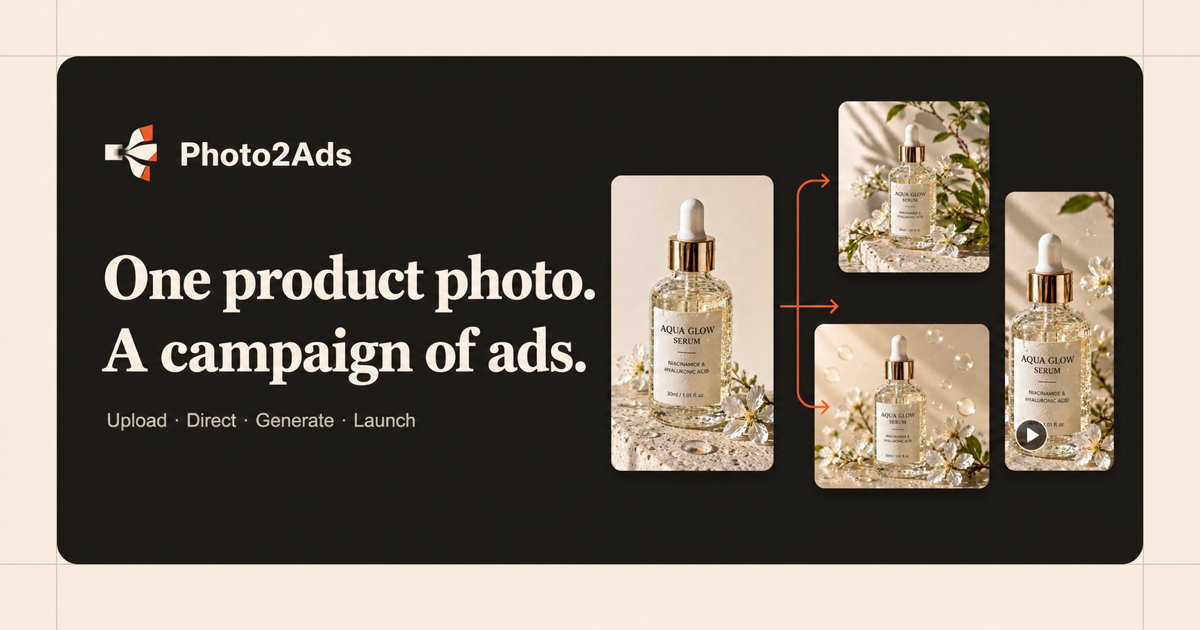
One product photo in, ecommerce and social ad creatives out.

Beginner
Screenshot of Photo2Ads, One product photo in, ecommerce and social ad creatives out

What is Photo2Ads?

Photo2Ads is an image to image tool. A browser studio that turns one product photo into image or video ad creatives. Upload the shot, pick a style and a model, choose an aspect ratio, and download results aimed at ecommerce listings and social placements.

Photo2Ads is a web studio that converts a single product photograph into finished ad creatives for ecommerce listings and social channels. The workflow is deliberately narrow: upload the shot, pick a creative direction and a model, then generate either a still image or a short video. The product stays the visual anchor throughout, and a person reference can be added when a specific presenter is wanted rather than a generic one. Image mode accepts up to five product views so that packaging, labels, colors and logo detail carry through to the output, and it returns one to four coordinated images per run. Video mode animates the source photo into formats the site describes as UGC recommendation, TikTok style product demo, commercial campaign spot and cinematic clip, with controls for motion, length, size, quality and audio depending on the chosen model. Aspect ratios cover square, portrait, vertical story, landscape and wide display placements, so a single session can produce assets for a feed post, a story and a display banner without a second setup. The underlying generation runs on a named model roster: Nano Banana 2 Lite, Nano Banana Pro and GPT Image 2 for stills, Seedance 2.0 Mini, Veo 3.1 Fast, Kling 3 Turbo and Wan 2.7 Reference for motion. A library of tested prompt directions (warm limestone studio, oxblood jewelry spotlight, morning city sneaker, sunlit packaging and similar) can be applied as presets or edited as free text, which shortens the blank canvas problem for teams without a designer. The tool suits small ecommerce sellers, dropshippers, marketplace listers and social media managers who need a steady volume of product creative but do not want a full photo shoot or a subscription editor. It sits closest to AI product photography and text-to-video generators, though its emphasis is on ad-ready output from existing catalogue imagery rather than net-new art direction.

How do you use Photo2Ads?

  1. 1Upload your product photo
    Start in the studio by uploading a clear product shot. Add up to five views (front, side, packaging, detail) when accuracy matters, and optionally attach a person reference for the presenter.
  2. 2Apply a tested prompt direction
    Browse the prompt library for a look that matches the campaign, such as studio, lifestyle, UGC or commercial, then apply that direction to carry its style into the studio.
  3. 3Pick image or video mode
    Choose stills for product pages and paid social, or switch to motion for UGC, demonstration and campaign clips. Each mode has its own reference and output settings.
  4. 4Set the model and format
    Review the supported image and video models, then set aspect ratio, quality, batch size and, in video mode, length, motion and audio according to what the chosen model allows.
  5. 5Generate and download
    Run the generation, check the returned images or clips against the source product, and download the assets for the placement you are building.

Pros and cons

Pros

  • Accepts up to five product views in image mode, which helps preserve packaging, logos and labelsAI
  • Covers both stills and video from the same interface, with square, portrait, story, landscape and wide ratiosAI
  • Ships a library of tested prompt directions that can be applied as presets or editedAI
  • Names the models behind generation, so buyers can judge output quality before committingAI
  • Optional person reference lets a specific presenter appear in the adAI

Cons

  • No public pricing figures on the homepage, so cost per creative has to be checked on the pricing page before judging valueAI
  • Video controls (motion, duration, audio) vary by model, which means output consistency depends on which one is selectedAI
  • Nothing on the homepage describes brand kits, saved presets or team collaboration featuresAI
  • Most sample outputs are studio, jewelry, beauty and packaging categories, so apparel and bulky goods are less well evidencedAI
  • No mention of an API or integration with ad platforms, making it a manual download workflowAI

How much does Photo2Ads cost?

Features

Image ads from up to five product views, one to four coordinated images per run, and video ads with UGC, TikTok demo, commercial and cinematic directions. Controls cover aspect ratio (square, portrait, story, landscape, wide display), quality, batch size, plus motion, duration and audio in video mode. Runs on Nano Banana 2 Lite, Nano Banana Pro, GPT Image 2, Seedance 2.0 Mini, Veo 3.1 Fast, Kling 3 Turbo and Wan 2.7 Reference, with an optional person reference and editable prompts.

Learn more

Frequently asked questions about Photo2Ads

  • How do you use Photo2Ads?
    The walkthrough on this page covers 5 steps: 1. Upload your product photo 2. Apply a tested prompt direction 3. Pick image or video mode 4. Set the model and format 5. Generate and download.
  • What platforms does Photo2Ads support?
    Photo2Ads is available on Web App.
  • What are the limitations of Photo2Ads?
    No public pricing figures on the homepage, so cost per creative has to be checked on the pricing page before judging value. Video controls (motion, duration, audio) vary by model, which means output consistency depends on which one is selected. Nothing on the homepage describes brand kits, saved presets or team collaboration features.

Status

StatusActive
Views0
Outbound clicks0
Added10/21/2026

Platforms

Web App

Pricing

PaidSubscription