Free trial
No standard trial is advertised. A free Home license can be requested by email, and applicants are asked for details about their work and audience.
Learn moreA floating AI frame that works over any desktop app
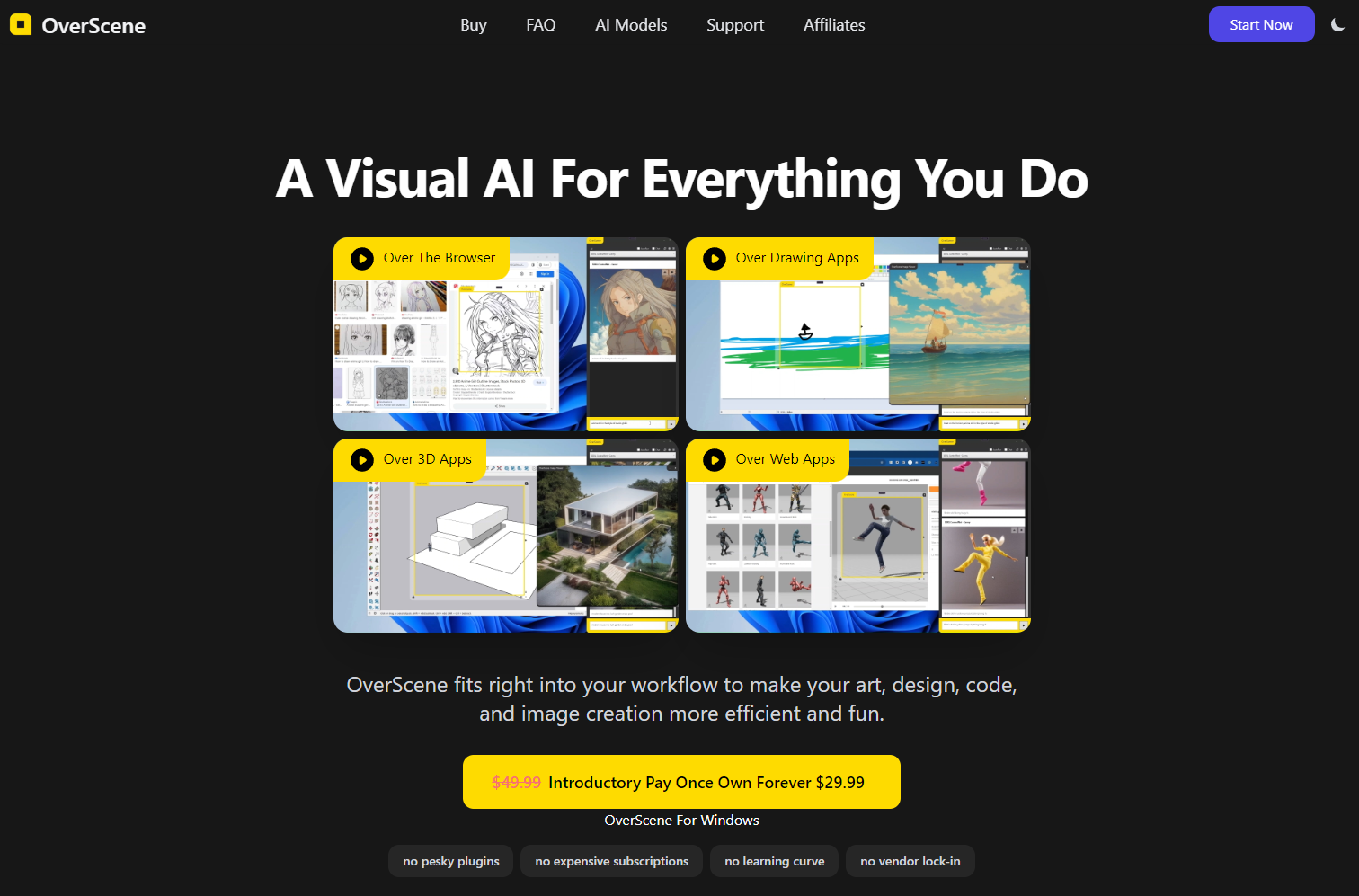
OverScene is a one-time-purchase Windows overlay that drags over any desktop app and sends the captured content to AI models from OpenAI and Replicate for image transformation, style transfer, code generation and text tasks, with no per-app plugins required.
OverScene is a Windows application that places a draggable floating frame on top of whatever is already running on the desktop. Content inside that frame (a sketch in Photoshop, a ZBrush model, a Tinkercad scene, a wireframe in Figma, a block of text in a browser) gets sent to a chosen AI model and returned transformed. There are no plugins to install per host application, which is the central idea: one overlay, every program. The model layer is deliberately open. OverScene connects to OpenAI and Replicate, so the task list spans image to image, text to image, image to text, depth to image, pose to image, style transfer, text summarization, code generation and 3D rendering. The Home tier ships 6 presets and 3 user-editable AIs, while Pro unlocks 43+ presets, unlimited editable AIs, your own API token, and the ability to add any model from either provider or a custom API. Pro also exports moodboards to HTML or PDF. In practice the tool suits concept artists, illustrators, 3D generalists and product designers who already have a comfortable workflow and do not want to migrate into a new canvas tool. A pencil scan becomes a painted fantasy scene, a screenshot becomes front-end code, a grey-box model gains painted detail. Several advertised capabilities (real-time generation, multimodal chat, offline AI) are marked as soon, so treat the shipping feature set as the presets plus the custom model hookup. Against browser-based generators, OverScene wins on context: the source material never leaves the app it lives in, and results can be saved straight to disk. Against a full AI-native editor it offers less control over masking, layers and iteration history. It is a companion layer, not a replacement for the software underneath.
No standard trial is advertised. A free Home license can be requested by email, and applicants are asked for details about their work and audience.
Learn moreTwo one-time licenses, no subscription. Home costs $19.99 and covers home use with 6 AI presets, 3 user-editable AIs and saving images to disk. Pro costs $49.99 and adds commercial use, 43+ presets, unlimited editable AIs, local backup, HTML or PDF moodboard export, your own API token, custom models and image to code.
Learn moreA dedicated support site at support.overscene.ai hosts downloads and help, and the homepage FAQ addresses compatibility, privacy, difficulty and older hardware. Direct contact is available by email.
Learn moreOverScene connects to OpenAI and Replicate.com, and Pro users can add any model from either provider, supply their own API token or wire in a custom API. Host applications need no plugin, since the overlay works at the desktop level.
Learn moreA draggable AI frame that sits over any Windows application and captures the content beneath it. Supported tasks include image to image, text to image, image to text, depth to image, pose to image, style transfer, text summarization, code generation from screenshots and 3D rendering. Presets cover art, 3D and prototyping work, and Pro adds custom models, moodboard export and local backup.
Learn more AI Angels400+ customizable AI girlfriends for NSFW chat, voice calls, and roleplay
 Candy AIExperience the future of companionship with AI friends who chat, role-play, and connect with you on a human level.
 ourdream.aiA vast AI roleplay platform with millions of characters for chat, images, video and voiceAI Angels400+ customizable AI girlfriends for NSFW chat, voice calls, and roleplayCandy AIExperience the future of companionship with AI friends who chat, role-play, and connect with you on a human level.ourdream.aiA vast AI roleplay platform with millions of characters for chat, images, video and voice