Free trial
The homepage offers a free sign-up path alongside demo booking, which suggests a no-cost entry tier, but the scope and limits of that free access are not described on the page.
Learn moreAI avatars that present, dub and answer in 70+ languages
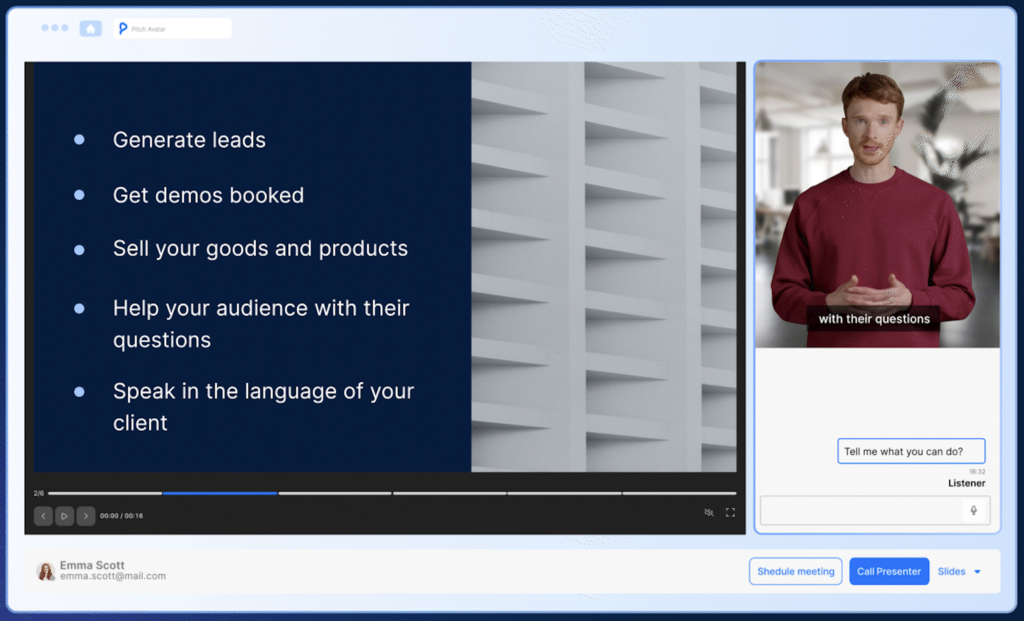
Pitch Avatar is an avatar presentation tool. A web platform for AI presenters, video dubbing in 70+ languages and configurable chat avatars, aimed at training, support and sales teams. It turns slides, PDFs and videos into narrated avatar links, with CRM and Chrome extension hooks for personalized outreach.
Pitch Avatar is a platform for building talking AI presenters and interactive chat agents that deliver presentations, training material and sales content without a camera, studio or voice actor. The product is organized around three levels of avatar. The AI Presenter takes an existing script and adds a voice-over and talking head to slides, PDFs or video. The Dubbing mode takes an uploaded video and returns a translated, voice-cloned version. The Chat-avatar is the most ambitious tier: a conversational agent whose role, knowledge base and boundaries are configured by the operator, then run continuously. The practical use cases the vendor positions are global training and onboarding, video localization, customer support and remote selling. HR teams use it to localize learning material and track how onboarding lands. Support teams deploy the chat-avatar to handle first-line questions and localized replies. Sales teams record personalized messages, generate per-contact links and watch interaction data. A Chrome extension pushes avatar links into Gmail, Outlook and LinkedIn, and a PowerPoint add-on exports decks with slide-level voice-overs. Mechanically, the workflow is document-first rather than camera-first. Content is uploaded from Google Drive, YouTube, PPTX or PDF, the avatar and voice are chosen, and the output is a shareable link with tracked viewing. Personalization and personal links are the retention hook: the same base presentation can be re-rendered for different contacts. Against alternatives, Pitch Avatar sits closer to corporate learning and sales enablement than to consumer avatar apps. It competes with generic talking-head generators on dubbing and presenter features, but its differentiation is the agent tier plus CRM plumbing (HubSpot, Salesforce, Zapier). Buyers who only need a one-off avatar video may find the surface area larger than necessary; teams running repeatable training and outreach programs are the better fit.
The homepage offers a free sign-up path alongside demo booking, which suggests a no-cost entry tier, but the scope and limits of that free access are not described on the page.
Learn moreGoogle Drive and YouTube for source files, PPTX and PDF for decks, HubSpot and Salesforce for lead forms and listener activity, Gmail, Outlook and LinkedIn through a Chrome extension, Zapier for workflows with Slack and SendPulse, plus a PowerPoint add-on.
AI Presenter adds voice-over and a talking head to slides, PDFs and video. Dubbing translates and voice-clones existing footage in 70+ languages. The Chat-avatar runs as a configurable interactive agent with a knowledge base and set boundaries. Personalization generates per-contact messages and tracked links, and real-time performance data is collected on viewer activity.
 AI Angels400+ customizable AI girlfriends for NSFW chat, voice calls, and roleplay
 Candy AIExperience the future of companionship with AI friends who chat, role-play, and connect with you on a human level.
 ourdream.aiA vast AI roleplay platform with millions of characters for chat, images, video and voiceAI Angels400+ customizable AI girlfriends for NSFW chat, voice calls, and roleplayCandy AIExperience the future of companionship with AI friends who chat, role-play, and connect with you on a human level.ourdream.aiA vast AI roleplay platform with millions of characters for chat, images, video and voice


