Revisely

Turn notes, documents and videos into flashcards, quizzes and summaries

Beginner
Screenshot of Revisely, Turn notes, documents and videos into flashcards, quizzes and summaries

What is Revisely?

Revisely is an AI task generator tool that turns notes, documents and videos into flashcards, quizzes and summaries. An AI study suite with three generators: flashcards, quizzes and structured notes. It turns your own documents, notes or videos into practice material and lets you share the results with classmates or students.

Revisely is a study toolkit built around three AI generators that share one purpose: converting raw material into material you can practise with. Paste in notes, upload a document or point the tool at a video, and it produces structured output you can review, drill or hand to someone else. The homepage frames the product around a simple loop of creating resources, practising them, then sharing them with peers or instructors. The AI Flashcard Generator is the core of the offering. Its stated aim is cutting the hours normally spent writing cards by hand, so the output can be used straight away for self testing. The AI Quiz Generator goes a step further by claiming to understand your source material and to evaluate answers, which makes it relevant to teachers assembling assessments as well as students checking their own recall. The third tool, the AI Notes Generator, condenses documents, notes or videos into clear, organised summaries for review and retention. The audience is deliberately broad: students revising for exams, teachers building classroom material, and professionals keeping up with their own development. Because all three tools start from content you supply, the practical workflow is the same whether the subject is a biology syllabus or an internal training deck. Sharing is built in, so generated quizzes and card sets can move between people rather than sitting in one account. Among study tools, Revisely sits closer to the generator end of the market than to the flashcard app end. It focuses on producing the resource rather than on long term spaced repetition scheduling, which makes it a fast front door for people who already have material and no time to format it. Anyone wanting a single place to create, practise and pass along study content will find the three tools cover that ground without extra setup.

How do you use Revisely?

  1. 1Choose the generator that matches your material
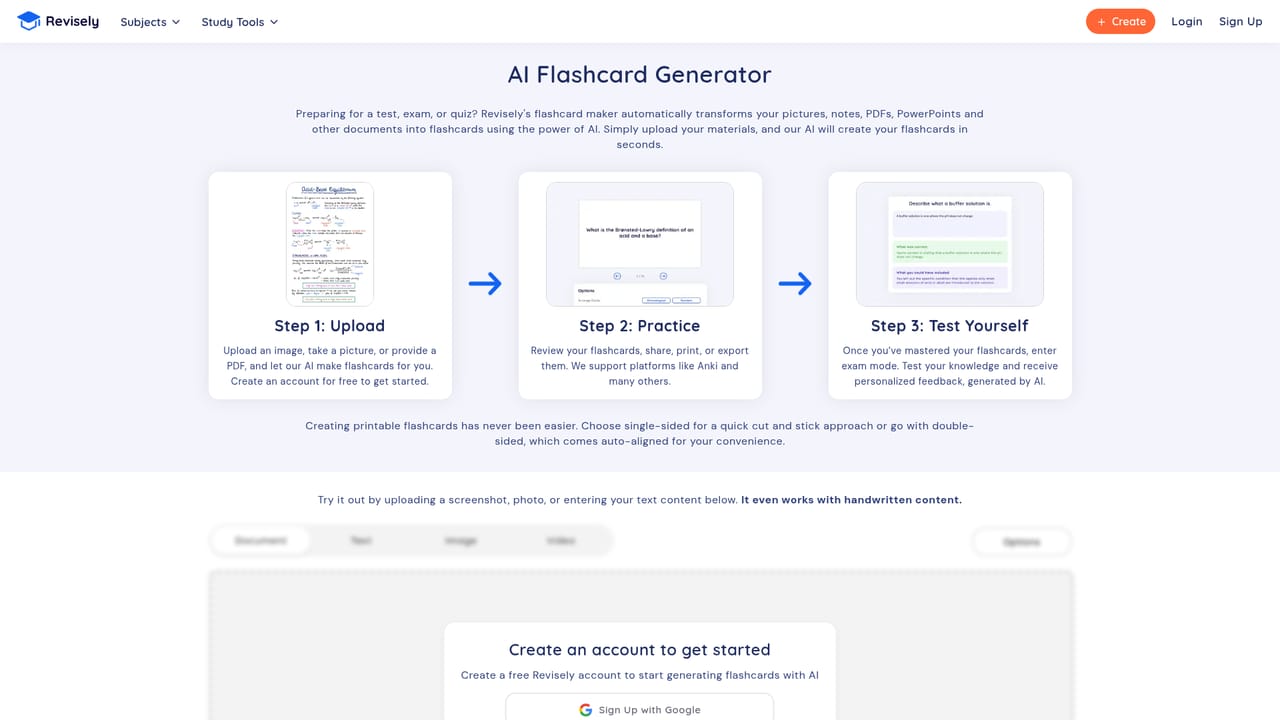
    Start from the flashcard, quiz or notes generator depending on whether you want to drill facts, test yourself, or condense a long source. Each has its own page on the site.
    Revisely — Choose the generator that matches your material
  2. 2Generate a flashcard set
    Feed in your notes and let the AI produce cards, which the homepage pitches as a way to skip hours of manual card writing.
  3. 3Build a quiz from the same material
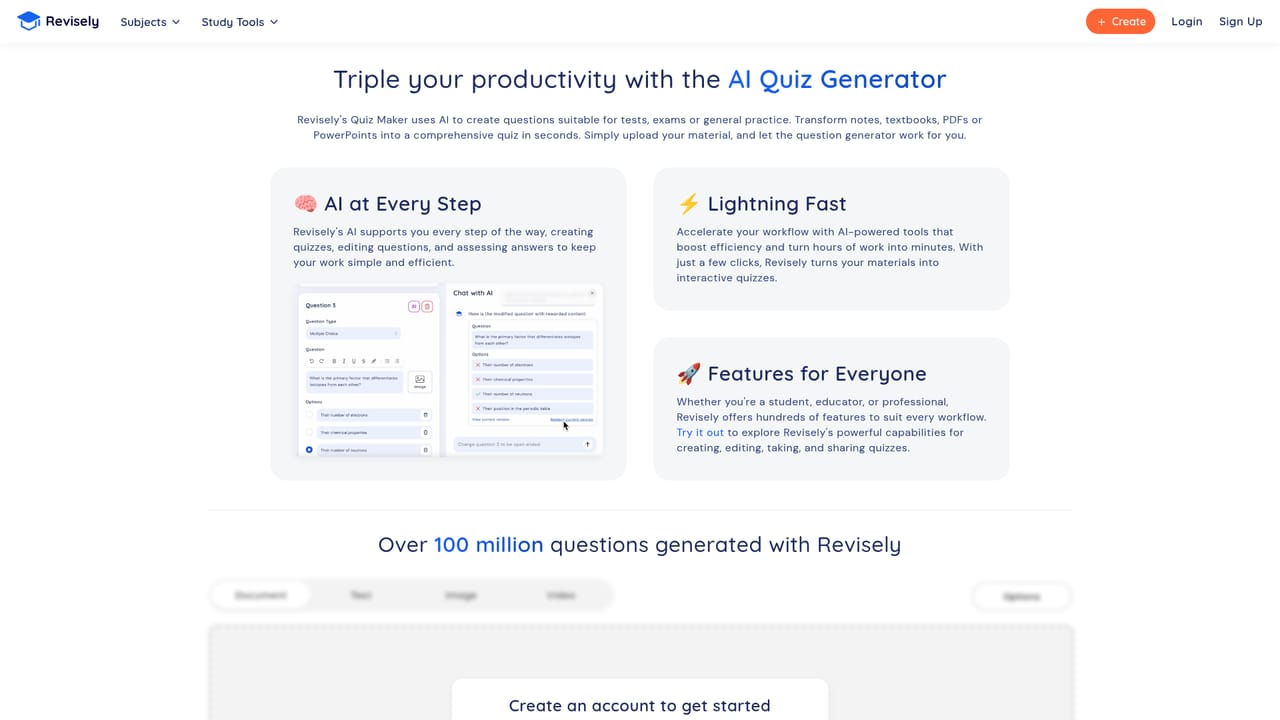
    Use the quiz generator to create questions the AI can evaluate, suited to classroom assessment or checking your own recall.
    Revisely — Build a quiz from the same material
  4. 4Condense documents and videos into notes
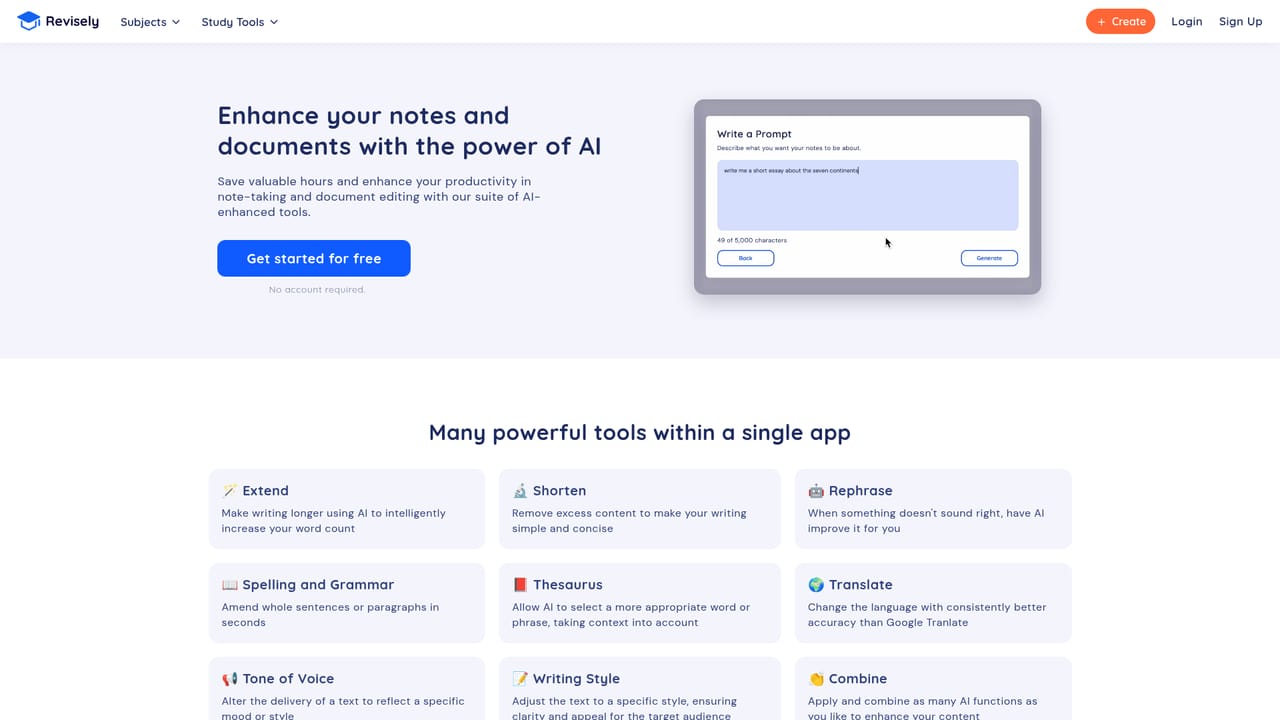
    Run longer sources through the notes generator to get a structured summary that pulls out the key information for review.
    Revisely — Condense documents and videos into notes
  5. 5Practise, then share with others
    Review the generated sets in your account and send them to classmates, students or colleagues to support group study.

Pros and cons

Pros

  • Three connected generators cover the full loop from source material to practice and reviewAI
  • Accepts documents, notes and videos as input, so existing material can be reused rather than rewrittenAI
  • Quiz tool claims to evaluate answers, which is useful for teachers as well as self testingAI
  • Built in sharing makes generated sets easy to pass to peers or instructorsAI
  • Explicitly aimed at students, teachers and professionals, so it is not locked to one audienceAI

Cons

  • Pricing, plan limits and free usage allowances are not stated on the homepage, so cost has to be confirmed elsewhereAI
  • No mention of spaced repetition scheduling or long term progress tracking for the generated cardsAI
  • Only three tools are described, with no integrations named for learning platforms or document servicesAI
  • Quality of output depends heavily on how clean the source notes or documents areAI
  • No information on supported file types and video sources, which matters if your material is in an unusual formatAI

How much does Revisely cost?

Features

Three generators share the platform: an AI flashcard maker, an AI quiz builder that evaluates answers, and an AI notes tool that turns documents, notes or videos into organised summaries. Generated content can be shared with peers or instructors, and the site also advertises free educational content alongside the automated tools.

Learn more

Frequently asked questions about Revisely

  • How do you use Revisely?
    The walkthrough on this page covers 5 steps: 1. Choose the generator that matches your material 2. Generate a flashcard set 3. Build a quiz from the same material 4. Condense documents and videos into notes 5. Practise, then share with others.
  • What platforms does Revisely support?
    Revisely is available on Web App.
  • What are the limitations of Revisely?
    Pricing, plan limits and free usage allowances are not stated on the homepage, so cost has to be confirmed elsewhere. No mention of spaced repetition scheduling or long term progress tracking for the generated cards. Only three tools are described, with no integrations named for learning platforms or document services.

Status

StatusActive
Views0
Outbound clicks0
Added10/21/2026

Platforms

Web App

Pricing

Freemium