Integrations
Strava and Whoop accounts can be connected so existing activity and recovery data is pulled into the Shapemate dashboard. A WhatsApp channel offers a conversational route into the product.
Daily health tracking for meals, workouts and recovery in one app
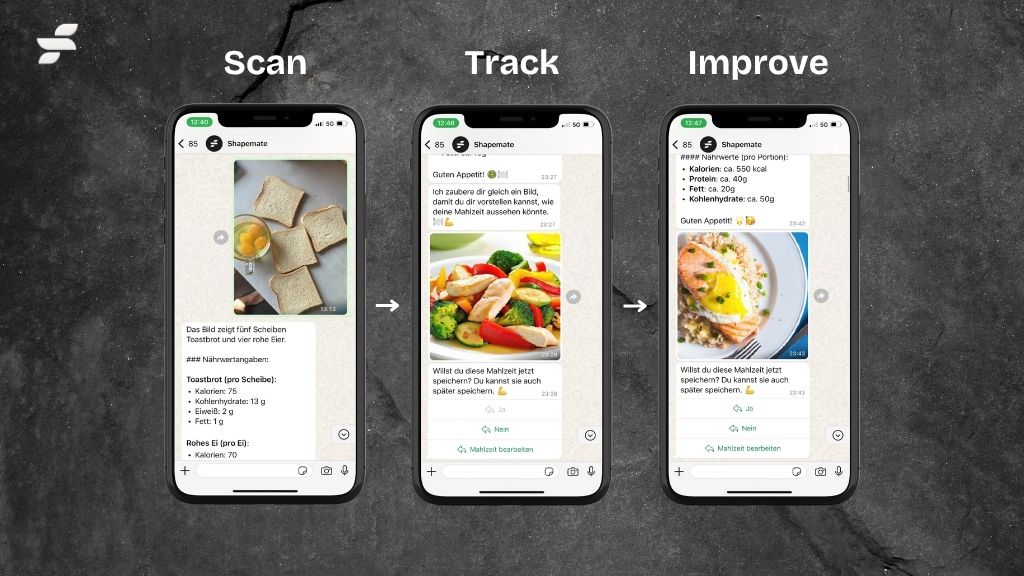
Shapemate is a weight loss preview tool. A mobile health and fitness tracker that combines meals, workouts, supplements, weight and water into one daily dashboard, with macro targets, smart insights and connections to Strava and Whoop.
Shapemate is a fitness and health tracking app built around a simple daily question: what did you do today, what changed, and what deserves attention next. The app collects meals, workouts, supplements, weight and water intake in a single mobile interface, then presents them as a compact daily dashboard with calorie and macronutrient targets such as protein, carbs and fat shown against what has been logged. A sample day on the homepage shows intake against a target, a burned calories figure, a current weight and a list of individual meals with their own calorie and macro breakdowns. The design leans on a step-by-step daily rhythm rather than a dense analytics suite. Meals are logged as entries with a time, a calorie count and a protein, carb and fat split. Workouts and other tracked items sit alongside them, and a bottom bar splits the app into Meals, Fitness and Progress areas so the daily log and the longer term view stay separate. The stated goal is comprehension: the app positions itself as the easiest way to understand your body, not the most feature packed tracker. Shapemate suits people who want a lightweight record of eating and training without maintaining a spreadsheet or learning a complicated dashboard. It fits best for individuals tracking personal goals around body weight and macronutrients, who already wear a tracker or use Strava and want that data consolidated rather than duplicated. The addition of a WhatsApp channel gives an option for people who prefer chatting with a coach or assistant over opening another app. The product is distributed as a native iOS app, so the practical choice comes down to platform fit and whether the daily summary matches how you already think about food and training. Where a dedicated calorie counter goes deep on food databases, Shapemate is oriented toward a quick daily read on intake, output and direction of travel.
Strava and Whoop accounts can be connected so existing activity and recovery data is pulled into the Shapemate dashboard. A WhatsApp channel offers a conversational route into the product.
Daily dashboard covering calorie intake against a target, protein, carbohydrate and fat tracking, individual meal entries with macro splits, plus workout, supplement, weight and water logging. Includes smart insights, a separate progress area and connections to Strava and Whoop.
 AI Angels400+ customizable AI girlfriends for NSFW chat, voice calls, and roleplay
 Candy AIExperience the future of companionship with AI friends who chat, role-play, and connect with you on a human level.
 ourdream.aiA vast AI roleplay platform with millions of characters for chat, images, video and voiceAI Angels400+ customizable AI girlfriends for NSFW chat, voice calls, and roleplayCandy AIExperience the future of companionship with AI friends who chat, role-play, and connect with you on a human level.ourdream.aiA vast AI roleplay platform with millions of characters for chat, images, video and voice