Free trial
A free trial is offered via the Start Free Trial buttons on the homepage, though the number of free sketches is not stated. Free output carries the SketchMe.App logo.
Learn moreTurn a handful of selfies into illustrated profile pictures
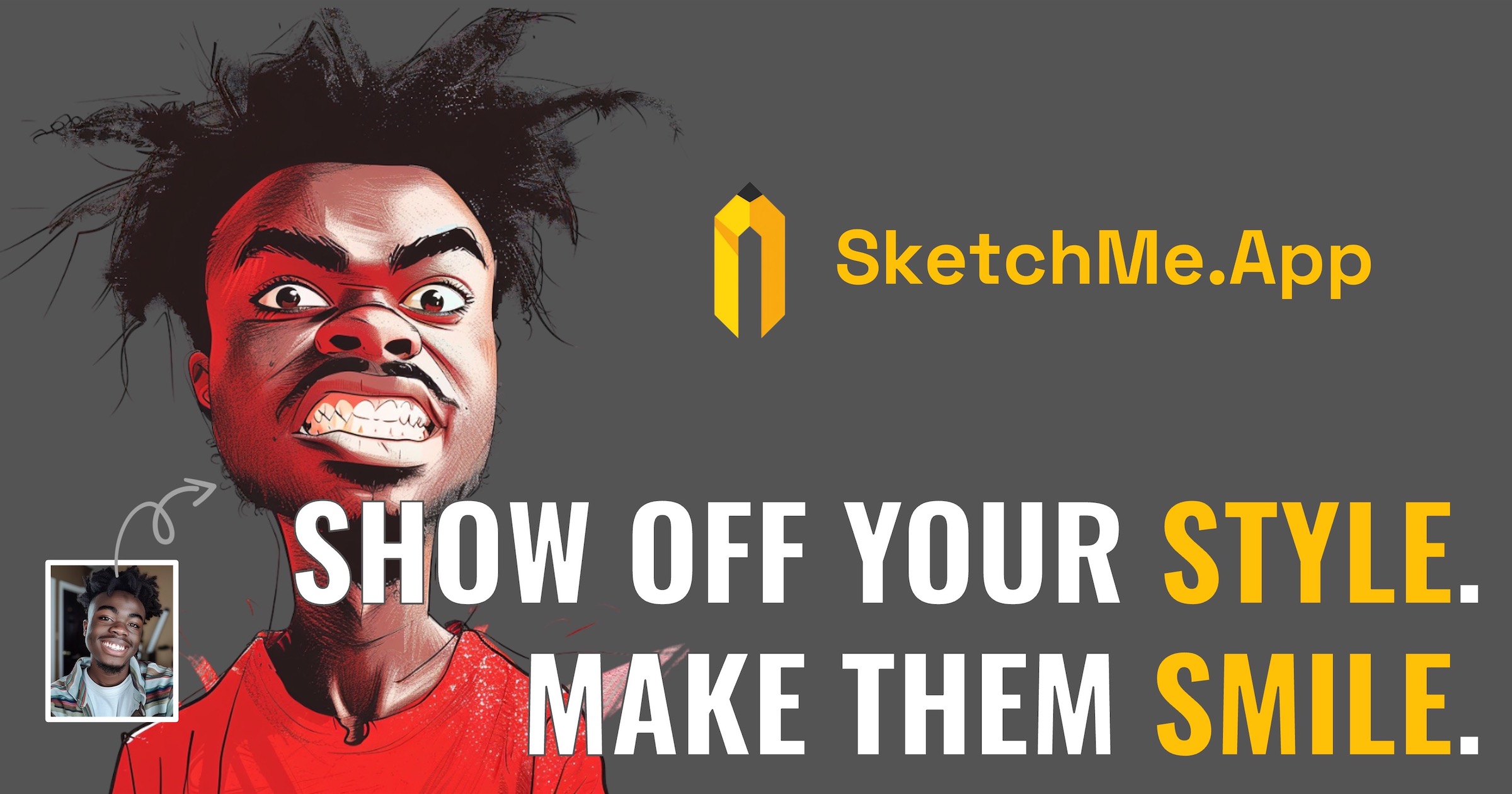
SketchMe.App is an anime generator tool that turns a handful of selfies into illustrated profile pictures. SketchMe.App turns up to five selfies into illustrated profile pictures across six styles including Pencil Sketch, Flat Design, Pixar Animation, Pixel Art, Caricature and Gogh Style, delivering batches of eight images per generation on a one-time credit model.
SketchMe.App is a web tool from Gibberish Lab that converts a small set of selfie photos into illustrated portraits for use as social media profile pictures. The workflow is deliberately narrow: a user uploads up to five selfies with their face clearly visible, picks a drawing style and a theme colour, and the service returns a gallery of generated illustrations. Eight images are produced per run, delivered four at a time within a few minutes. The style list is short and distinct rather than infinite. Pencil Sketch reproduces fine lines and shading. Flat Design leans on simple shapes and bold colours. Pixar Animation imitates 3D film rendering, Pixel Art nods to retro CryptoPunks-style avatars, Caricature exaggerates facial features for comic effect, and Gogh Style borrows from post-impressionist painting. Each package lets a buyer apply multiple styles and colours, giving four sketches per style, so the practical output of a purchase is a spread of variations to choose from. Uploading a selfie set and waiting for a batch is the whole learning curve, which makes the tool approachable for people with no design background. The obvious audience is individuals who want a distinctive avatar without commissioning an artist, and the site pitches the cost as roughly ten times cheaper than hiring an illustrator. The output is also a plausible fit for print-on-demand work such as T-shirt designs, where a stylised portrait can become a graphic, though buyers should confirm the commercial terms before selling anything. SketchMe.App sits in the same space as general purpose image generators, but trades flexibility for consistency. There is no prompt box and no scene composition: the subject is always the user's own face, and variation comes from style and colour rather than wording. Packages are one-time credit purchases rather than subscriptions, credits can be topped up, and paid tiers remove the SketchMe.App logo from the results.
A free trial is offered via the Start Free Trial buttons on the homepage, though the number of free sketches is not stated. Free output carries the SketchMe.App logo.
Learn moreOne-time credit packages: Small at $9 for 24 sketches (up to 6 styles and colours), Basic at $15 for 48 sketches (up to 12), Pro at $24 for 96 sketches (up to 24). Each style produces 4 sketches. Paid tiers remove the SketchMe.App logo, and credits can be added at any time.
Learn moreSupport is handled by Gibberish Lab Ltd. in Tokyo. Contact details, help documentation and response times are not listed on the homepage, which points only to social accounts and legal pages.
Selfie-to-illustration generation from up to 5 photos, six art styles (Pencil Sketch, Flat Design, Pixar Animation, Pixel Art, Caricature, Gogh Style), theme colour selection, batches of 8 images delivered 4 at a time, and logo removal on paid packages.
 AI Angels400+ customizable AI girlfriends for NSFW chat, voice calls, and roleplay
 Candy AIExperience the future of companionship with AI friends who chat, role-play, and connect with you on a human level.
 ourdream.aiA vast AI roleplay platform with millions of characters for chat, images, video and voiceAI Angels400+ customizable AI girlfriends for NSFW chat, voice calls, and roleplayCandy AIExperience the future of companionship with AI friends who chat, role-play, and connect with you on a human level.ourdream.aiA vast AI roleplay platform with millions of characters for chat, images, video and voice