Free trial
The homepage offers a trial where you put agents to work on a task of your own, but does not state its length, credit amount, or any conditions.
Learn moreAI agents with their own computers, accounts, and budgets

Solid is a developer tool. Solid gives AI agents their own computers, accounts, and budgets so they can take a plain-language brief, find the tools, do the work, and report back while the user is offline. It is built for operators and builders who want long-running tasks completed under defined approval rules rather than chat-style assistance.
Solid is a platform for delegating business tasks to AI agents that come equipped with their own computers, accounts, and spending budgets. A user describes a job in plain language, sets access and approval rules, and the agents plan the steps, pick the tools, and work through the task without supervision. The product is aimed at builders and operators inside companies rather than casual experimenters, and the homepage points to teams at firms such as Revolut, NVIDIA, Stanford, and the UK Government Digital Service using it. The distinguishing feature is how far the setup autonomy goes. Agents can use Windows and macOS machines, Linux servers, iPhones, and Android phones, register their own Google or Apple accounts, and sign up for and pay for services as long as the spend stays inside the budget the user defined. Prebuilt connectors are not required: an agent can reach a tool through an API, write a missing integration, or simply operate the website or desktop app the way a person would. When something breaks, agents are expected to repair their own setup and verify the job runs again, and they escalate only when genuinely blocked. In practice, a request looks like a short brief with constraints. The agent connects the relevant tools, does the research or build work, verifies the output, and messages the user with a deliverable, which might be a hosted demo link, an approved outreach sequence, a test report, or a pull request. Agents also retain corrections between jobs and can spin up additional Solid agents or bring in external agents such as Codex and Claude Code to divide larger workloads. Usage draws on a shared credit balance covering AI calls, machines, and purchases, and an enterprise tier adds workspace controls plus deployment on Solid Cloud, in a VPC, or on premises. The tool sits in the crowded autonomous agent category, but its pitch leans on infrastructure ownership rather than on a library of integrations or a chat interface. It suits people who have a checkable outcome to hand off and are comfortable defining budgets and approval gates up front.
The homepage offers a trial where you put agents to work on a task of your own, but does not state its length, credit amount, or any conditions.
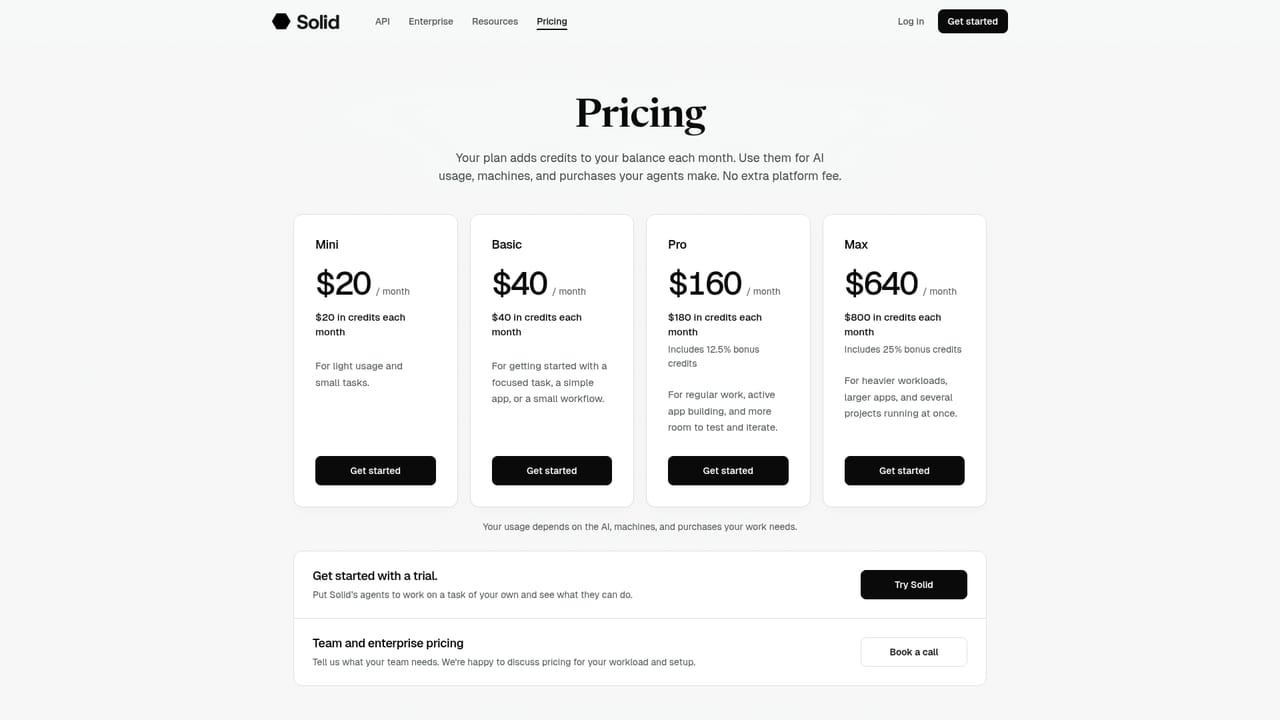
Learn moreFour monthly plans, all paid: Mini at $20 with $20 in credits, Basic at $40 with $40, Pro at $160 with $180 (a 12.5% bonus), and Max at $640 with $800 (a 25% bonus). Credits cover AI usage, machines, and agent purchases, and there is no extra platform fee.
Learn moreAgents explain what is blocking them when a job stalls, and the homepage notes that users can also talk to a real person on the Solid team. No help centre is linked, and onboarding runs through a scheduled demo.
Solid relies on direct tool use rather than a connector catalogue: agents can call APIs, write missing integrations, or drive websites, desktop software, and phone apps, and can sign up for services within your rules.
Agents take jobs in natural language, run on their own Windows, macOS, and Linux machines plus iPhones and Android phones, register Google or Apple accounts, and pay for services within budgets and approval rules. They build missing integrations, repair broken setups, retain corrections, and can create more agents or call in Codex and Claude Code. An API and enterprise controls for access, budgets, policies, and approvals are also offered.
 AI Angels400+ customizable AI girlfriends for NSFW chat, voice calls, and roleplay
 Candy AIExperience the future of companionship with AI friends who chat, role-play, and connect with you on a human level.
 ourdream.aiA vast AI roleplay platform with millions of characters for chat, images, video and voiceAI Angels400+ customizable AI girlfriends for NSFW chat, voice calls, and roleplayCandy AIExperience the future of companionship with AI friends who chat, role-play, and connect with you on a human level.ourdream.aiA vast AI roleplay platform with millions of characters for chat, images, video and voice


