The Logo Creator AI

Turn a short brief into brand-ready logo concepts

Beginner
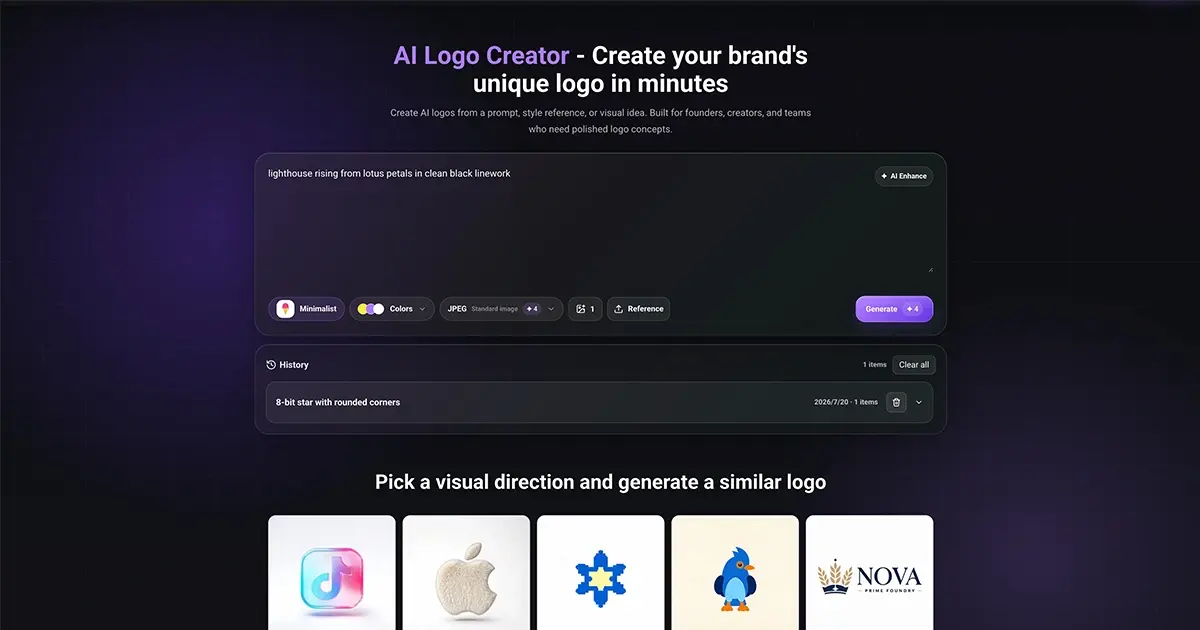
Screenshot of The Logo Creator AI, Turn a short brief into brand-ready logo concepts

What is The Logo Creator AI?

The Logo Creator AI is a generate concepts tool that turns a short brief into brand-ready logo concepts. A prompt driven logo generator with style presets, color palettes, reference image upload and JPEG, PNG or SVG export. Suited to founders, small shops and marketing teams that need quick concept directions rather than a full brand design suite.

The Logo Creator AI is a web based logo generator that converts a plain language prompt into logo concepts, then lets you steer the output with style presets, a three color palette and an optional reference image. The workflow is built for people who have a brand idea but not a design file: describe the industry, mood or symbol you have in mind, optionally run the prompt through AI Enhance to sharpen it, and generate a set of variations to compare side by side. In practice the tool works in two modes. Text to Logo starts from a written brief, while Image to Logo accepts an uploaded reference or a pick from the built-in example gallery so the model can read shape, mood, color and composition. A style preset browser covers directions such as minimalist marks, luxury badges, playful mascots, retro labels and clean technology symbols. Before generating, you choose an output format (JPEG Standard, PNG Transparent or SVG Vector) and how many variations you want, which makes it practical to explore several directions in one pass rather than committing to a single result. Output quality depends heavily on the prompt and preset you choose, so the tool rewards a few iterations. Generated results can be previewed at a larger size, edited, or downloaded, and recent history is retained for 7 days so you can return to a strong direction without rebuilding it. A separate toolkit extends the same workflow: a vector converter turns a raster logo into editable SVG, a 3D maker gives a flat mark dimensional styling, and a logo animation feature adds MP4 motion to a static logo. The audience is founders, small shops, e-commerce sellers, creators and lean marketing teams who need concept-level logos for pitch decks, storefronts, avatars and packaging mockups. It sits at the early ideation end of the market rather than replacing a brand designer: agencies can use it for fast moodboard directions, but final typography control and full identity systems still call for dedicated design software.

How do you use The Logo Creator AI?

  1. 1Write your logo brief
    Describe the brand, industry, mood and any symbol you want. If the wording feels vague, run it through AI Enhance to turn it into a clearer prompt.
  2. 2Set style, colors and reference
    Open the style preset browser and pick a direction, choose primary, secondary and background colors, then optionally upload a reference image or select one from the gallery.
  3. 3Choose format and variation count
    Select JPEG Standard, PNG Transparent or SVG Vector and decide how many variations to generate so you can compare several directions at once.
  4. 4Generate and review the variations
    Click Generate, open larger previews of the results and compare the strongest candidates against your brand direction before editing or downloading.
  5. 5Convert or animate the final mark
    Use the vector converter for an editable SVG, the 3D maker for a dimensional look, or the animation tool to produce an MP4 version of the chosen logo.

Pros and cons

Pros

  • Prompt, preset, palette and reference image can all be combined in one generation passAI
  • Export options cover standard JPEG, transparent PNG and SVG vector filesAI
  • Multiple variations generated at once make direction comparison practicalAI
  • Recent history is kept for 7 days, so strong results are not lost between sessionsAI
  • Companion tools for SVG vector conversion, 3D styling and MP4 logo animation extend the same workflowAI

Cons

  • Prompt quality drives the result, so weak briefs produce generic marks and several rounds of iteration are usually neededAI
  • Typography and letterform control are limited compared with a vector editor, which matters for wordmark precisionAI
  • History expires after 7 days, so finished files must be downloaded rather than left in the accountAI
  • The homepage does not document pricing tiers, commercial licensing terms or file ownership detailsAI
  • Output is concept level, so a full identity system still needs a designer or separate design softwareAI

How much does The Logo Creator AI cost?

Features

Prompt to logo generation with an AI Enhance prompt rewriter, a style preset browser (minimalist, luxury badge, mascot, retro label, technology symbol and more), a three color palette picker, reference image upload or gallery selection, and a similar-logo mode. Output formats are JPEG, PNG Transparent and SVG Vector with a selectable number of variations. Results can be previewed, edited and downloaded, with 7 day history. Separate tools cover vector conversion, 3D logos and MP4 logo animation.

Frequently asked questions about The Logo Creator AI

  • How do you use The Logo Creator AI?
    The walkthrough on this page covers 5 steps: 1. Write your logo brief 2. Set style, colors and reference 3. Choose format and variation count 4. Generate and review the variations 5. Convert or animate the final mark.
  • What platforms does The Logo Creator AI support?
    The Logo Creator AI is available on Web App.
  • What are the limitations of The Logo Creator AI?
    Prompt quality drives the result, so weak briefs produce generic marks and several rounds of iteration are usually needed. Typography and letterform control are limited compared with a vector editor, which matters for wordmark precision. History expires after 7 days, so finished files must be downloaded rather than left in the account.

Status

StatusActive
Views0
Outbound clicks0
Added10/21/2026

Platforms

Web App

Pricing

Freemium