Topview Drama Studio

Plan, storyboard, and produce vertical AI dramas from a script or novel.

Beginner
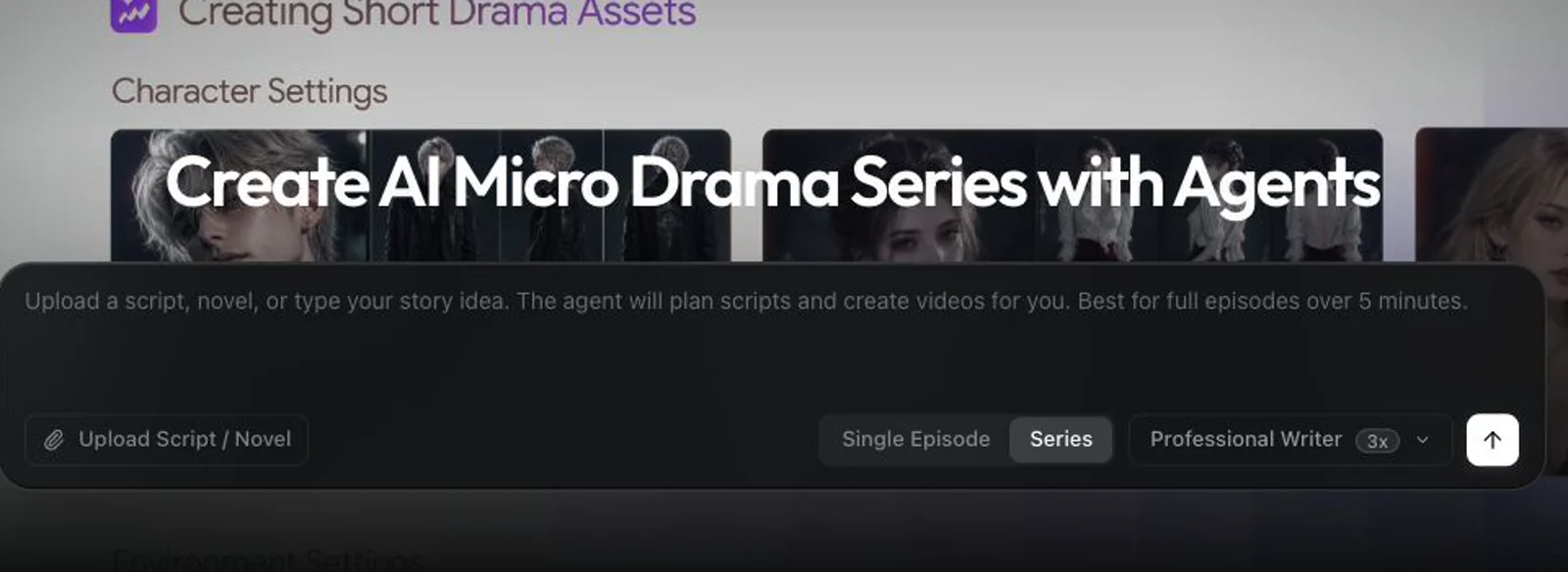
Screenshot of Topview Drama Studio, Plan, storyboard, and produce vertical AI dramas from a script or novel

What is Topview Drama Studio?

Topview Drama Studio is an AI drama tool that plans storyboard, and produce vertical AI dramas from a script or novel. Topview Drama Studio turns ideas, scripts, or novel chapters into structured short drama projects, combining an AI planning agent with an editable workbench for outlines, characters, storyboards, voiceover, and vertical episode production.

Topview Drama Studio is a browser based production environment for building short dramas and micro dramas with AI. It is not a single prompt video generator. The product pairs a planning agent with a structured workbench, so a project can begin as a one line idea, a plot outline, a full script, a novel chapter, or a serialized story concept and then move through outline, characters, storyboards, and finished vertical scenes. The site pitches it at solo creators, web fiction writers, MCNs, social media teams, and agencies that need to test several drama concepts without a crew. In practice the agent handles the early conversation about story direction and adaptation choices, while the workbench stores editable records for outlines, episodes, characters, locations, props, scripts, and beat sheets. That means decisions are not trapped in a chat log. Each record can carry visual references that get reused across beats and generated versions, which is how the tool tries to keep a cast and a set consistent from episode to episode. Approved beats then open in a production workspace with prompt editing, reference assets, generated video versions, continuation, post processing, and export. Voiceover, captions, and vertical framing are part of the same workflow rather than separate tools. The site shows a complete example project, The Fight I Owe You, that runs from agent planning through an eight beat episode to a finished teaser, plus sample output in animation, historical drama, and science fiction. Against generic AI video tools, the differentiator is structure: storyboard based generation, script assistance, and an episode model instead of clip by clip prompting. The trade off is that Drama Studio expects a story shaped for serialized vertical video, so it is a poor fit for one off cinematic clips or non narrative footage. Pricing and plan limits are not stated on the homepage, so buyers should confirm credit costs before committing a series.

How do you use Topview Drama Studio?

  1. 1Choose your starting input
    Decide whether the project begins as an idea, outline, script, novel chapter, or serialized story concept, then enter it through the create panel on the Drama Studio page.
  2. 2Set up the project type
    Pick single episode or series mode so the agent plans the right scope, then start the planning conversation to settle story direction and adaptation choices.
  3. 3Review the outline and script cards
    Work through episode outlines, scene details, shots, dialogue, and emotional beats in the workbench, editing records directly rather than re-prompting from scratch.
  4. 4Build characters, locations, and props
    Create editable records with visual references for the cast and sets so the same assets can be reused across beats and generated versions.
  5. 5Generate storyboards for each scene
    Turn scene ideas into multi panel storyboard images, review the shot flow, and bring board assets back into the project for production.
  6. 6Produce and export the episode
    Open approved beats in the production workspace, edit prompts, add references, compare video versions, then add voiceover and captions before exporting the vertical cut.

Pros and cons

Pros

  • Structured workbench keeps outlines, characters, locations, props, and beat sheets editable instead of burying them in a chat log.AI
  • Accepts many starting points, from a one line idea to a full script or novel chapter, which suits adaptation work.AI
  • Storyboard first workflow with reusable visual references supports continuity across episodes and generated versions.AI
  • Production workspace bundles prompt editing, continuation, post processing, and export, with voiceover and captions in the same project.AI
  • Public example projects and featured director series give a realistic sense of output quality before you commit.AI

Cons

  • Homepage gives no pricing, credit costs, or plan limits, so budgeting a multi episode series is guesswork until you sign in.AI
  • The workflow is built around serialized vertical drama; one off clips or non narrative video get little benefit from the structure.AI
  • Planning quality depends on the agent conversation and prompt editing, so output consistency across many beats is not guaranteed.AI
  • No API, third party integrations, or export formats are documented on the page, which limits pipeline automation.AI
  • No support channels or documentation hub are linked beyond the on page tutorial and FAQ.AI

How much does Topview Drama Studio cost?

Features

Drama Studio combines an AI planning agent with a structured workbench for outlines, episodes, characters, locations, props, scripts, and beat sheets. It supports multi panel storyboards, reusable visual references, a beat to video production workspace with prompt editing and generated versions, plus voiceover and automatic captions for vertical drama output.

Frequently asked questions about Topview Drama Studio

  • How do you use Topview Drama Studio?
    The walkthrough on this page covers 6 steps: 1. Choose your starting input 2. Set up the project type 3. Review the outline and script cards 4. Build characters, locations, and props 5. Generate storyboards for each scene 6. Produce and export the episode.
  • What platforms does Topview Drama Studio support?
    Topview Drama Studio is available on Web App.
  • What are the limitations of Topview Drama Studio?
    Homepage gives no pricing, credit costs, or plan limits, so budgeting a multi episode series is guesswork until you sign in. The workflow is built around serialized vertical drama; one off clips or non narrative video get little benefit from the structure. Planning quality depends on the agent conversation and prompt editing, so output consistency across many beats is not guaranteed.