Free trial
A free tier is advertised at 5,000 traces per month with 90-day trace retention and no credit card. No time-limited trial duration is stated.
Learn moreObservability and governance for AI agents in production

TuringPulse is a pattern recognition tool. A control plane for production AI agents that combines trace-level observability, rubric-based evaluations, drift and anomaly monitoring, runtime policy enforcement and a human review queue, with SDK integration and an in-portal assistant for drafting rules.
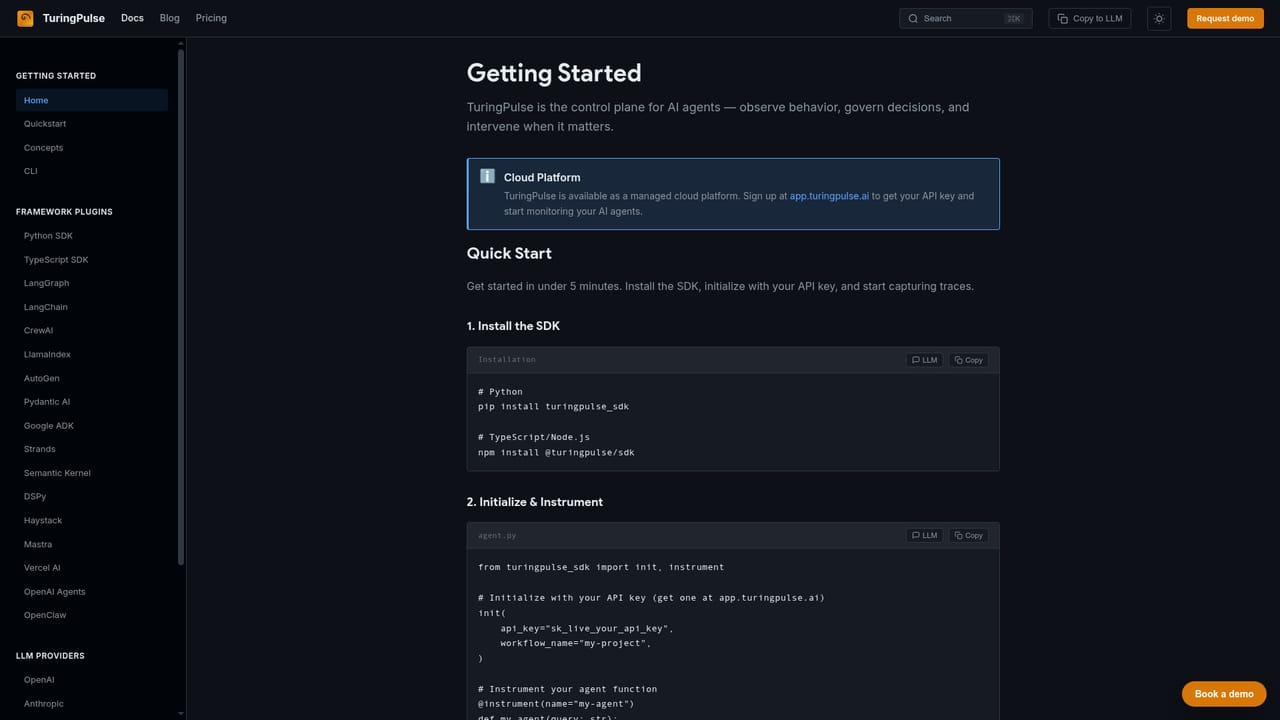
TuringPulse is a control plane for AI agents: a web platform that watches what autonomous agents do in production, scores the quality of their output, enforces rules on their actions and routes risky decisions to a human reviewer. It is built for the teams that ship agentic systems (engineering, platform, risk and compliance) and need evidence of how those systems behave once real traffic hits them, not just benchmark scores from a notebook. Setup is deliberately light. Teams install the SDK and add a decorator, and the platform starts collecting traces. The Trace Explorer renders each agent execution as a full DAG, so an engineer can open any node (an LLM call, a tool invocation, a retriever query) and compare inputs, outputs, latency and cost. From there the workflow splits into four areas. Evaluate covers rubric-based scoring of outputs and a Metrics Explorer for building KPI queries such as latency percentiles, token usage and error rates, with root cause analysis that ties a regression back to the config change, prompt update or commit behind it. Monitor tracks those KPIs on dashboards, runs drift detection against rolling baselines and fires anomaly alerts into Slack, Teams, Telegram, email or a webhook. Govern applies declarative policy rules at runtime, including an MCP proxy that inspects every tool call, plus HIPAA and GDPR compliance packs. Coordinate adds the human layer: a priority-ranked review queue, policy triggers that decide when review is mandatory and audit history of who approved what. It fits the operational gap between an agent framework and a finished product. Frameworks such as LangGraph, CrewAI and the OpenAI Agents SDK help teams build agents; TuringPulse sits above them as the layer that records, judges and constrains live behavior. That places it closer to an observability and governance suite than to a prompt tool, and it suits regulated or high-cost environments where a bad agent decision carries real money or compliance exposure. Fluent agent teams will get the most out of it; the policy, drift and evaluation machinery assumes someone is willing to write and tune rules.
A free tier is advertised at 5,000 traces per month with 90-day trace retention and no credit card. No time-limited trial duration is stated.
Learn moreThe homepage describes a free tier of 5,000 traces per month with 90-day retention and no credit card required. Paid tiers and their limits are not listed on the homepage; the pricing page and demo request are the places to get specifics.
Learn moreSupport is offered through documentation and a demo request form. No help desk, community forum or SLA details appear on the homepage.
Learn moreFrameworks include LangChain, LangGraph, LlamaIndex, CrewAI, OpenAI Agents, AutoGen, Pydantic AI, Semantic Kernel, Google ADK, AWS Strands, Haystack, DSPy, Mastra and Vercel AI. Models cover OpenAI, Anthropic, Google GenAI, Vertex AI, Bedrock, Cohere and Mistral.
Trace Explorer with full DAG visualization, rubric-based evaluations, a custom metrics query builder and root cause analysis. Governance adds a runtime policy engine, thresholds and baselines, MCP tool governance and HIPAA/GDPR packs. Monitoring covers KPI dashboards, drift detection, anomaly rules and alert channels. Human oversight runs through a review queue, policy triggers and audit history.
 AI Angels400+ customizable AI girlfriends for NSFW chat, voice calls, and roleplay
 Candy AIExperience the future of companionship with AI friends who chat, role-play, and connect with you on a human level.
 ourdream.aiA vast AI roleplay platform with millions of characters for chat, images, video and voiceAI Angels400+ customizable AI girlfriends for NSFW chat, voice calls, and roleplayCandy AIExperience the future of companionship with AI friends who chat, role-play, and connect with you on a human level.ourdream.aiA vast AI roleplay platform with millions of characters for chat, images, video and voice


