Ultimaps

Spreadsheet data in, polished interactive maps out.

Beginner
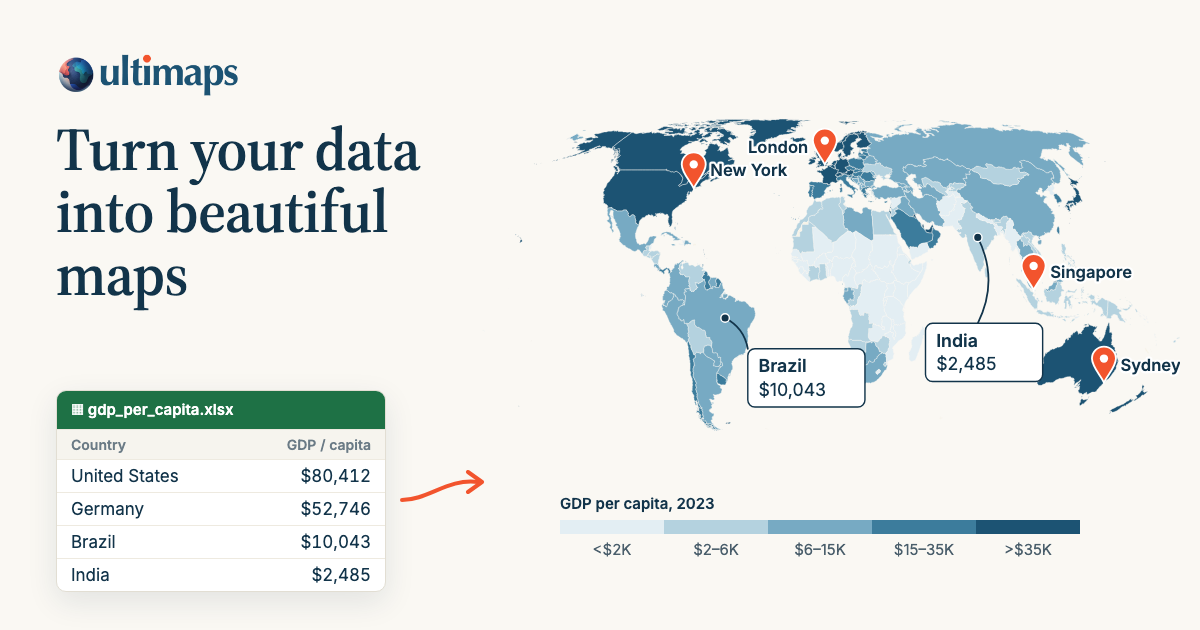
Screenshot of Ultimaps, Spreadsheet data in, polished interactive maps out

What is Ultimaps?

Ultimaps turns spreadsheets into choropleth, territory and location maps with automatic region matching. Pick from 200+ vector maps, connect Excel, CSV, Google Sheets or Notion, then export PNG, SVG or PDF or embed an interactive map.

Ultimaps is a browser-based map maker that turns spreadsheet rows into color-coded maps. Instead of drawing shapes by hand, users pick from a library of over 200 vector maps covering continents, countries, and administrative regions (US states, US counties, provinces, departments), then feed in their own data. Excel files, CSVs, Google Sheets and Notion databases are all accepted, and the tool matches entries to the correct regions automatically, even when labels are inconsistent. Colored regions can carry tooltips and popups filled from the same data columns, and pins can be placed from addresses or coordinates. The workflow has three stages. First, choose a base map; popular choices include the United States, US counties, individual states, world, Europe, India, China, Canada and France departments. Second, add data by pasting a range, importing a file, connecting a sheet, or typing a prompt such as "color states by population" to let the AI feature build the view. Third, customize colors, themes, pins and annotations, then export as PNG (up to roughly 7000x7000px on paid plans), SVG or PDF, or publish an interactive version with an embed code or a link that auto-expands in Notion, WordPress, Ghost and Substack. The tool suits analysts, sales operations teams, journalists, researchers and small businesses that need territory maps, portfolio maps, election maps, location maps or business presence maps without touching GIS software. It differs from Mapchart in that the software derives color scales and legends from uploaded data rather than requiring manual color assignment, and it can publish live interactive maps, not just static images. Unlike tile-based services such as Google Maps or Mapbox, it is built for region-based data visualization rather than street-level navigation. A free plan supports unlimited maps with no card, and a one-time export or Pro subscription removes the credit and unlocks high-resolution and vector output. Custom map builds and workspace features are available for organizations.

How do you use Ultimaps?

  1. 1Choose a base map from the library
    Browse the vector map collection by region and pick the geography that matches your data, such as US states, US counties or world countries. Each map is divided into regions you can color individually.
  2. 2Import your data
    Paste a range from Excel or Google Sheets, upload a CSV, connect a Notion database, or describe the map you want in a prompt. Ultimaps aligns your entries with the correct regions.
  3. 3Color, pin and customize
    Adjust the color scale, switch themes, and add pins or annotations for specific locations. Legends and tooltips populate from your data columns.
  4. 4Export a static file
    Download the map as a standard-resolution PNG on the free plan, or upgrade to a one-time export or Pro for high-resolution PNG, SVG and PDF without the credit.
  5. 5Publish and embed an interactive map
    Save the map to a free account, then copy the share link or embed code. Paste the link into Notion, WordPress, Ghost or Substack to render the live map automatically.
  6. 6Review licensing for commercial use
    Check the license terms before publishing commercially. Free exports are permitted with the credit visible; paid exports remove the branding requirement.

Pros and cons

Pros

  • Data is matched to regions automatically, reducing manual cleanup of messy spreadsheet entries.AI
  • Publishing an interactive map requires no code: paste a link or embed snippet into common CMS platforms.AI
  • Free plan is genuinely usable with unlimited maps and no sign-up until saving or publishing.AI
  • One-time export option lets occasional users pay per map instead of committing to a subscription.AI
  • Custom map builds and white-label options are available for organizations with unusual regions.AI

Cons

  • Free exports carry an ultimaps.com credit; removing it requires a one-time fee or Pro plan.AI
  • The 200+ map library covers countries and standard administrative divisions but not custom subdivisions out of the box.AI
  • AI requests and address lookups are capped monthly even on Pro, which can constrain heavy batch workflows.AI
  • Interactive map publishing requires a free account, so anonymous creation has a hard ceiling.AI
  • Tile-based street detail and satellite views are outside the product's scope, limiting location-map context.AI

How much does Ultimaps cost?

Pricing

Free plan costs $0 with unlimited maps, spreadsheet imports, 100 address lookups and 20 AI requests per month, plus PNG export with credit. Pro is $49/month billed yearly (about €499) for unlimited unbranded exports, high-resolution PNG, SVG and PDF, and 5,000 lookups and 500 AI requests. A one-time export costs €12.50 per map. Custom plans add custom maps and workspaces.

Learn more

Support

Email support is listed, with priority email support on the Pro plan. Custom map requests and organizational inquiries go through the contact option on the website.

Integrations

Imports data from Excel, CSV, Google Sheets and Notion. Interactive maps can be embedded in WordPress, Squarespace, Wix, Ghost, Substack and Notion, either via HTML embed code or by pasting a shareable link that expands into the live map.

Features

Color-code over 200 vector maps by region using data from Excel, CSV, Google Sheets or Notion, or describe the output with an AI prompt. Automatic region matching builds color scales and legends. Add pins from addresses or coordinates, tooltips and popups from data columns, and click-through links. Export PNG, SVG or PDF, or publish an interactive map with pan, zoom and a one-line embed.

Learn more

Frequently asked questions about Ultimaps

  • How much does Ultimaps cost?
    Free plan costs $0 with unlimited maps, spreadsheet imports, 100 address lookups and 20 AI requests per month, plus PNG export with credit. Pro is $49/month billed yearly (about €499) for unlimited unbranded exports, high-resolution PNG, SVG and PDF, and 5,000 lookups and 500 AI requests. A one-time export costs €12.50 per map. Custom plans add custom maps and workspaces.
  • How do you use Ultimaps?
    The walkthrough on this page covers 6 steps: 1. Choose a base map from the library 2. Import your data 3. Color, pin and customize 4. Export a static file 5. Publish and embed an interactive map 6. Review licensing for commercial use.
  • What platforms does Ultimaps support?
    Ultimaps is available on Web App.
  • What does Ultimaps integrate with?
    Imports data from Excel, CSV, Google Sheets and Notion. Interactive maps can be embedded in WordPress, Squarespace, Wix, Ghost, Substack and Notion, either via HTML embed code or by pasting a shareable link that expands into the live map.
  • What are the limitations of Ultimaps?
    Free exports carry an ultimaps.com credit; removing it requires a one-time fee or Pro plan. The 200+ map library covers countries and standard administrative divisions but not custom subdivisions out of the box. AI requests and address lookups are capped monthly even on Pro, which can constrain heavy batch workflows.

Status

StatusActive
Views0
Outbound clicks0
Added10/21/2026

Platforms

Web App

Pricing

FreemiumSubscriptionPaid