Vismint

Turn 2D images and text prompts into textured 3D assets for games, print and web

Beginner
Screenshot of Vismint, Turn 2D images and text prompts into textured 3D assets for games, print and web

What is Vismint?

Vismint is a generative art tool that turns 2D images and text prompts into textured 3D assets for games, print and web. Vismint converts images and text prompts into textured 3D models in the browser, with PBR materials and export to GLB, STL, OBJ, FBX, PLY and USDZ for Blender, Unity, Unreal Engine, 3D printing and web previews.

Vismint is a browser-based AI 3D model generator that turns 2D references into usable 3D assets. Upload a product photo, sketch, illustration or piece of concept art, and the platform reconstructs geometry and materials, producing a textured model that can be previewed in the browser before download. A text-to-3D mode covers the case where no reference image exists, and the site positions that path as an early concept explorer rather than a precision tool. Once the shape is roughly right, the recommendation is to switch back to image-to-3D for tighter control over silhouette and style. The output pipeline is built around practical handoff. GLB (glTF) is the default for textured assets and interactive previews, and the site also points to STL, OBJ, FBX, PLY and USDZ depending on the model and export route. Geometry-first generation targets shape and mesh structure, which suits STL work for slicing and miniatures, while textured generation adds PBR maps (Albedo, Normal, Roughness) for game prototypes, ecommerce renders and animation tests. Watertight meshes and optimized polycounts are the claimed targets for printing and real-time scenes, and clean UV unwrapping is pitched as the reason assets can be dropped into Blender, Unity, Unreal Engine or a WebGL viewer without heavy prep. The tool is aimed at two groups at once: non-technical creators who need a fast 3D starting point, and professionals who want a rough asset to refine in their existing pipeline. Sample outputs on the site (a shield prop, a treasure chest, a character preview) demonstrate the intended use cases: game props, tabletop concepts, product visualization. Vismint is not a full modeling suite. It sits upstream of Blender and Unity, generating a starting mesh and materials rather than replacing retopology, rigging or scene assembly. Pricing is credit-based with no subscription, commercial licensing available on paid packs, and credits valid for up to a year.

How do you use Vismint?

  1. 1Open the image-to-3D studio
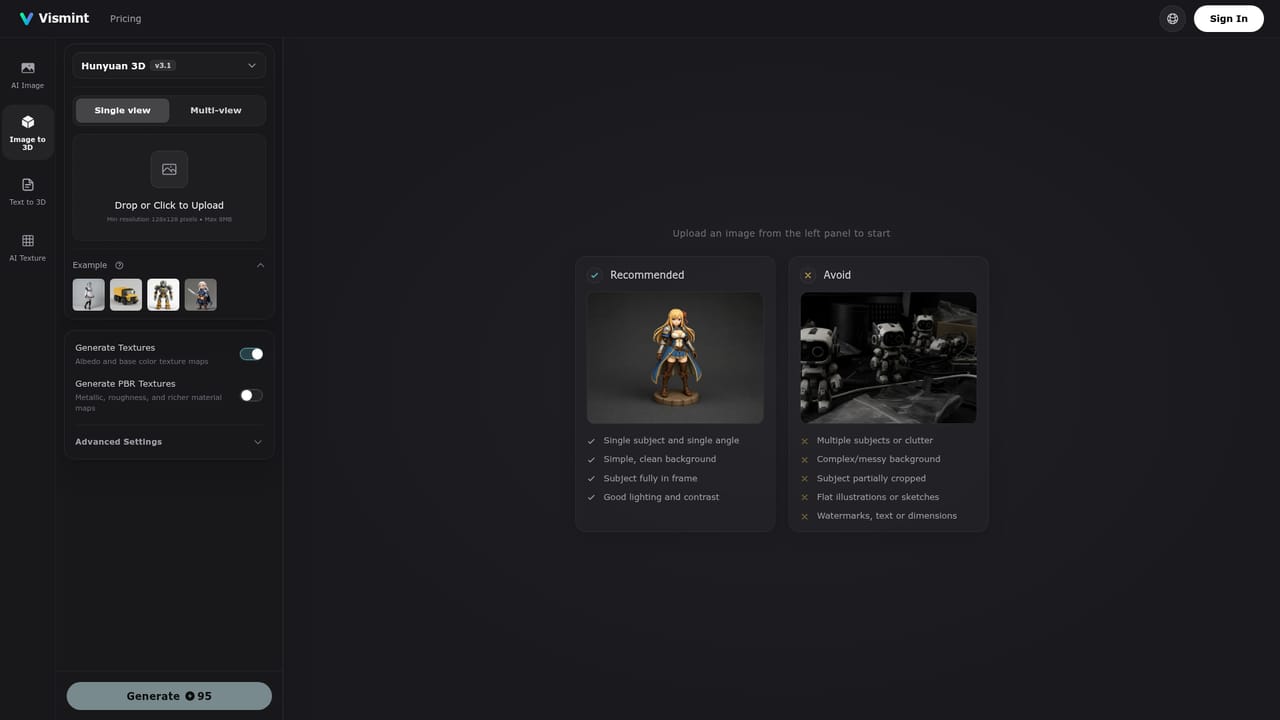
    Go to the image-to-3D page and start a new project. The whole workflow runs in the browser, so no install or GPU setup is needed.
    Vismint — Open the image-to-3D studio
  2. 2Prepare and upload a reference
    Pick a single-subject photo, sketch or concept art with clear lighting and a visible shape. Avoid heavy cropping, reflective surfaces, transparent materials and cluttered backgrounds.
  3. 3Choose generation mode and model
    Select geometry-first output when shape and STL export matter most, or textured output when you need full PBR materials. Supported engines include Trellis-style and Hunyuan-style models.
  4. 4Generate and preview
    Run the generation, then inspect the result in the 3D preview. If the silhouette is off, try text-to-3D for a rough concept or re-upload a cleaner reference.
  5. 5Export in the right format
    Download GLB for Blender, Unity, Unreal Engine or Three.js previews, or STL if the asset is headed for a slicer. Check scale, wall thickness and mesh repairs before printing.

Pros and cons

Pros

  • Image-to-3D and text-to-3D in one browser studio, no 3D software needed to startAI
  • Textured output ships with Albedo, Normal and Roughness maps rather than flat color aloneAI
  • Broad export set (GLB, STL, OBJ, FBX, PLY, USDZ) covers both game pipelines and print slicingAI
  • Credits never expire within a year and no subscription is requiredAI
  • Commercial license included with paid credit packsAI

Cons

  • Results depend heavily on input quality: reflective, transparent or busy-background images are flagged as poor sourcesAI
  • Generation time is not fixed, and queue load or higher texture settings can stretch jobs well past the advertised minutesAI
  • Export formats beyond GLB are described as dependent on the model and export path, so the full format list is not guaranteed per assetAI
  • No stated API or automation route, so batch and pipeline work stays manual through the web interfaceAI
  • Credit costs vary by task complexity, which makes per-model budgeting harder to predict than the headline generation estimate suggestsAI

How much does Vismint cost?

Pricing

Credit packs bought once, no subscription. Starter: 800 credits for $9.90 (about 8 3D generations). Pro Standard: 3,000 credits for $29.90 (about 31 generations). Max Value: 8,000 credits for $69.90 (about 84 generations). Credits last up to 1 year and include a commercial license. Monthly and yearly billing tabs appear on the page.

Learn more

Support

Priority customer support is listed on the Pro Standard and Max Value credit packs only. No documentation portal or help centre is linked from the homepage.

Integrations

Exports are built for Blender, Unity, Unreal Engine, 3D printing slicers and WebGL/Three.js viewers. No plugin or API integrations are described on the homepage.

Features

Image-to-3D and text-to-3D generation, geometry-first or textured output, high-resolution PBR maps (Albedo, Normal, Roughness), clean UV unwrapping, watertight meshes for printing, optimized polycounts for real-time use, in-browser model previews, and export to GLB, STL, OBJ, FBX, PLY and USDZ.

Learn more

Frequently asked questions about Vismint

  • How much does Vismint cost?
    Credit packs bought once, no subscription. Starter: 800 credits for $9.90 (about 8 3D generations). Pro Standard: 3,000 credits for $29.90 (about 31 generations). Max Value: 8,000 credits for $69.90 (about 84 generations). Credits last up to 1 year and include a commercial license. Monthly and yearly billing tabs appear on the page.
  • How do you use Vismint?
    The walkthrough on this page covers 5 steps: 1. Open the image-to-3D studio 2. Prepare and upload a reference 3. Choose generation mode and model 4. Generate and preview 5. Export in the right format.
  • What platforms does Vismint support?
    Vismint is available on Web App.
  • What does Vismint integrate with?
    Exports are built for Blender, Unity, Unreal Engine, 3D printing slicers and WebGL/Three.js viewers. No plugin or API integrations are described on the homepage.
  • What are the limitations of Vismint?
    Results depend heavily on input quality: reflective, transparent or busy-background images are flagged as poor sources. Generation time is not fixed, and queue load or higher texture settings can stretch jobs well past the advertised minutes. Export formats beyond GLB are described as dependent on the model and export path, so the full format list is not guaranteed per asset.

Status

StatusActive
Views0
Outbound clicks0
Added10/21/2026

Platforms

Web App

Pricing

PaidFree Trial