Free trial
A free plan provides 10 credits with no credit card required, limited to watermarked 480p output and a single parallel task.
Learn moreText to video and image to video generation in one browser workspace

Wan 2.7 is a browser based AI video and image generator with text to video, image to video and text to image modes. It offers a prompt assistant, commercial licensing on paid plans, credit based pricing and access to additional models such as Kling 3.0 and Nano Banana 2.
Wan 2.7 is a browser based AI video and image generator that turns written prompts or uploaded reference images into short video clips. The workspace supports text to video, image to video and text to image modes in the same interface, so a creator can move from a still concept to an animated shot without leaving the page. Multi reference and video edit options sit alongside the standard modes for material that needs to stay consistent across shots. The product is aimed at people who need footage without a camera crew or an editing suite. Content creators producing B-roll, marketing teams testing several ad concepts in a week, e-commerce sellers animating product photos, teachers building visual explanations and freelancers delivering client work all appear in the vendor's own audience list. The workflow is prompt driven: describe the scene, mood, camera movement and style in natural language, pick a mode, set resolution, duration, aspect ratio and style, then preview and download the result. A prompt assistant is available for users who want help expanding a rough idea into a detailed description. Output is generated in minutes according to the site, with resolution capped at 480p on the free tier and 1080p on paid plans. Watermarking follows the same split, and commercial licensing is included on paid tiers. The platform also advertises private generation, stating that prompts and uploads are not used to train models. Compared with single purpose video generators, Wan 2.7 bundles image creation and photo animation with video generation and also exposes third party models including Kling 3.0 and Nano Banana 2 on paid plans. Credits are the billing unit, and the site notes that Wan 2.7 runs at a 30 percent credit discount relative to other models on the same plan. Parallel task limits scale from one on the entry tiers to ten on Ultra, which matters for anyone queueing batches of clips.
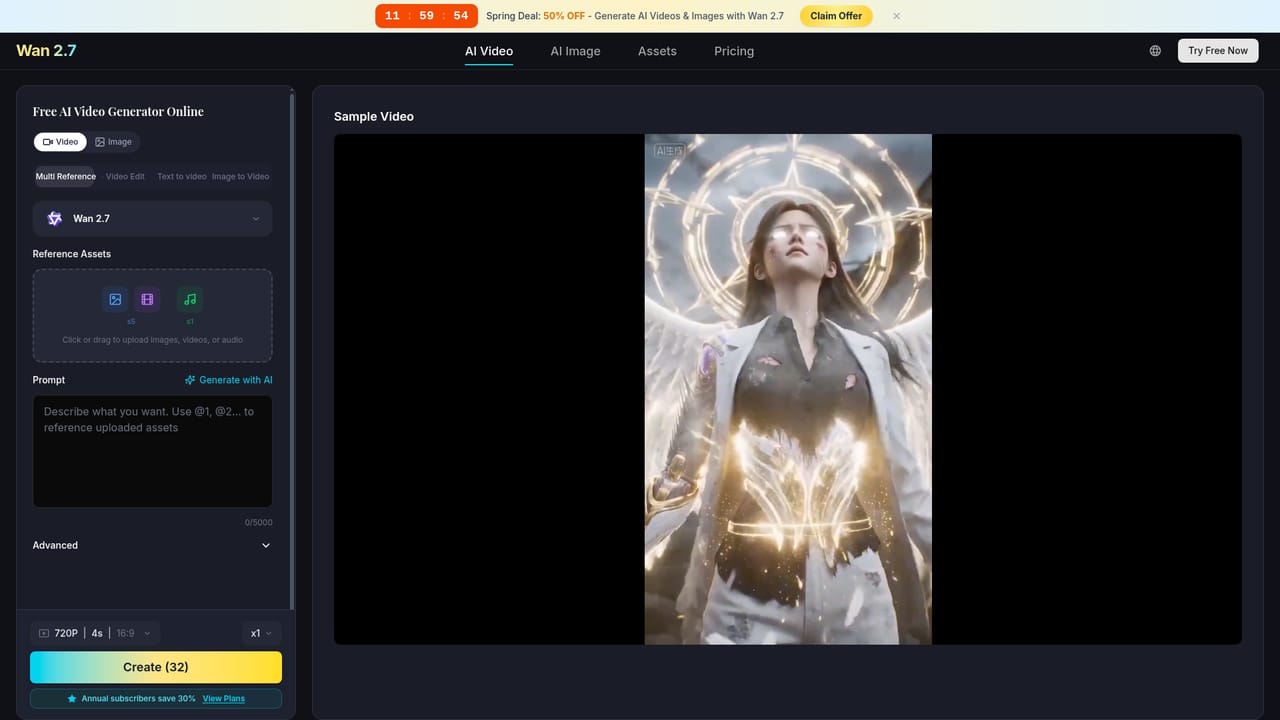
A free plan provides 10 credits with no credit card required, limited to watermarked 480p output and a single parallel task.
Learn moreFree plan costs $0 with 10 credits, watermarked output, 480p resolution and 1 parallel task. Lite is $9.9 per month billed yearly (400 credits), Pro $19.9 per month yearly (1,000 credits), Ultra $28.5 per month yearly (2,000 credits). Paid tiers add 1080p, no watermark and up to 10 parallel tasks.
Learn moreDedicated support is listed as an Ultra plan benefit. The homepage otherwise points to an FAQ section rather than a documented help centre.
Text to video, image to video, text to image, multi reference and video edit modes sit in one workspace. The platform adds an AI prompt assistant, adjustable resolution, duration, aspect ratio and style, commercial licensing on paid plans, private generation that does not train on user content, and access to Kling 3.0 and Nano Banana 2 alongside Wan 2.7.
 AI Angels400+ customizable AI girlfriends for NSFW chat, voice calls, and roleplay
 Candy AIExperience the future of companionship with AI friends who chat, role-play, and connect with you on a human level.
 ourdream.aiA vast AI roleplay platform with millions of characters for chat, images, video and voiceAI Angels400+ customizable AI girlfriends for NSFW chat, voice calls, and roleplayCandy AIExperience the future of companionship with AI friends who chat, role-play, and connect with you on a human level.ourdream.aiA vast AI roleplay platform with millions of characters for chat, images, video and voice


