Wanderboat

AI-powered local discovery and travel planning

Beginner
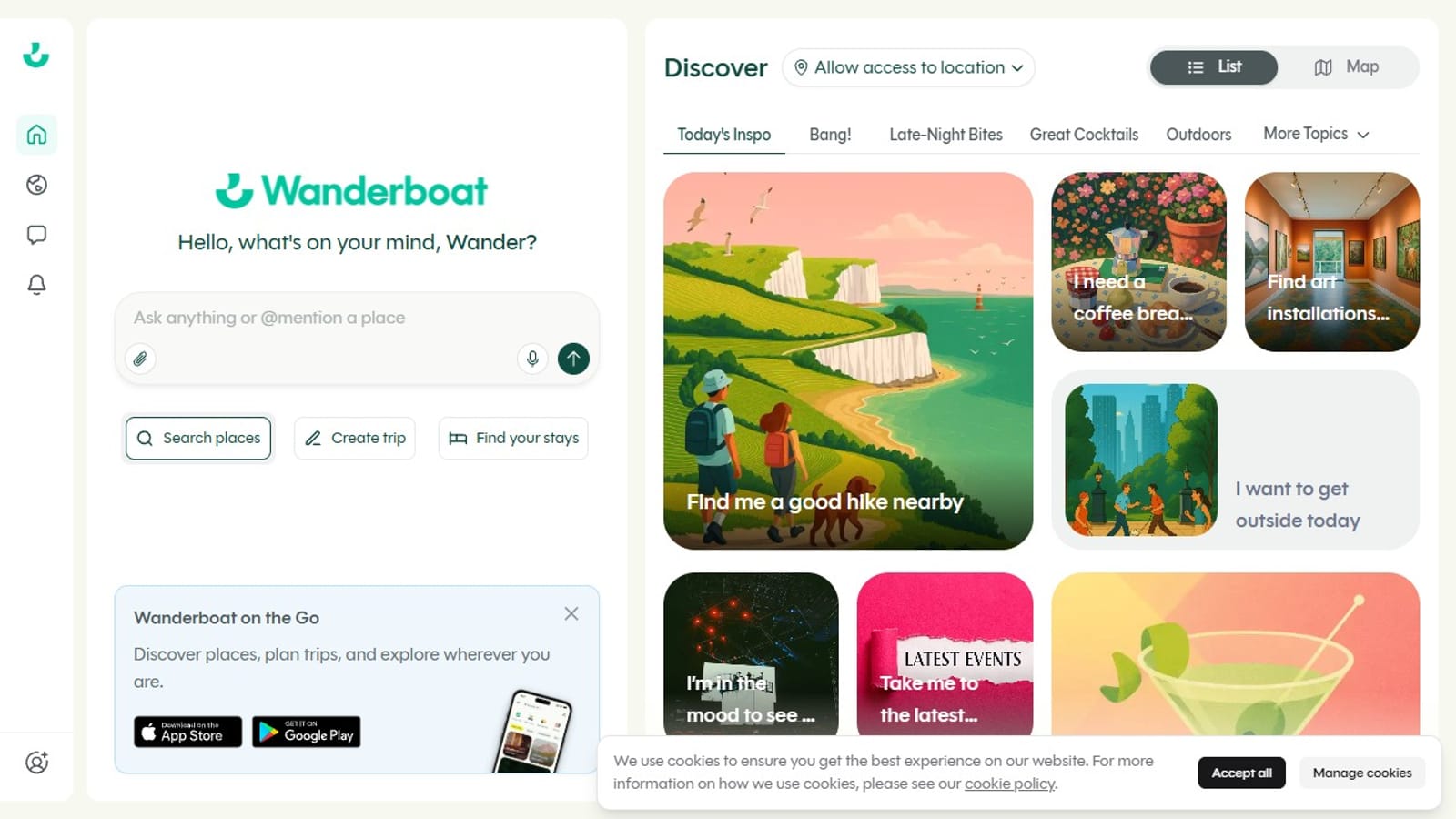
Screenshot of Wanderboat, AI-powered local discovery and travel planning

What is Wanderboat?

Wanderboat is a life assistance tool. Conversational AI tool for discovering local places, events, food spots, and hotels, combining natural-language search with map-based browsing and a built-in hotel lookup workflow.

Wanderboat is an AI-powered travel and local discovery tool that blends conversational search with map-based browsing. Users phrase requests in plain language, asking for nearby coffee shops, outdoor activities for the day, live shows, or craft cocktail bars, and the system surfaces matching local venues and events. Results appear in either a list view or an interactive map layout built on Mapbox, letting users toggle between formats depending on whether they want detail cards or spatial context. The interface is built around a persistent chat input paired with a curated prompt feed called "Today's Inspo." These pre-built starters, covering categories from live events to dining moods, help users who have a rough feeling about what they want but haven't yet formed a specific query. Location access, when granted, anchors results to the user's current position, making the tool useful for spontaneous local decisions as well as deliberate destination research. Hotel search is integrated directly alongside the discovery features. Travelers can specify a destination, arrival and departure dates, and the number of rooms and guests, with a "Find your stays" workflow handling the booking entry point. A separate "Create trip" option appears beside the hotel search, signaling that itinerary building is part of the intended use, though the homepage does not detail how much the trip-planning layer does beyond hotel lookup. A companion mobile app, available for iOS and Android, extends the experience off the desktop for on-the-ground exploration. The product positions itself as an all-in-one assistant for both locals filling a free afternoon and travelers researching unfamiliar cities, handling the full arc from open-ended inspiration to concrete place and accommodation discovery.
How do you use Wanderboat?

  1. 1Open Wanderboat and set your location
    Visit wanderboat.ai and allow location access, or type a destination into the search field to anchor results to a specific city or area.
    Wanderboat — Open Wanderboat and set your location
  2. 2Type a natural-language query
    Enter a conversational request in the chat input, such as asking for nearby coffee shops, outdoor activities, or live events tonight. The tool interprets intent rather than requiring keyword searches.
  3. 3Switch between list and map views
    Toggle the list and map controls to browse results as detail cards or as pins on the Mapbox interactive map, whichever helps you evaluate options faster.
  4. 4Search for hotel stays
    Use the hotel search widget to enter a destination, set arrival and departure dates, and specify the number of rooms and guests, then tap Find your stays.
  5. 5Start a trip plan
    Click Create trip alongside the hotel search to begin building an itinerary around your destination. Combine accommodation lookup with the place and event results from earlier queries.
  6. 6Download the mobile app
    Install the Wanderboat app on iOS or Android to carry the discovery and planning tools with you while traveling or exploring a city on foot.

Pros and cons

Pros

  • Natural-language queries surface venues and events without form-heavy inputsAI
  • Dual list and map views let users choose how they browse resultsAI
  • Today's Inspo prompts reduce the blank-page problem for vague intentionsAI
  • Hotel search with date and guest configuration sits in the same workflowAI
  • Mobile app extends discovery for on-the-ground explorationAI

Cons

  • Trip-planning depth beyond hotel search is not detailed in any public documentationAI
  • No pricing or plan information is published, making upgrade paths opaqueAI
  • Location accuracy depends on how comprehensively local venue data is indexed per cityAI
  • Itinerary saving and sharing features are not described on the homepageAI

How much does Wanderboat cost?

Integrations

Mapbox powers the interactive map view for spatially browsing place and event search results.

Features

Natural-language conversational search for places, events, food, and drinks; list and map result views via Mapbox; location-based local discovery; hotel search with date and guest configuration; Today's Inspo curated prompt feed; trip creation workflow; iOS and Android mobile app.

Frequently asked questions about Wanderboat

  • How do you use Wanderboat?
    The walkthrough on this page covers 6 steps: 1. Open Wanderboat and set your location 2. Type a natural-language query 3. Switch between list and map views 4. Search for hotel stays 5. Start a trip plan 6. Download the mobile app.
  • What platforms does Wanderboat support?
    Wanderboat is available on Web App, iOS and Android.
  • What does Wanderboat integrate with?
    Mapbox powers the interactive map view for spatially browsing place and event search results.
  • What are the limitations of Wanderboat?
    Trip-planning depth beyond hotel search is not detailed in any public documentation. No pricing or plan information is published, making upgrade paths opaque. Location accuracy depends on how comprehensively local venue data is indexed per city.

Status

StatusActive
Views0
Outbound clicks0
Added9/5/2026

Platforms

Web AppiOSAndroid

Pricing

Free