Word Studio

Over 150 guided AI tools for writing, ideas and visuals

Beginner
Screenshot of Word Studio, Over 150 guided AI tools for writing, ideas and visuals

What is Word Studio?

Word Studio is a content writing tool. A web based library of more than 150 guided AI tools covering writing, brainstorming, business documents, lyrics and image generation. Each tool uses a short form and built in presets instead of free form prompts, with Word Studio choosing the model per task.

Word Studio is a web based collection of more than 150 small, purpose built AI tools that each handle one creative task through a short form rather than a blank prompt box. Instead of asking users to write instructions and tune a model, it presents fields for the things the task needs, such as audience, tone, topic or character details, and then generates a finished result. The catalogue spans creative writing, business and marketing documents, naming, editing cleanups, children's stories, song lyrics, screenwriting beats, and a set of image tools for covers, collages, coloring pages, emojis, invitations and background textures. The site positions itself as a creative playground, and the breadth of the catalogue is the main argument. Some entries are practical writing utilities: an active voice converter, an adverb overload detector, a cliche finder, an em dash remover, and a brand voice analyzer that returns both a description of a voice and a prompt for reproducing it. Others are ideation devices, including an acronym builder, an anagram generator, an analogy maker, a business name brainstormer and a career path explorer. A third group produces structured documents, such as case studies, business plans, buyer personas, competitive analyses and cover letters. Visual tools sit alongside these, generating custom imagery from a description plus built in styles. Day to day use looks the same across the range: pick a tool from the catalogue, fill in the form, choose from the provided presets and styles, generate, then refine and regenerate until the output is worth keeping. Word Studio says each tool is routed to whichever AI model suits the job, which means users do not have to choose a model themselves or compare outputs across providers. That removes a layer of setup that general chat assistants leave in the user's hands, though it also hides which model produced a given result. The trade off compared with a general assistant like ChatGPT or Claude is focus versus flexibility. Word Studio trades open ended conversation for narrow, repeatable tasks with sensible inputs, which suits marketers, small business owners, teachers and writers who want a fast draft without promptcraft. Those who need multi turn iteration on a single long document, or who want to bring their own API keys, will find a dedicated assistant more adaptable. The product currently presents itself as a single subscription destination rather than a platform with published integrations.

How do you use Word Studio?

  1. 1Open the site and create an account
    Start at the Word Studio homepage, review the tool catalogue, then use the Get Access link to register before generating anything.
    Word Studio — Open the site and create an account
  2. 2Pick a tool that matches the task
    Browse the catalogue by task type, from writing and naming to image generation, and open the tool page for the job at hand.
  3. 3Fill in the guided form
    Answer the fields the tool asks for, such as topic, audience and tone, instead of writing a free form prompt.
  4. 4Choose a preset or style
    Where the tool offers creative presets and styles, select one to steer the output before generating.
  5. 5Generate, review and regenerate
    Run the tool, read the result, adjust the inputs and regenerate until the draft is usable, then copy it out.

Pros and cons

Pros

  • Large catalogue of focused tools means the right task is usually one click away rather than a prompt engineering exerciseAI
  • Forms, presets and styles lower the barrier for users who do not write prompts comfortablyAI
  • Covers both text and image tasks, so covers, emojis and coloring pages sit beside the writing toolsAI
  • Editorial utilities such as the cliche finder, adverb detector and em dash remover add real polish valueAI
  • Model selection is handled per tool, removing the need to compare providers manuallyAI

Cons

  • Each tool is a narrow single shot flow, so iterating on one long document across several tasks is clumsyAI
  • No published detail on which AI models power which tools, which matters for teams with procurement rulesAI
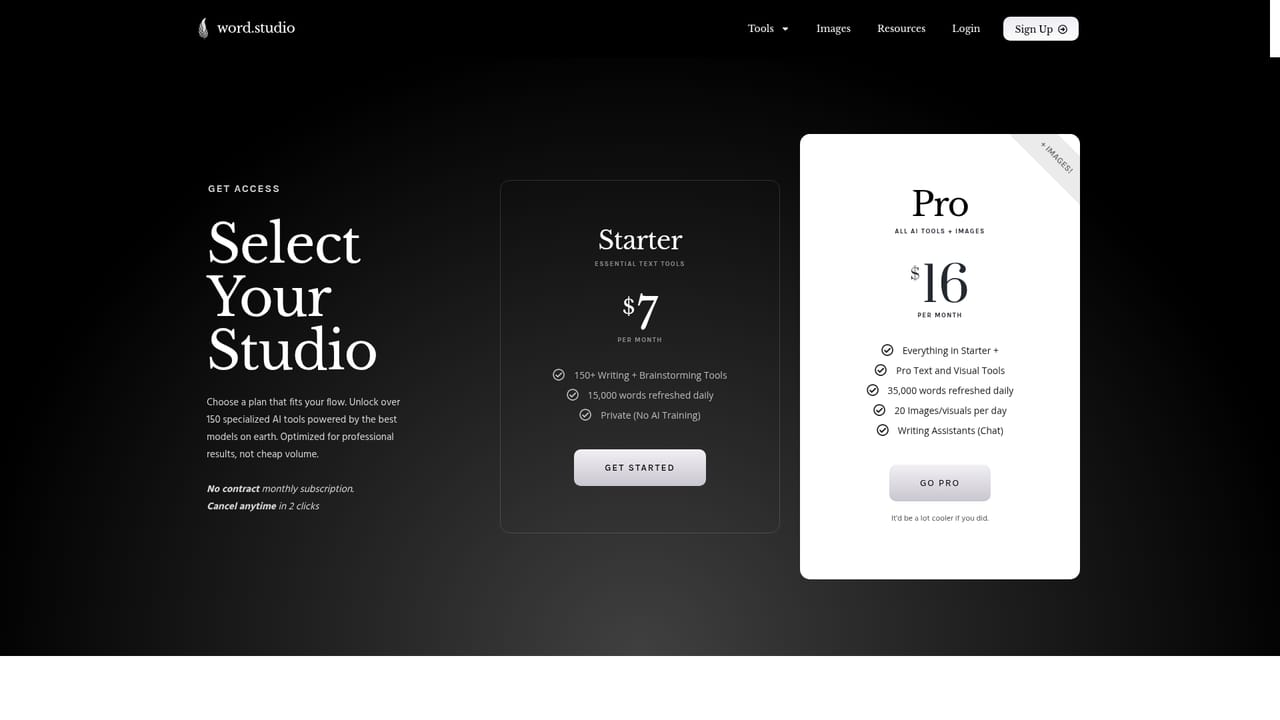
  • Pricing, limits and what the subscription includes are not stated on the homepageAI
  • No integrations or API are described, so output has to be copied out by hand into other systemsAI
  • A library of 150 tools can be hard to navigate without knowing which one you wantAI

How much does Word Studio cost?

Features

The core feature is a catalogue of over 150 single purpose AI tools reached through guided forms rather than open prompts. Built in presets and styles cover creative direction, and each tool runs on the model Word Studio judges best for that task. Coverage includes writing and editing utilities, brainstorming and naming, marketing and business documents, storytelling and lyrics, screenwriting beats, plus image tools for book covers, collages, coloring pages, emojis, invitations and textures.

Frequently asked questions about Word Studio

  • How do you use Word Studio?
    The walkthrough on this page covers 5 steps: 1. Open the site and create an account 2. Pick a tool that matches the task 3. Fill in the guided form 4. Choose a preset or style 5. Generate, review and regenerate.
  • What platforms does Word Studio support?
    Word Studio is available on Web App.
  • What are the limitations of Word Studio?
    Each tool is a narrow single shot flow, so iterating on one long document across several tasks is clumsy. No published detail on which AI models power which tools, which matters for teams with procurement rules. Pricing, limits and what the subscription includes are not stated on the homepage.

Status

StatusActive
Views0
Outbound clicks0
Added10/21/2026

Platforms

Web App

Pricing

Subscription