ZCode

Agentic coding desktop built around GLM-5.3

Intermediate
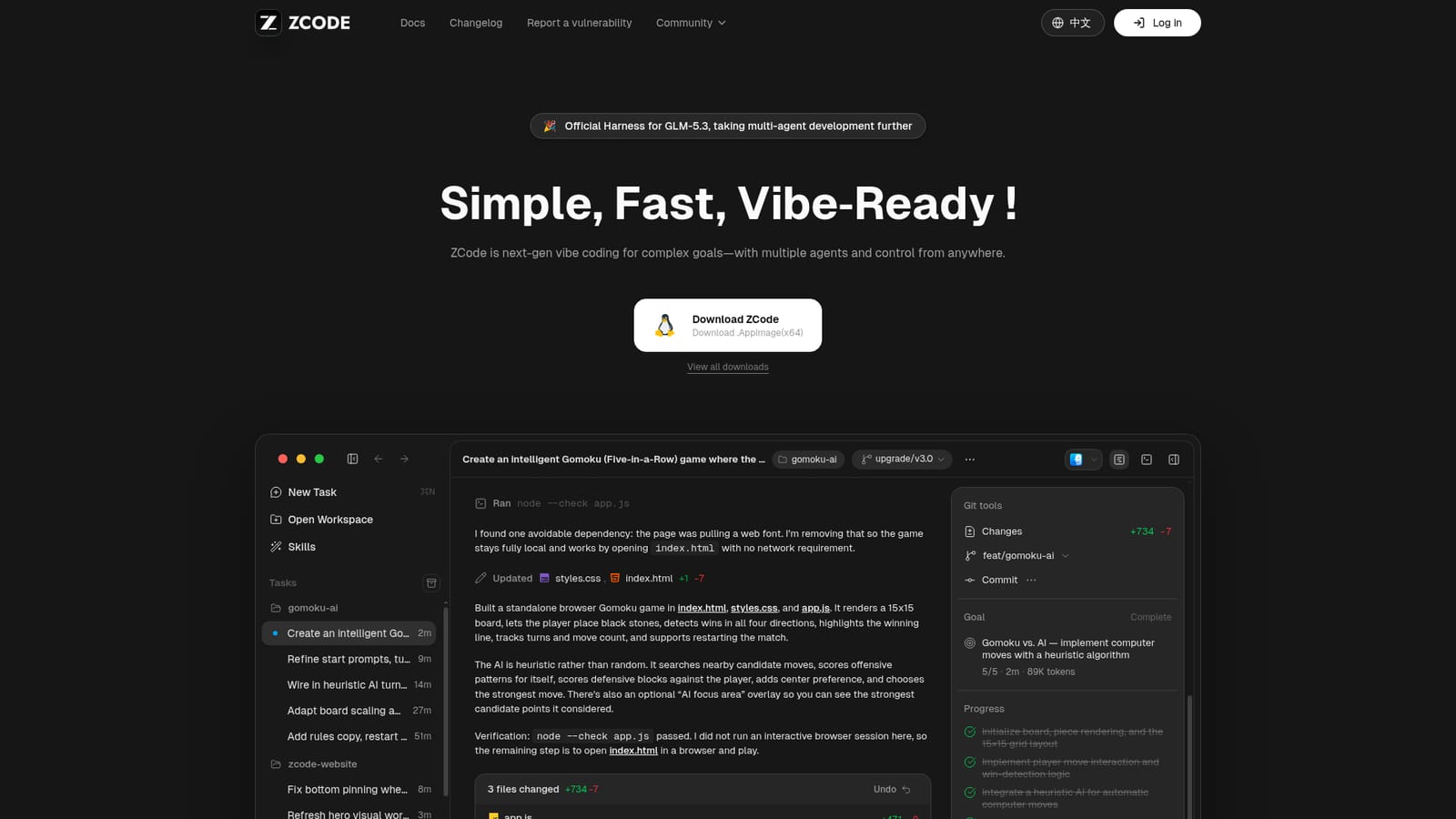
Screenshot of ZCode, Agentic coding desktop built around GLM-5.3

What is ZCode?

ZCode is a developer tool. A desktop coding workspace from Z.AI that runs multi-agent tasks on GLM-5.3, with long-running Goals, remote control through messaging apps, and installers for macOS, Windows and Linux.

ZCode is a desktop coding environment from Z.AI built as the official harness for GLM-5.3. It packages multiple coding agents into a single workspace where tasks are planned, executed and verified against a real project on disk. Rather than a chat window that pastes snippets, it opens a workspace, proposes a plan, writes files, runs shell commands and reports back with a transcript of what it searched, changed and tested. The bundled example task shows the pattern: an agent inspects a repository, finds it empty, scaffolds HTML, JavaScript and CSS for a Gomoku game, runs a syntax check and summarises the changed files. Goals are the mechanism for longer work. A goal carries continuous planning, execution and verification, so multi-step jobs such as a release pipeline or a documentation refresh can run across sessions instead of collapsing into one prompt. Bot control extends the same session to messaging platforms: work can be started and steered from WeChat, Feishu or Telegram, which suits developers who want to check on a long task without returning to the laptop. Model access runs through the GLM Coding Plan, with Lite, Pro and Max tiers priced monthly and defined mainly by weekly credit allowances. The tool is aimed at developers and small engineering teams already working in repositories, particularly those who want agent-driven changes without assembling their own orchestration layer. It ships as a native installer for macOS (Apple Silicon and Intel), Windows (64-bit and ARM64) and Linux (x64 and ARM64, marked beta), with a .deb, .rpm and .AppImage available on Linux. Plans are listed from $12.6 per month for Lite up to $117.6 per month for Max, and the same subscription covers over 20 agent tools beyond ZCode. Its closest alternatives are general coding agents tied to other model providers and terminal-based assistants. ZCode's differentiator is vertical integration: the harness, the GLM-5.3 model and the billing all come from one vendor, with a Flash variant handling multimodal work such as screenshot understanding.

How do you use ZCode?

  1. 1Download the installer for your platform
    Open the downloads section and pick the build that matches your machine: macOS Apple Silicon or Intel, Windows x64 or ARM64, or a Linux package. Linux users choose between .deb, .rpm and .AppImage.
    ZCode — Download the installer for your platform
  2. 2Install and launch ZCode
    Run the downloaded installer and open the app. The workspace opens with a task list, a command palette and a terminal panel where agent commands are echoed.
  3. 3Create a task and describe the goal
    Start a new task and write the outcome you want, as the demo does with a browser-based Gomoku game. The agent reads the workspace first, then proposes what to build or change.
  4. 4Review the agent's plan and tool calls
    Each step is reported as it happens: files searched, commands run and files written. Check the transcript and the diff summary before accepting changes, and use undo if a change is unwanted.
  5. 5Escalate long work into a Goal
    For work that will not finish in one sitting, run it as a Goal so planning, execution and verification continue across sessions instead of restarting from a single prompt.
  6. 6Check the changelog for new builds
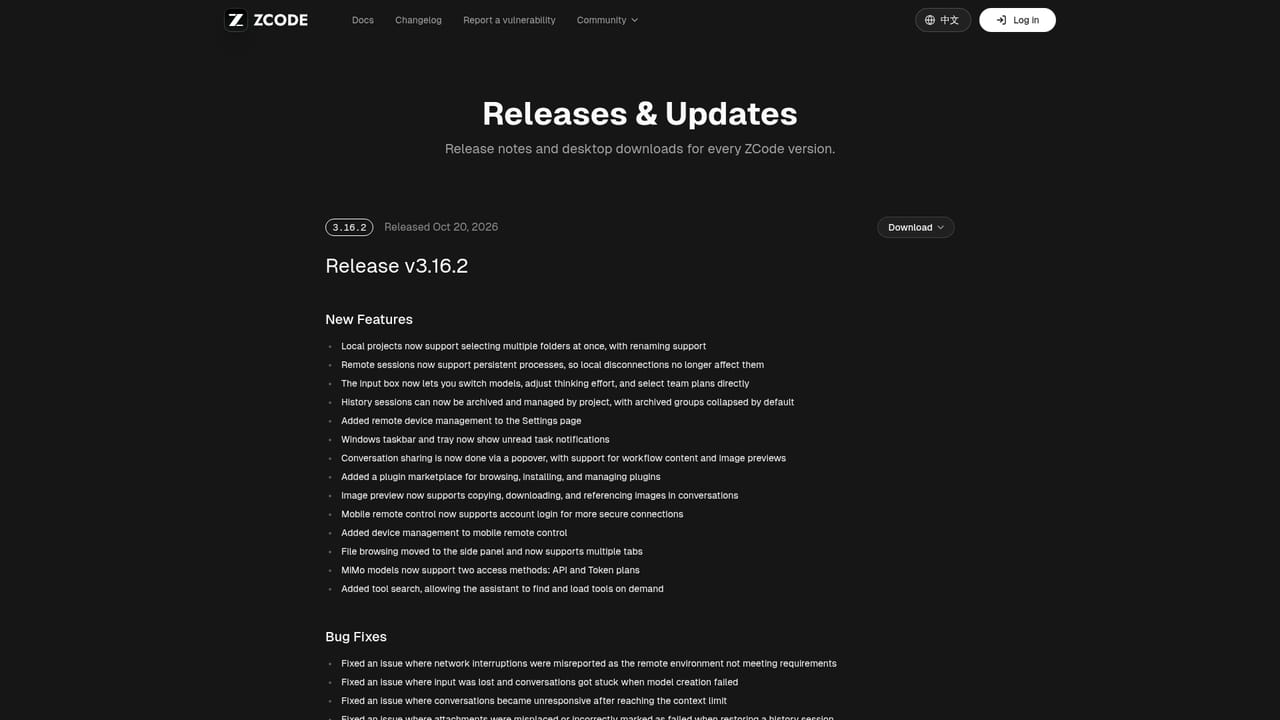
    Version notes are published on the changelog page, which is where GLM-5.3 and multi-agent changes are announced before you update.
    ZCode — Check the changelog for new builds

Pros and cons

Pros

  • Agents work inside a real repository, running commands and verifying output rather than only returning code in chatAI
  • Goals support continuous planning, execution and verification for work that spans multiple sessionsAI
  • Remote control via WeChat, Feishu or Telegram lets a running task be steered away from the deskAI
  • Native installers cover macOS, Windows and Linux, including ARM builds for Apple Silicon and Windows ARM64AI
  • The GLM Coding Plan subscription also unlocks 20+ other agent tools, so the spend is not locked to one appAI

Cons

  • Deepest behaviour depends on GLM-5.3, so teams standardised on another model provider gain little from the harnessAI
  • Linux builds are labelled beta, which is a risk for production or CI-adjacent useAI
  • Only three subscription tiers are published and each is metered in weekly credits, adding forecasting work for heavy usersAI
  • The homepage documents capabilities but not editor integrations, self-hosting or data handling detail for regulated environmentsAI
  • Bot control routes work through third-party messaging platforms, which some security policies may not permitAI

How much does ZCode cost?

Pricing

GLM Coding Plan subscriptions are billed monthly in three tiers: Lite at $12.6 per month (list $18) with 10,000 credits per week, Pro at $56 per month (list $80) with six times Lite usage, and Max at $117.6 per month (list $168) with fourteen times Lite usage. Prices and plan benefits can change; final details are shown on z.ai.

Learn more

Integrations

Bot control connects ZCode to WeChat, Feishu and Telegram for remote operation. The GLM Coding Plan also covers 20+ agent tools beyond ZCode, and Pro adds a curated selection of MCP tools.

Features

Goals handle complex work with continuous planning, execution and verification. Bot control starts and steers sessions from WeChat, Feishu or Telegram. GLM-5.3 is tuned for reasoning, coding and multi-agent collaboration, with GLM-5.3-Flash built in for multimodal tasks such as screenshot understanding and image analysis. A workspace, task list, terminal panel and command palette sit in one desktop app.

Frequently asked questions about ZCode

  • How much does ZCode cost?
    GLM Coding Plan subscriptions are billed monthly in three tiers: Lite at $12.6 per month (list $18) with 10,000 credits per week, Pro at $56 per month (list $80) with six times Lite usage, and Max at $117.6 per month (list $168) with fourteen times Lite usage. Prices and plan benefits can change; final details are shown on z.ai.
  • How do you use ZCode?
    The walkthrough on this page covers 6 steps: 1. Download the installer for your platform 2. Install and launch ZCode 3. Create a task and describe the goal 4. Review the agent's plan and tool calls 5. Escalate long work into a Goal 6. Check the changelog for new builds.
  • What platforms does ZCode support?
    ZCode is available on MacOS, Windows and Linux.
  • What does ZCode integrate with?
    Bot control connects ZCode to WeChat, Feishu and Telegram for remote operation. The GLM Coding Plan also covers 20+ agent tools beyond ZCode, and Pro adds a curated selection of MCP tools.
  • What are the limitations of ZCode?
    Deepest behaviour depends on GLM-5.3, so teams standardised on another model provider gain little from the harness. Linux builds are labelled beta, which is a risk for production or CI-adjacent use. Only three subscription tiers are published and each is metered in weekly credits, adding forecasting work for heavy users.

Status

StatusActive
Views0
Outbound clicks0
Added10/22/2026

Platforms

MacOSWindowsLinux

Pricing

SubscriptionPaid