AnimatePhoto.io

Browser-based AI that turns one photo into a short animated video

Beginner
Screenshot of AnimatePhoto.io, Browser-based AI that turns one photo into a short animated video

What is AnimatePhoto.io?

AnimatePhoto.io is a web-based AI animator that converts a single photo or text prompt into a short MP4 video, with motion presets, dozens of models and a studio of viral-style video effects.

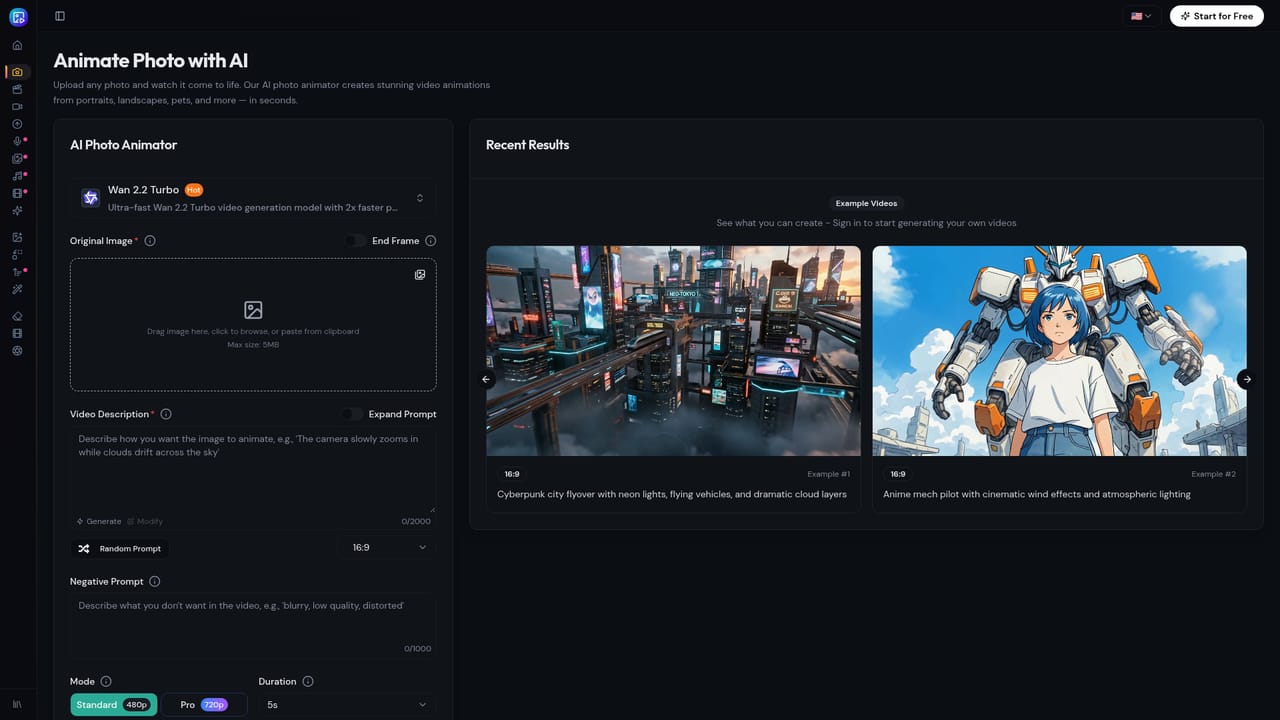
AnimatePhoto.io is a browser-based tool that turns a single still image into a short animated video. It accepts portraits, landscapes, pets, anime illustrations, product shots and old family photographs, and it offers both an image-to-video mode and a text-to-video mode. The site says it draws on more than 60 AI models, and the generator screen lets a user pick a specific model, such as Wan 2.2 Turbo, with the credit cost displayed next to the choice. In practice the workflow has three steps. A user uploads a photo, selects a motion preset (smile and look at camera, talk, walk or dance, animate the scene) or describes the movement in plain text, and then downloads the finished MP4. The site quotes an average generation time of about 30 seconds and 1080p output. Generations are paid for in credits, and the interface states that credits are refunded when a generation fails. Commercial rights to the generated animations are listed among the features, which matters for anyone producing ads or client work. Beyond the general animator, a Video Effects Studio collects single-purpose effects built on WaveSpeed models, each tuned to one format or trend. Examples include hug reunions, one-photo dance clips, cartoon-doll transformations, wedding videos, a zombie love story, a hotel lobby duet, action figures, mermaids and a cinematic earth zoom. Several of these take two photos as input. They are designed for shareable social clips rather than precise creative control. The audience described on the site spans social media creators, e-commerce and marketing teams making product video ads, digital artists animating illustrations, and families reviving old photos. Compared with full video generators or timeline editors, AnimatePhoto.io trades fine control for speed and simplicity, which suits quick clips better than storyboarded projects. The homepage does not spell out plan prices or credit allowances, so buyers need to check the separate pricing page before relying on it for volume work.

How do you use AnimatePhoto.io?

  1. 1Open the animator
    Go to the photo animator page and choose Image to Video, or Text to Video if starting from a description.
    AnimatePhoto.io — Open the animator
  2. 2Upload a photo
    Add a portrait, pet, landscape, illustration or product shot. Clear, well-lit images tend to give the most natural motion.
  3. 3Pick a motion and model
    Select a preset such as smile and look at camera, talk or walk, or describe the movement in text. Check the model and credit cost shown before generating.
  4. 4Try a video effect
    For trend-style clips such as hug, dance or wedding videos, browse the effects studio and upload the one or two photos each effect needs.
    AnimatePhoto.io — Try a video effect
  5. 5Review credits and plans
    Check how credits are allocated and what paid plans add before generating at volume.
    AnimatePhoto.io — Review credits and plans
  6. 6Download and share
    Export the finished MP4 and post it to social media, add it to a presentation or send it to friends and family.

Pros and cons

Pros

  • Turns one uploaded photo into a short video in roughly 30 seconds, according to the siteAI
  • Offers both image-to-video and text-guided motion, so users can pick presets or describe movementAI
  • Large library of single-purpose video effects such as hug, dance, wedding and earth zoomAI
  • Credits are refunded when a generation fails, which lowers the cost of experimentingAI
  • States commercial rights for generated animations and exports MP4 at up to 1080pAI

Cons

  • Homepage gives no plan prices or credit allowances, so real cost is unclear until the pricing pageAI
  • Output is short clips; there is no timeline editor or multi-scene control mentionedAI
  • Many effects are novelty or trend formats that suit social posts more than professional productionAI
  • Credit-based generation means heavy experimentation with higher-cost models can add upAI
  • No API or integrations are mentioned, which limits automation and team workflowsAI

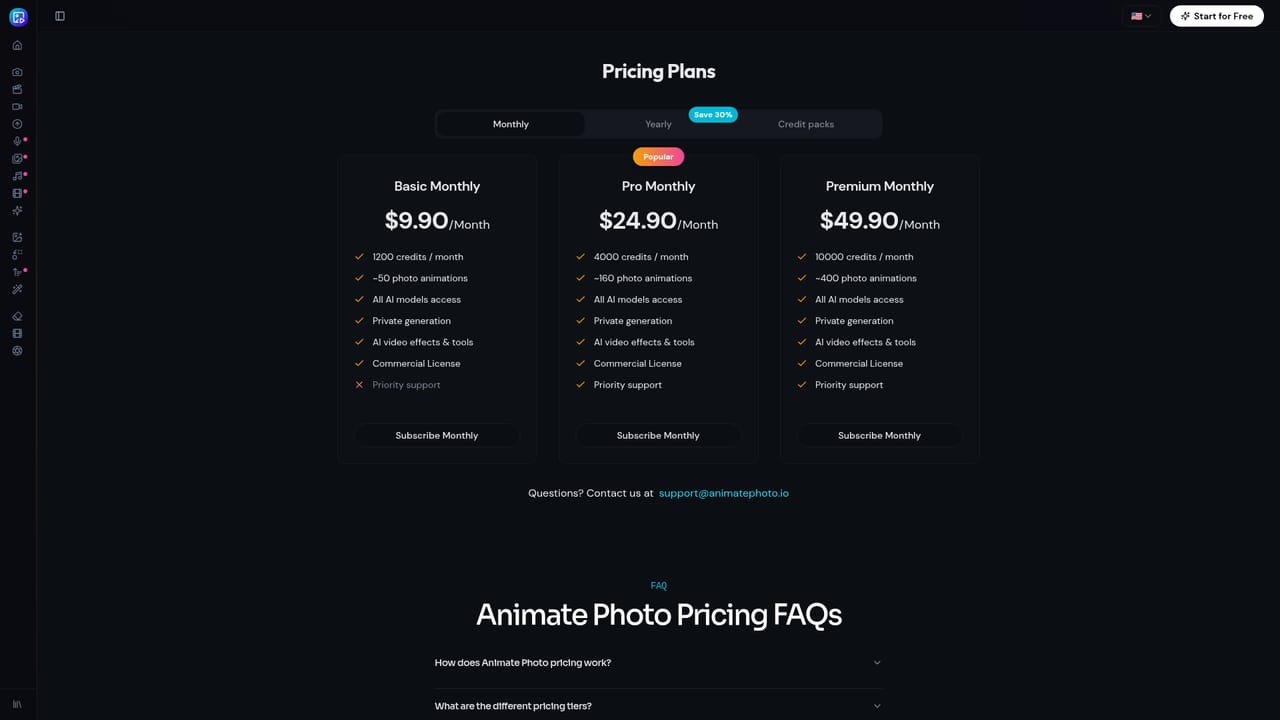
How much does AnimatePhoto.io cost?

Free trial

The site says users can start animating for free with no credit card required. The homepage does not state how many free credits are included.

Learn more

Pricing

Free to start with no credit card required. Generations use credits (for example 25 credits for a Wan 2.2 Turbo animation), refunded on failure. Plan prices are on the pricing page, not the homepage.

Learn more

Features

Photo-to-video animation, text-guided motion, 60+ animation styles and AI models, a video effects studio (hug, dance, wedding, zombie, mermaid, earth zoom), 1080p MP4 export, about 30 second generation and commercial rights.

Learn more

Frequently asked questions about AnimatePhoto.io

  • How much does AnimatePhoto.io cost?
    Free to start with no credit card required. Generations use credits (for example 25 credits for a Wan 2.2 Turbo animation), refunded on failure. Plan prices are on the pricing page, not the homepage.
  • Does AnimatePhoto.io offer a free trial?
    The site says users can start animating for free with no credit card required. The homepage does not state how many free credits are included.
  • How do you use AnimatePhoto.io?
    The walkthrough on this page covers 6 steps: 1. Open the animator 2. Upload a photo 3. Pick a motion and model 4. Try a video effect 5. Review credits and plans 6. Download and share.
  • What platforms does AnimatePhoto.io support?
    AnimatePhoto.io is available on Web App.
  • What are the limitations of AnimatePhoto.io?
    Homepage gives no plan prices or credit allowances, so real cost is unclear until the pricing page. Output is short clips; there is no timeline editor or multi-scene control mentioned. Many effects are novelty or trend formats that suit social posts more than professional production.

Status

StatusActive
Views0
Outbound clicks0
Added10/18/2026

Platforms

Web App

Pricing

Freemium