Free trial
New users get 5000 characters free, enough to render sample scripts and compare voices across languages before choosing a paid plan or lifetime purchase.
Learn moreBrowser based text to speech with a large multilingual voice library

Blakify turns text into downloadable MP3 or WAV audio using a library of several hundred AI voices in roughly 65 languages. The online editor adds pronunciation controls, SSML tags, speech styles, drafts and autosave, plus audio merging. Built for audiobooks, e-learning, voice-over and IVR scripts, with a free character allowance and a lifetime purchase option.
Blakify is a browser based text to speech studio built around a large catalogue of synthetic voices. The homepage advertises 500+ voices and elsewhere cites 700+ voices across roughly 65 to 70 languages and accents, with the underlying speech engines sourced from Google, Amazon, IBM and Microsoft. The workflow is straightforward: type or paste text, or import it, then pick a voice and render the audio. Finished files download as MP3 or WAV at selectable sample rates, and generated audio is stored in the account so past conversions stay accessible. The editor is where most of the practical value sits. It supports drafts and autosave, pronunciation controls for words the engine would otherwise misread, SSML tags for finer control over delivery, and speech style adjustments. Multiple rendered clips can be merged, which is useful when a single piece of audio needs more than one voice or perspective, such as a dialogue segment or a narrated document with distinct sections. The vendor positions the product around audiobook narration, e-learning course audio, voice-over for video and social channels, telephony scripts and IVR messages, and general content read-aloud use for people who want to reduce screen time. It suits solo creators, small marketing teams, course authors and independent publishers who need narration without hiring voice talent, and who want to revise a script and regenerate the audio instead of booking a re-record. Compared with premium narration services it trades some voice nuance for speed and cost, and compared with developer oriented TTS APIs it is friendlier for non-technical users but less flexible for programmatic pipelines. Billing is unusual for the category: beyond subscription style plans, the site offers a lifetime purchase paid through Stripe or PayPal, with updates included. A free entry point grants 5000 characters so the voice library can be tested before any commitment. The homepage does not document an API, so teams needing automated bulk generation should confirm that directly.
New users get 5000 characters free, enough to render sample scripts and compare voices across languages before choosing a paid plan or lifetime purchase.
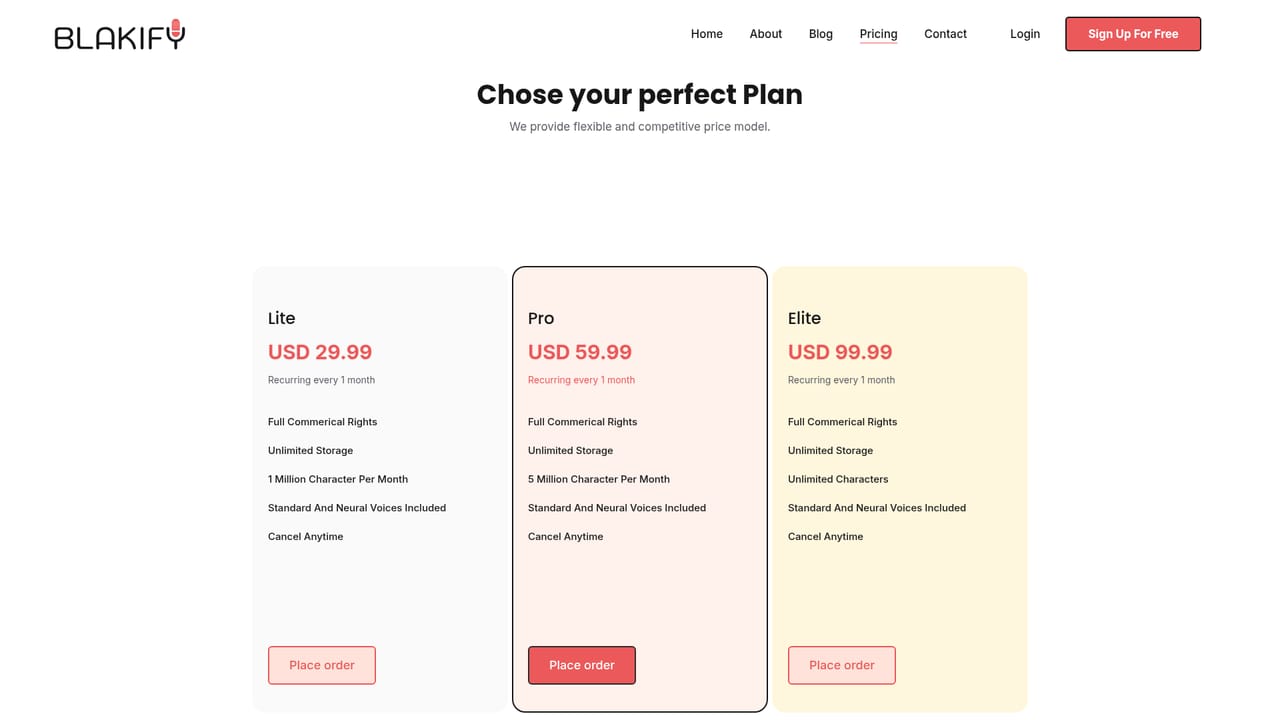
Learn moreFlexible plans are listed on a dedicated pricing page. The homepage states that monthly payment is not required, since lifetime access can be purchased with updates included, and payment is accepted through Stripe or PayPal. A free allowance of 5000 characters is offered to start.
Learn moreSupport is reached through a contact channel on the site. The FAQ states responses usually arrive in under 24 hours, with a target of 1 to 2 working days for requests.
Learn moreSeveral hundred AI voices across 65 or more languages and accents, drawing on speech engines from Google, Amazon, IBM and Microsoft. The online editor supports pronunciation controls, SSML tags, speech styles, drafts and autosave. Audio can be merged from multiple voices and exported as MP3 or WAV at selectable sample rates, with generated files stored in the account for later reuse.
Learn more AI Angels400+ customizable AI girlfriends for NSFW chat, voice calls, and roleplay
 Candy AIExperience the future of companionship with AI friends who chat, role-play, and connect with you on a human level.
 ourdream.aiA vast AI roleplay platform with millions of characters for chat, images, video and voiceAI Angels400+ customizable AI girlfriends for NSFW chat, voice calls, and roleplayCandy AIExperience the future of companionship with AI friends who chat, role-play, and connect with you on a human level.ourdream.aiA vast AI roleplay platform with millions of characters for chat, images, video and voice


