Codex Pets

Optional animated companions that float over your Codex sessions.

Beginner
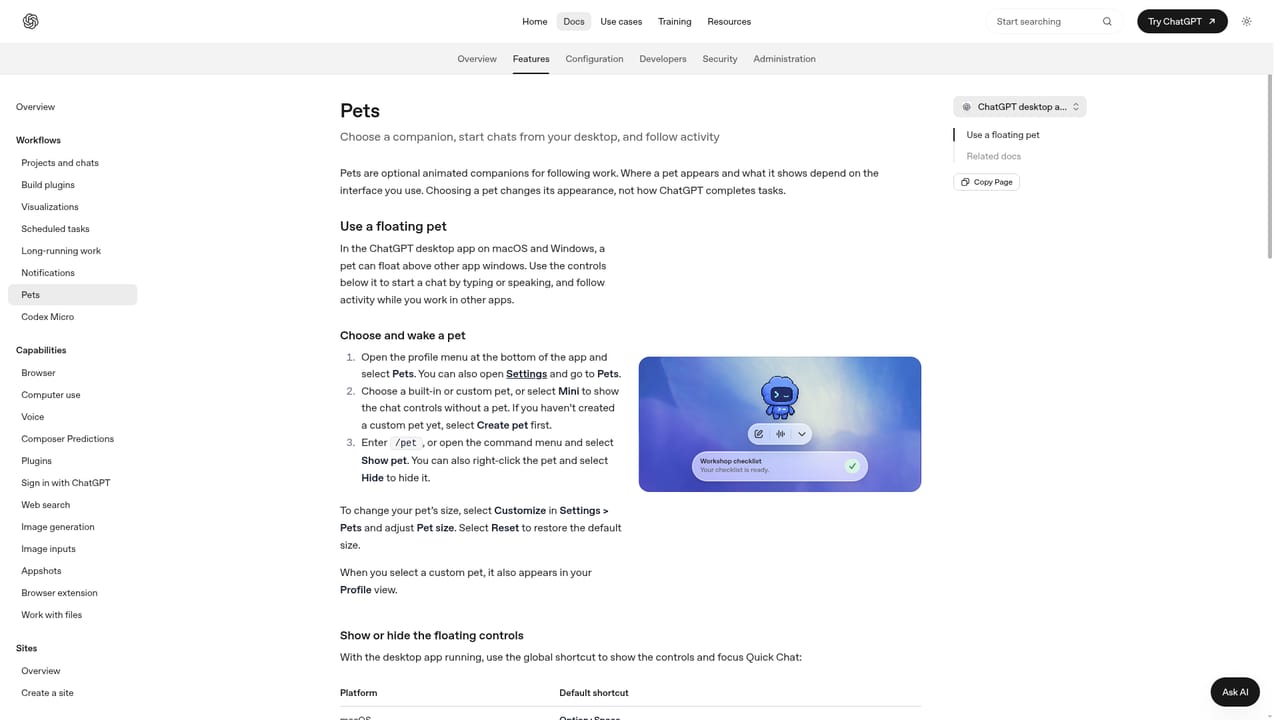
Screenshot of Codex Pets, Optional animated companions that float over your Codex sessions

What is Codex Pets?

Codex Pets is a coding tool. An optional animated companion overlay inside the ChatGPT desktop app's Codex environment, configured from Settings > Pets. You can pick a built-in or custom pet, show or hide it with /pet, or switch to Mini to keep chat controls without a creature.

Codex Pets is an optional cosmetic layer built into the ChatGPT desktop app's Codex environment. Rather than a standalone product, it is a personalization feature found under Settings > Pets, where you pick a built-in or custom animated companion that floats in an overlay on top of your coding workspace. The pet can be shown, hidden, or swapped at any time, and a Mini option keeps chat controls visible without any creature on screen. The documentation frames pets as decorative first and functional second: they sit alongside real workflows like starting chats, using voice, and following activity inside the app. In daily use, the feature is entirely opt-in. Developers who like ambient personality in their tools can select a pet and toggle the overlay with the /pet command or the Show pet and Hide pet controls. The pet lives in the same window where you review diffs, run builds, and read agent responses, so it is meant to coexist with serious work rather than replace any part of it. Custom pets are supported alongside the built-in roster, which gives users a way to make the companion their own. Who is this for? Primarily individual developers already working inside the Codex desktop experience who want a light personal touch. Because pets do not add analytical capability, they are not a reason to choose the app on their own. Teams evaluating coding assistants should treat this as a minor appearance setting, comparable to theme and font customization. If animated overlays are distracting, the Mini and Hide options remove them completely with no impact on the rest of the workflow.

How do you use Codex Pets?

  1. 1Open the Settings panel
    Launch the ChatGPT desktop app and open Settings from the app menu, or press Cmd + Comma on macOS or Ctrl + Comma on Windows.
  2. 2Go to the Pets section
    In the Settings sidebar, select Pets to see the available companions and the overlay controls.
    Codex Pets — Go to the Pets section
  3. 3Pick a built-in or custom pet
    Choose from the built-in roster or select a custom pet to use as your floating companion.
  4. 4Toggle the overlay
    Use the /pet command in a chat, or the Show pet and Hide pet controls, to bring the companion on or off screen.
  5. 5Switch to Mini if you prefer no pet
    Select Mini to keep the chat controls visible while removing the animated overlay entirely.

Pros and cons

Pros

  • Fully optional and disabled by default, so it never intrudes on focused workAI
  • Custom pets are supported alongside built-in companions for personalizationAI
  • The /pet command and Show pet / Hide pet toggles make switching fastAI
  • Mini mode keeps chat controls visible without any animated overlayAI
  • Settings live in the same panel as themes and fonts, so configuration is centralizedAI

Cons

  • Purely decorative: adds no coding, analysis, or productivity capabilityAI
  • Requires the ChatGPT desktop app, so browser-only users cannot access itAI
  • Documentation is thin on how custom pets are created or importedAI
  • Animated overlays can distract during diff review or long build runsAI
  • Not a reason to pick Codex; value depends entirely on the rest of the appAI

How much does Codex Pets cost?

Pricing

No separate price is listed for Codex Pets. It is a settings feature inside the ChatGPT desktop app, and the docs point to a general pricing page. Plan eligibility and invitation rewards are described there, but the pets page itself gives no figure.

Learn more

Support

Help is limited to the settings reference and the dedicated Pets documentation page. No dedicated support channel for the pets feature is described in the source material.

Learn more

Integrations

Pets has no integrations of its own. It lives inside the ChatGPT desktop app's Codex environment and shares that app's settings, themes, and shortcuts, but it does not connect to external services.

Features

Pets is a cosmetic overlay configured in Settings > Pets. Users choose a built-in or custom pet, control visibility with /pet or Show pet and Hide pet, and can select Mini to keep chat controls without a pet. It coexists with chat, voice, and activity views but does not change how Codex performs coding tasks.

Learn more

Frequently asked questions about Codex Pets

  • How much does Codex Pets cost?
    No separate price is listed for Codex Pets. It is a settings feature inside the ChatGPT desktop app, and the docs point to a general pricing page. Plan eligibility and invitation rewards are described there, but the pets page itself gives no figure.
  • How do you use Codex Pets?
    The walkthrough on this page covers 5 steps: 1. Open the Settings panel 2. Go to the Pets section 3. Pick a built-in or custom pet 4. Toggle the overlay 5. Switch to Mini if you prefer no pet.
  • What platforms does Codex Pets support?
    Codex Pets is available on MacOS, Windows and Linux.
  • What does Codex Pets integrate with?
    Pets has no integrations of its own. It lives inside the ChatGPT desktop app's Codex environment and shares that app's settings, themes, and shortcuts, but it does not connect to external services.
  • What are the limitations of Codex Pets?
    Purely decorative: adds no coding, analysis, or productivity capability. Requires the ChatGPT desktop app, so browser-only users cannot access it. Documentation is thin on how custom pets are created or imported.

Status

StatusActive
Views0
Outbound clicks0
Added11/3/2026

Platforms

MacOSWindowsLinux

Pricing

Freemium

Categories