Drawings Alive

Turn a child's pencil sketch into polished AI artwork, video or 3D model

Beginner
Screenshot of Drawings Alive, Turn a child's pencil sketch into polished AI artwork, video or 3D model

What is Drawings Alive?

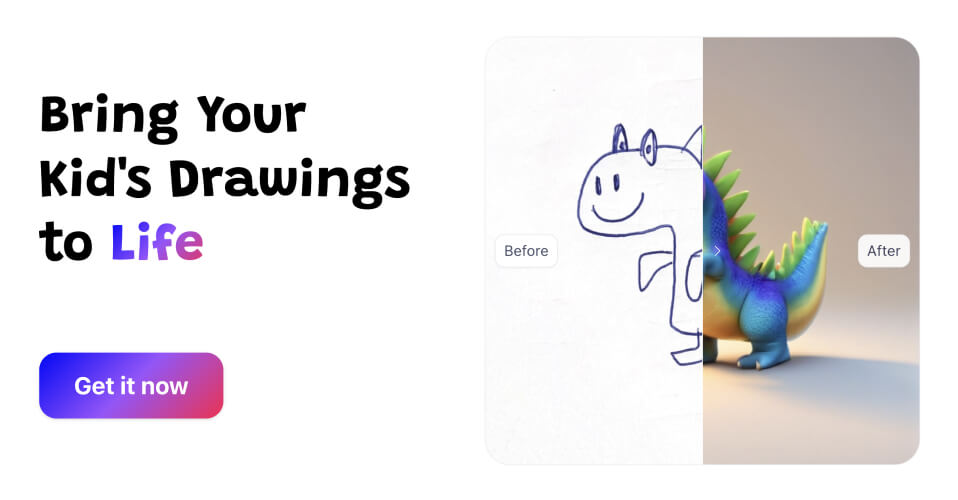
Drawings Alive is a drawing to image tool that turns a child's pencil sketch into polished AI artwork, video or 3D model. A family-focused AI app that converts children's sketches into finished artwork, short animations and augmented-reality 3D models, with style presets, a one-line description field and a web, iOS and Android presence.

Drawings Alive is a consumer AI app built around a single, narrow job: taking a child's drawing and returning a finished, colorful version of it. A parent, teacher or kid uploads a photo or scan of the sketch (JPG or PNG), or draws directly inside the app, then adds a short text description so the model knows what the shapes are meant to represent. Generation typically finishes in under a minute, and the original scribble comes back as a glossy illustration in whatever style is selected. Examples on the site show houses, dinosaurs and portraits reworked into several variants each, which makes it easy to pick a favorite from a batch. The product has grown past still images. Newer additions include short animations (advertised as roughly six seconds, produced in one click, where characters move and dance) and 3D models that can be placed into a room through augmented reality on phones running iOS 12+ or Android 7.0+. Style presets extend the output beyond a generic painterly look: Toy Bricks, Plush toy and Blocks Game each reinterpret the same drawing in a distinct visual language. That combination suits families looking for a keepsake or a classroom activity, and teachers who want a fast creative reward for students rather than a full illustration suite. In practice the workflow is deliberately shallow. There is no layer editing, masking or control net setup, and no attempt to serve professional illustrators. Where a general image generator such as Midjourney or Stable Diffusion asks the user to engineer prompts and iterate on composition, Drawings Alive bets that the drawing itself carries the intent and a one-line description fills the gaps. The site is candid that very abstract sketches produce weaker results unless a reference or a detailed description is supplied. Access runs through iOS, Android and a web app, with subscription tiers metered by monthly image, video and 3D model allowances. Purchases are processed by Stripe, and buyers get ownership plus a commercial license over what they generate, though refunds are not offered once generation has begun.

How do you use Drawings Alive?

  1. 1Install or open the app
    Download Drawings Alive from the App Store or Play Store, or open the web app in a browser to reach the same generation tools.
  2. 2Capture or draw the sketch
    Photograph or scan your child's drawing and upload it as a JPG or PNG, or draw directly inside the app if you are starting from scratch.
  3. 3Describe the drawing
    Type a short description in the Describe the drawing box so the AI knows what the shapes represent; this matters most for unusual or abstract pictures.
  4. 4Generate and pick a style
    Run the generation and wait under a minute for results, then compare the variants produced for the chosen style, including Toy Bricks, Plush toy or Blocks Game.
  5. 5Try animation and 3D
    Switch to video generation for a one-click clip of roughly six seconds, or build a 3D model and place it in the room through your phone's camera. Follow the walkthrough for animation guidance.
  6. 6Choose or upgrade a plan
    Compare the Starter, Hobby and Artist tiers against your monthly image, video and 3D allowances before buying, since access is immediate and refunds are not available.

Pros and cons

Pros

  • Built specifically for children's drawings rather than general prompting, so the input flow is shortAI
  • Returns finished images in under a minute according to the site, which keeps kids engagedAI
  • Includes style presets such as Toy Bricks, Plush toy and Blocks Game for quick variationAI
  • Generous ownership terms: full commercial license over generated outputAI
  • Works across web, iOS and Android, with AR viewing on modern phonesAI

Cons

  • Very abstract or messy sketches yield poor results unless the user writes a detailed descriptionAI
  • No refunds once generation has started, which leaves no room to test a plan before committingAI
  • Uploads are limited to JPG and PNG, so HEIC phone photos need converting firstAI
  • Video output is capped at short clips and 3D viewing depends on device AR supportAI
  • No API, batch tooling or editing controls, so it cannot slot into a professional pipelineAI

How much does Drawings Alive cost?

Pricing

Three subscription tiers, billed monthly or yearly with up to 45 percent saved on annual plans. Starter is $5 per month for 50 images, 1 video and 1 3D model; Hobby is $8 per month for 200 images, 5 videos and 5 models; Artist is $17 per month for 500 images, 10 videos and 10 models. Yearly prices are $59, $99 and $199. Cancel anytime.

Learn more

Support

No help centre or contact channel is listed on the homepage. Payments are handled by Stripe, and the FAQ states that refunds are not available once generation has started.

Features

Sketch to finished artwork from an upload or in-app drawing, with a description box to guide the model. Results usually arrive in under one minute and come as multiple variants per drawing. Style presets include Toy Bricks, Plush toy and Blocks Game. Added modes cover one-click animations of around six seconds and 3D models viewable in augmented reality on iOS 12+ and Android 7.0+. Output is licensed for commercial use.

Frequently asked questions about Drawings Alive

  • How much does Drawings Alive cost?
    Three subscription tiers, billed monthly or yearly with up to 45 percent saved on annual plans. Starter is $5 per month for 50 images, 1 video and 1 3D model; Hobby is $8 per month for 200 images, 5 videos and 5 models; Artist is $17 per month for 500 images, 10 videos and 10 models. Yearly prices are $59, $99 and $199. Cancel anytime.
  • How do you use Drawings Alive?
    The walkthrough on this page covers 6 steps: 1. Install or open the app 2. Capture or draw the sketch 3. Describe the drawing 4. Generate and pick a style 5. Try animation and 3D 6. Choose or upgrade a plan.
  • What platforms does Drawings Alive support?
    Drawings Alive is available on Web App, iOS and Android.
  • What are the limitations of Drawings Alive?
    Very abstract or messy sketches yield poor results unless the user writes a detailed description. No refunds once generation has started, which leaves no room to test a plan before committing. Uploads are limited to JPG and PNG, so HEIC phone photos need converting first.

Status

StatusActive
Views0
Outbound clicks0
Added10/21/2026

Platforms

Web AppiOSAndroid

Pricing

SubscriptionPaid