Free trial
The homepage states sign-up is free and needs no credit card, but it does not describe what a free account includes.
Learn moreScript-to-video generator with consistent characters, voices and captions
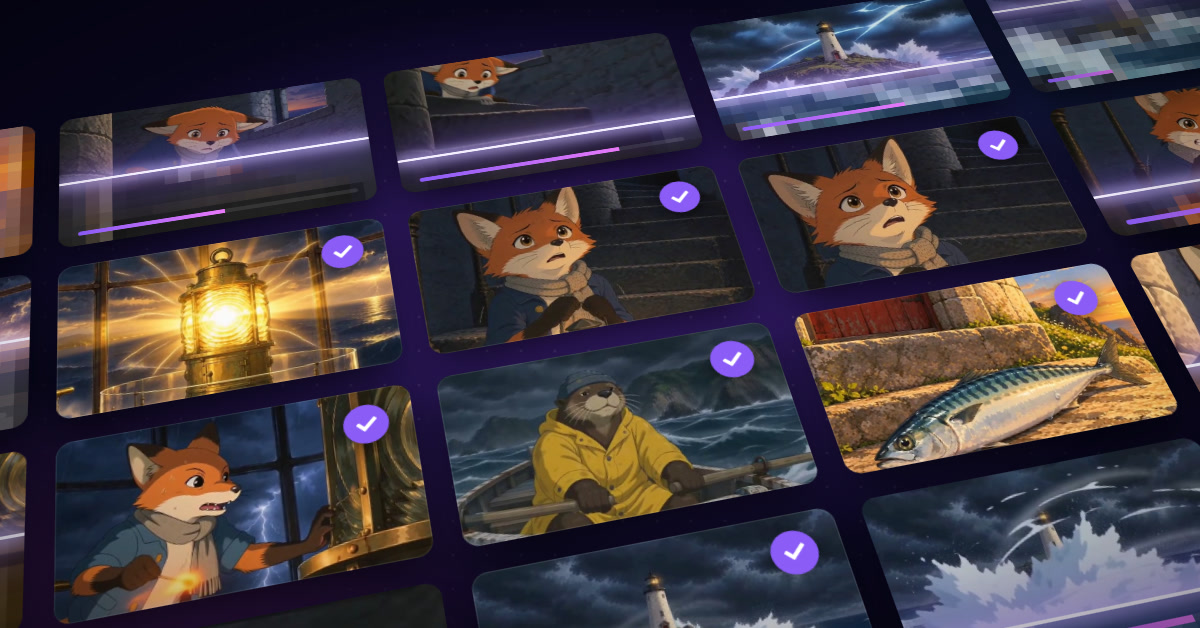
EasyVid turns a script or idea into a complete AI video with consistent characters, per-character voices, synced subtitles and music, in vertical, square or landscape formats, with paid plans allowing up to 10 minutes.
EasyVid is a web-based video generator that takes a written script, or an idea expanded into one, and assembles a finished video from it. The pipeline covers visuals, voiceover, subtitles and music, so a single prompt can yield a story, a music video, an ad or an educational piece without a separate editing suite. Finished videos can run up to 10 minutes on paid plans, and the site says generation usually takes under two minutes. The workflow has three stages. A user pastes or writes a script (or generates one from a prompt), then reviews an auto-built storyboard where visuals, subtitles and narration can each be adjusted. After previewing and making final changes, the video is rendered and downloaded. Editing is scene-based: rewriting one scene's prompt regenerates only that scene and leaves the rest untouched, and an Animate button adds motion to a chosen scene. Users can also upload their own images as backgrounds. Several features target the weak points of AI video. EasyVid detects the characters in a script and builds one reference per character so faces and outfits stay stable across scenes. Each character can get its own HD voice and delivery, with lip-sync available in Director Mode. Subtitles follow the voices automatically in styles such as karaoke and pop, and output can be vertical, square or landscape. Brand-minded users can attach product photos and a logo so the product appears in each shot. For music videos, an uploaded song is analysed for tempo, bars and sections so scenes cut on bar lines. Narration is offered in 21 languages, including English, Hindi, Japanese, Korean and Spanish. The audience is broad: social creators posting to TikTok, Reels or Shorts, marketers producing ads, real estate agents building listing tours, educators, musicians and storytellers. Videos are stated to be usable commercially. Compared with clip-by-clip text-to-video generators, EasyVid sits closer to an automated filmmaking tool, trading frame-level control for speed and cross-scene consistency.
The homepage states sign-up is free and needs no credit card, but it does not describe what a free account includes.
Learn moreSigning up is free with no credit card required. Videos up to 10 minutes need a paid plan. Specific plan prices are listed on the pricing page, not on the homepage.
Learn moreQuestions can be asked in the EasyVid Discord server, and a YouTube channel offers example videos and a full tutorial.
Voices are powered by ElevenLabs. The homepage lists no other integrations, though users can upload their own images, product photos, logos and songs.
Script-to-video generation, consistent characters, per-character HD voices, Director Mode lip-sync, scene-level regeneration, Animate button, synced subtitles, vertical/square/landscape output, product and logo placement, beat-synced music videos, and 21 narration languages.
 AI Angels400+ customizable AI girlfriends for NSFW chat, voice calls, and roleplay
 Candy AIExperience the future of companionship with AI friends who chat, role-play, and connect with you on a human level.
 ourdream.aiA vast AI roleplay platform with millions of characters for chat, images, video and voiceAI Angels400+ customizable AI girlfriends for NSFW chat, voice calls, and roleplayCandy AIExperience the future of companionship with AI friends who chat, role-play, and connect with you on a human level.ourdream.aiA vast AI roleplay platform with millions of characters for chat, images, video and voice