Free trial
The page metadata invites visitors to start a free trial. Duration and limits are not stated, and the service is closing on October 31.
Learn moreAI avatar video and translation tool that is shutting down on October 31
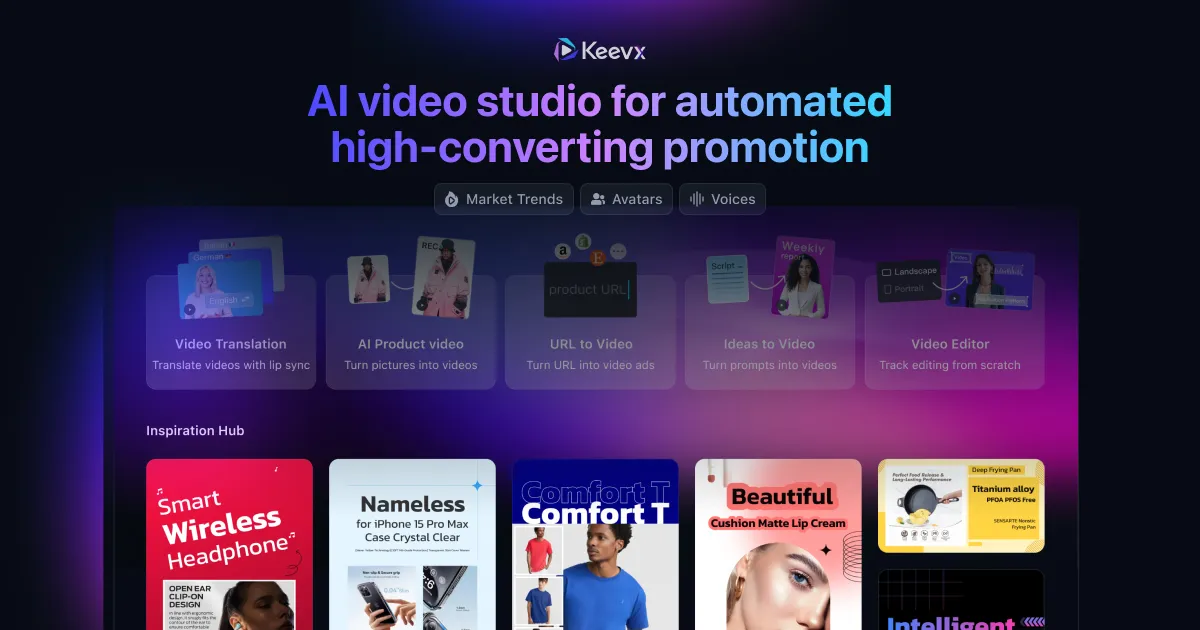
Keevx is a web AI video platform that turns text, URLs or images into avatar videos with translation and lip-sync, but the service closes on October 31 and its features have moved to Wizstar.
Keevx is a browser-based AI video platform that turns text, web page URLs or still images into finished videos. The homepage positions it as an all-in-one workspace for translating video, cloning a presenter and generating new clips, with a library of more than 210 avatars, support for over 170 languages and lip-sync so that spoken audio matches on-screen mouths. It is aimed at businesses that need video at volume and at individual creators who want polished results without a camera, studio or editing timeline. The landing page highlights two entry points. AI Product Video animates product visuals into moving clips, which suits marketers and sellers who start from a catalog photo rather than footage. Image Creation covers generating new pictures and swapping a product into a different scene, and an Inspiration Hub gives visitors sample work to browse before starting. In practice the workflow is to supply a script, a link or an image, choose an avatar or language, and let the system render the result. The most important fact for anyone reading this entry is that Keevx has announced it will discontinue service at 23:59 UTC on October 31. The site states that its features have moved to a successor product called Wizstar and asks existing users to migrate their accounts before the shutdown. A new buyer should therefore treat Keevx as a service in wind-down: it is relevant mainly to current account holders who need to move their work, and to researchers tracing where its capabilities went. Among alternatives, Keevx sat in the crowded field of avatar presenters, video localization and text-to-video generators. Its pitch was breadth, bundling translation, cloning and generation in one place instead of splitting them across several specialist apps. Teams comparing options today should look at the migration path to Wizstar or at actively maintained tools in the same category, since no new plans or long-term support are implied by the current site.
The page metadata invites visitors to start a free trial. Duration and limits are not stated, and the service is closing on October 31.
Learn moreGenerates AI videos from text, URLs or images. Offers 210+ avatars, 170+ languages, lip-sync, video translation and cloning, an AI Product Video tool, Image Creation with product swap, and an Inspiration Hub of examples.
 AI Angels400+ customizable AI girlfriends for NSFW chat, voice calls, and roleplay
 Candy AIExperience the future of companionship with AI friends who chat, role-play, and connect with you on a human level.
 ourdream.aiA vast AI roleplay platform with millions of characters for chat, images, video and voiceAI Angels400+ customizable AI girlfriends for NSFW chat, voice calls, and roleplayCandy AIExperience the future of companionship with AI friends who chat, role-play, and connect with you on a human level.ourdream.aiA vast AI roleplay platform with millions of characters for chat, images, video and voice