Free trial
A 7 day free trial is available with no credit card required. It is listed on the pricing tiers as the entry point before a paid subscription begins.
Learn moreOvernight AI drafts that sound like you, waiting in Gmail or Outlook

Ellie is an email polishing tool. Ellie connects to Gmail or Outlook and writes replies overnight in your own voice, leaving finished drafts in the right threads for you to skim and send. Custom categories, per-category voices and a grounded knowledge base make it most useful for founders, consultants and small teams with heavy correspondence.
Ellie is an email drafting assistant that works inside the inbox you already use. You connect a Gmail or Outlook account once, and every morning the drafts folder holds finished replies to the threads that needed an answer. Nothing is sent automatically: the drafts sit there for you to skim, adjust and send. The product is built around the premise that most email work is repetitive writing, not decisions, so the decision stays with you while the typing gets handled overnight. The training runs on your own sent mail. Ellie reads past messages and picks up the small habits that make your writing recognisable, such as how you open a message, how you sign off with clients versus colleagues, and how long your replies usually run. There are no rigid templates and no identical output across threads. In practice this matters most for people who answer the same kinds of questions all day: founders, consultants, account managers, support leads, and small sales teams that spend hours on correspondence. Beyond voice matching, Ellie handles routing and facts. You define email categories in plain sentences, and each category decides whether a draft is produced, whether a task with a due date appears, and which role voice writes the reply (brisk for billing, warm for sales, patient for support). A knowledge base crawls your public site and help centre, and generic connectors pull live records such as plan tier or renewal date at draft time, so figures in a draft come from source rather than guesswork. Ellie competes with generic AI writing assistants and with native smart-compose features in mail clients. Its differentiator is the combination of your own voice, per-category roles and grounded company data. The main commercial caveat is that the always-on, multi-account experience is reserved for the higher tiers.
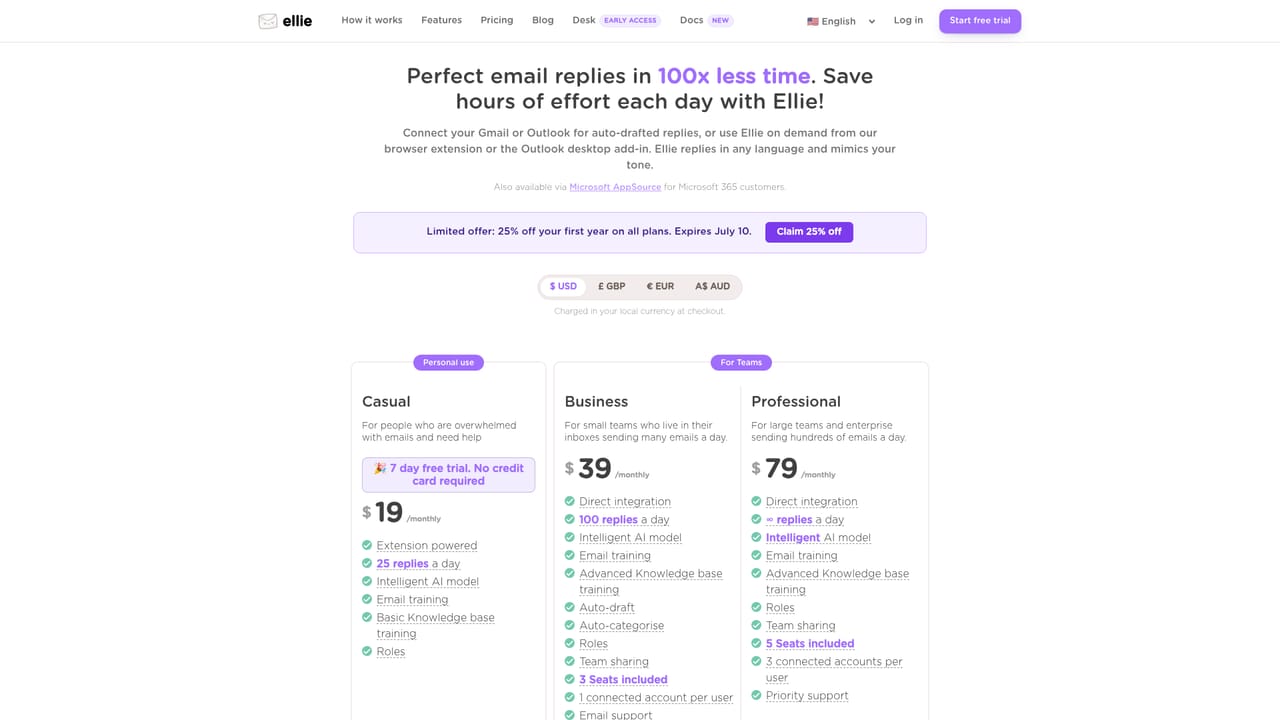
A 7 day free trial is available with no credit card required. It is listed on the pricing tiers as the entry point before a paid subscription begins.
Learn moreThree tiers priced in local currency: Casual at $19 per month for personal use with 25 replies a day, Business at $39 per month with 100 replies a day and 3 seats, and Professional at $79 per month with unlimited replies and 5 seats. A discount applies to the first three months via a coupon at checkout.
Learn moreEmail support is included on the Business plan with a two working day target, and Professional adds priority email support with a one working day target plus setup help. No phone or live chat channel is mentioned.
Learn moreConnects to Gmail and Outlook, with an Outlook desktop add-in and a browser extension that also covers Outlook web and Fastmail. Generic connectors pull records from CRM, e-commerce, helpdesk and billing systems, and public website or help centre pages feed the knowledge base.
Voice learning from sent mail, overnight auto-drafting into native Gmail and Outlook threads, custom categories written as plain sentences, per-category role voices, task creation with due dates, a site knowledge base that re-indexes weekly, live CRM and billing lookups cited in drafts, team sharing on paid plans, plus a browser extension and Outlook desktop add-in.
 AI Angels400+ customizable AI girlfriends for NSFW chat, voice calls, and roleplay
 Candy AIExperience the future of companionship with AI friends who chat, role-play, and connect with you on a human level.
 ourdream.aiA vast AI roleplay platform with millions of characters for chat, images, video and voiceAI Angels400+ customizable AI girlfriends for NSFW chat, voice calls, and roleplayCandy AIExperience the future of companionship with AI friends who chat, role-play, and connect with you on a human level.ourdream.aiA vast AI roleplay platform with millions of characters for chat, images, video and voice


