Friday Email

Draft polished business emails in seconds without the blank page

Beginner
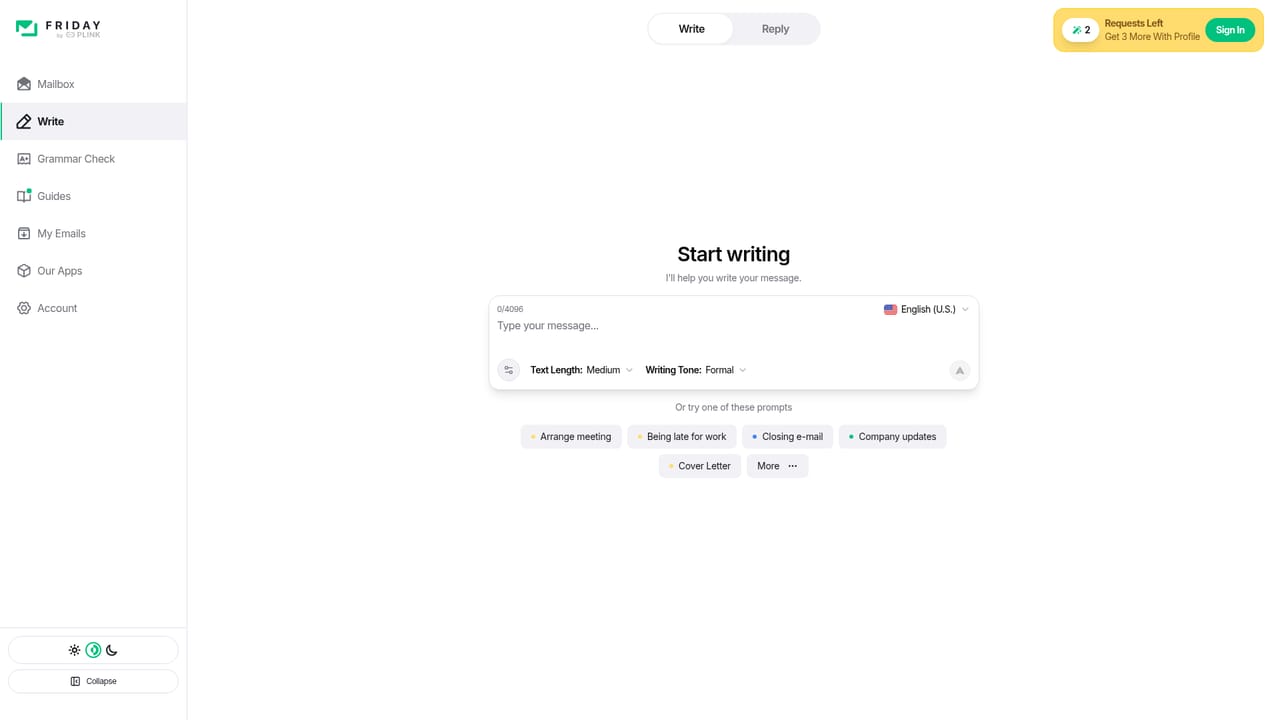
Screenshot of Friday Email, Draft polished business emails in seconds without the blank page

What is Friday Email?

Friday Email is an email polishing tool. An AI email writer that turns a short brief into a complete draft with subject line, greeting and sign-off. Tone adjustment and role-specific examples target sales, HR, support and operations correspondence. Narrow by design: it drafts messages rather than managing your inbox.

Friday Email is an AI email writer built around a single job: turning a short prompt or a half-formed thought into a finished, sendable message. The product is positioned as a communication aid first and a general writing tool second, with the homepage framing its value in reputational terms: the first email sets the tone for how a recipient reads everything that follows. Users describe the situation, the recipient and the intent, and the tool produces a draft with a subject line, greeting, body and sign-off. The illustrative examples on the site show the range the team is aiming for. Sales replies about weather-resistant doors sit next to internal notes on onboarding, hiring outreach, IT security audits, project budgeting, cash flow forecasting and legal compliance during market expansion. Each sample carries a subject line and a named sender with a job title, which suggests the intended workflow: match the register of a specific role rather than produce one generic voice. The company also advertises tone adjustment as a control, so a message to a candidate and a message to a board member can start from the same facts and land differently. In practice this is a prompt-to-draft tool. It stays narrow on purpose and does not claim to run your inbox, schedule sends or manage threads. That makes it easy to adopt alongside an existing mail client rather than as a replacement for one. The learning curve is minimal: the real skill is writing a good brief, since output quality tracks how precisely the user states the audience and the goal. It suits sales, HR, account management, operations and support staff who write similar messages repeatedly and want a faster first draft. Knowledge workers handling occasional formal correspondence get similar value. Compared with all-purpose assistants, Friday Email trades breadth for a tighter email-specific starting point, which is the right trade only if email is the bulk of your writing.

How do you use Friday Email?

  1. 1Open the writing app
    Go to the write page from the homepage. This is the entry point for the free start, and it is where the drafting interface loads.
    Friday Email — Open the writing app
  2. 2Describe the message you need
    State who the recipient is, what you want them to know or do, and any facts that must appear. Specific briefs return more usable drafts than one-line requests.
  3. 3Set the tone
    Adjust the tone control to match the relationship and the stakes, for example a formal note to a client versus a relaxed internal update.
  4. 4Review and edit the draft
    Read the generated subject line and body critically. Check names, figures and commitments, then rewrite any sentence that does not sound like you.
  5. 5Move it into your mail client
    Copy the final text into whichever email client you already use. There is no stated mailbox integration, so sending happens outside Friday Email.

Pros and cons

Pros

  • Produces a full message structure, including subject line, greeting and sign-off, rather than loose paragraph suggestionsAI
  • Tone adjustment lets the same facts be reframed for candidates, clients or executivesAI
  • Homepage examples span sales, hiring, finance, legal, IT and operations, showing the intended breadth of business useAI
  • No setup burden: it complements an existing mail client instead of replacing itAI
  • Free entry point is advertised, so the drafting quality can be judged before committingAI

Cons

  • No pricing figures, plan tiers or usage caps are published on the homepage, so cost per user is unknown before signing upAI
  • Nothing on the site covers data handling, retention or whether email content is used for model training, which matters for confidential correspondenceAI
  • No stated integrations with Gmail, Outlook or any CRM, so drafted text has to be copied into the mail client manuallyAI
  • The value depends heavily on prompt quality; vague briefs will likely return generic text that needs substantial rewritingAI
  • The feature set stays inside email drafting, so users needing long-form documents or campaign copy will need a second toolAI

How much does Friday Email cost?

Free trial

The homepage advertises a free start through the write page, so drafting can be tried without payment details according to the site. No trial length, usage limit or paid tier is stated, so treat the free access as the only confirmed commercial detail.

Learn more

Features

Generates complete emails from a short brief, with subject lines, greetings, bodies and sign-offs. Tone adjustment lets the same content be reworked for different recipients and levels of formality. The site's samples cover sales replies, hiring outreach, client retention, customer support, project budgeting, IT security, legal expansion questions and executive communication, each written in the voice of a named role such as account manager or CFO.

Learn more

Frequently asked questions about Friday Email

  • Does Friday Email offer a free trial?
    The homepage advertises a free start through the write page, so drafting can be tried without payment details according to the site. No trial length, usage limit or paid tier is stated, so treat the free access as the only confirmed commercial detail.
  • How do you use Friday Email?
    The walkthrough on this page covers 5 steps: 1. Open the writing app 2. Describe the message you need 3. Set the tone 4. Review and edit the draft 5. Move it into your mail client.
  • What platforms does Friday Email support?
    Friday Email is available on Web App.
  • What are the limitations of Friday Email?
    No pricing figures, plan tiers or usage caps are published on the homepage, so cost per user is unknown before signing up. Nothing on the site covers data handling, retention or whether email content is used for model training, which matters for confidential correspondence. No stated integrations with Gmail, Outlook or any CRM, so drafted text has to be copied into the mail client manually.

Status

StatusActive
Views0
Outbound clicks0
Added10/21/2026

Platforms

Web App

Pricing

FreeFreemium