Free trial
No trial is needed: the Free plan is permanent and requires no credit card, with unlimited generations and a single project canvas. Paid plans are the upgrade path once limits bite.
Learn moreAI rendering and a shared canvas built for architecture studios

Gendo is an AI rendering tool for architects and interior designers, wrapping photorealistic image generation and video inside a shared project canvas. Teams upload sketches, change materials by prompt, apply style transfer and iterate together, with EU hosting, no model training on paid plans and enterprise SSO at the top tier.
Gendo is an AI rendering platform for architects and interior designers, built around a collaborative canvas rather than a single-shot image generator. Sketch or upload a design, generate a photorealistic render in minutes, then keep working on the same canvas: swap materials and finishes with a prompt, apply style transfer while holding the underlying design, and compare image sets with collaborators. The point is iteration and team decision-making, not one hero image for a pitch deck. The use cases map onto three stages of practice. During design, the canvas shortens iteration cycles and cuts rework by letting teams test a massing or finish before committing. During communication, renders move from rough to presentation quality quickly enough to bring into client conversations. During delivery, the platform's published case studies describe planning teams responding to renders shown in pre-application meetings. Material specification is handled through Material Bank, and paid tiers add video generation and upscaling. Governance is unusually explicit for this category. Projects, prompts and renders are private by default; designs on paid plans are not used to train models; studio and enterprise users hold full commercial rights to outputs; data sits in EU data centres under GDPR-aligned hosting. Enterprise includes SAML single sign-on, activity tracking, custom DPAs, data isolation controls and trained custom models, which is the language procurement departments ask for. Alternatives split into two camps. General image generators are cheaper and broader but weak on architectural fidelity and team workflow. Traditional rendering engines fit deep technical documentation but are slower for concept-stage exploration. Gendo sits between them, and it is priced accordingly: a functional free tier for individuals, a Studio plan at roughly £79 per month (cheaper annually) with four seats included, a Studio Scale beta at £299 monthly, and a seat-based Enterprise tier with a 20 seat minimum. Students and educators get a free non-commercial plan.
No trial is needed: the Free plan is permanent and requires no credit card, with unlimited generations and a single project canvas. Paid plans are the upgrade path once limits bite.
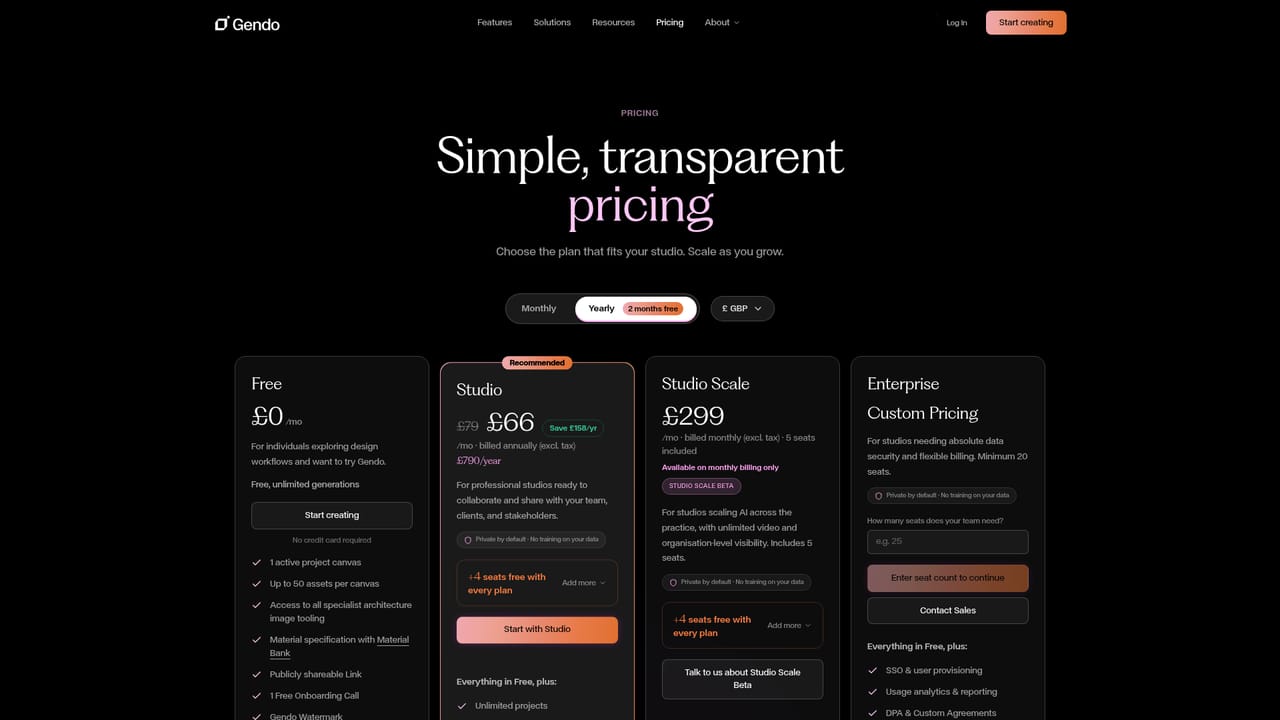
Learn moreFree tier at £0 with unlimited generations but one canvas, 50 assets, a watermark and limited history. Studio costs £79 monthly or £66 monthly billed annually (£790 per year, ex tax) with four seats included. Studio Scale is £299 monthly with five seats. Enterprise is custom priced with a 20 seat minimum. Prices are in GBP and exclude tax.
Learn moreFree includes one onboarding call. Studio Scale adds VIP onboarding and priority support. Enterprise adds DPAs, custom agreements and user provisioning, with contact by email for sales queries.
The homepage names Material Bank for material specification. No other third-party integrations or public API are described on the listed pages.
Design to image from sketches, prompt-based material and finish swapping, style transfer with design fidelity, video generation, 2x and 4x upscaling, parallel rendering, shared team canvases with roles, Material Bank specification, and governance features including EU hosting, SSO and audit logs.
Learn more AI Angels400+ customizable AI girlfriends for NSFW chat, voice calls, and roleplay
 Candy AIExperience the future of companionship with AI friends who chat, role-play, and connect with you on a human level.
 ourdream.aiA vast AI roleplay platform with millions of characters for chat, images, video and voiceAI Angels400+ customizable AI girlfriends for NSFW chat, voice calls, and roleplayCandy AIExperience the future of companionship with AI friends who chat, role-play, and connect with you on a human level.ourdream.aiA vast AI roleplay platform with millions of characters for chat, images, video and voice


