GenPPT AI

Turn briefs, documents and existing decks into editable slide drafts

Beginner
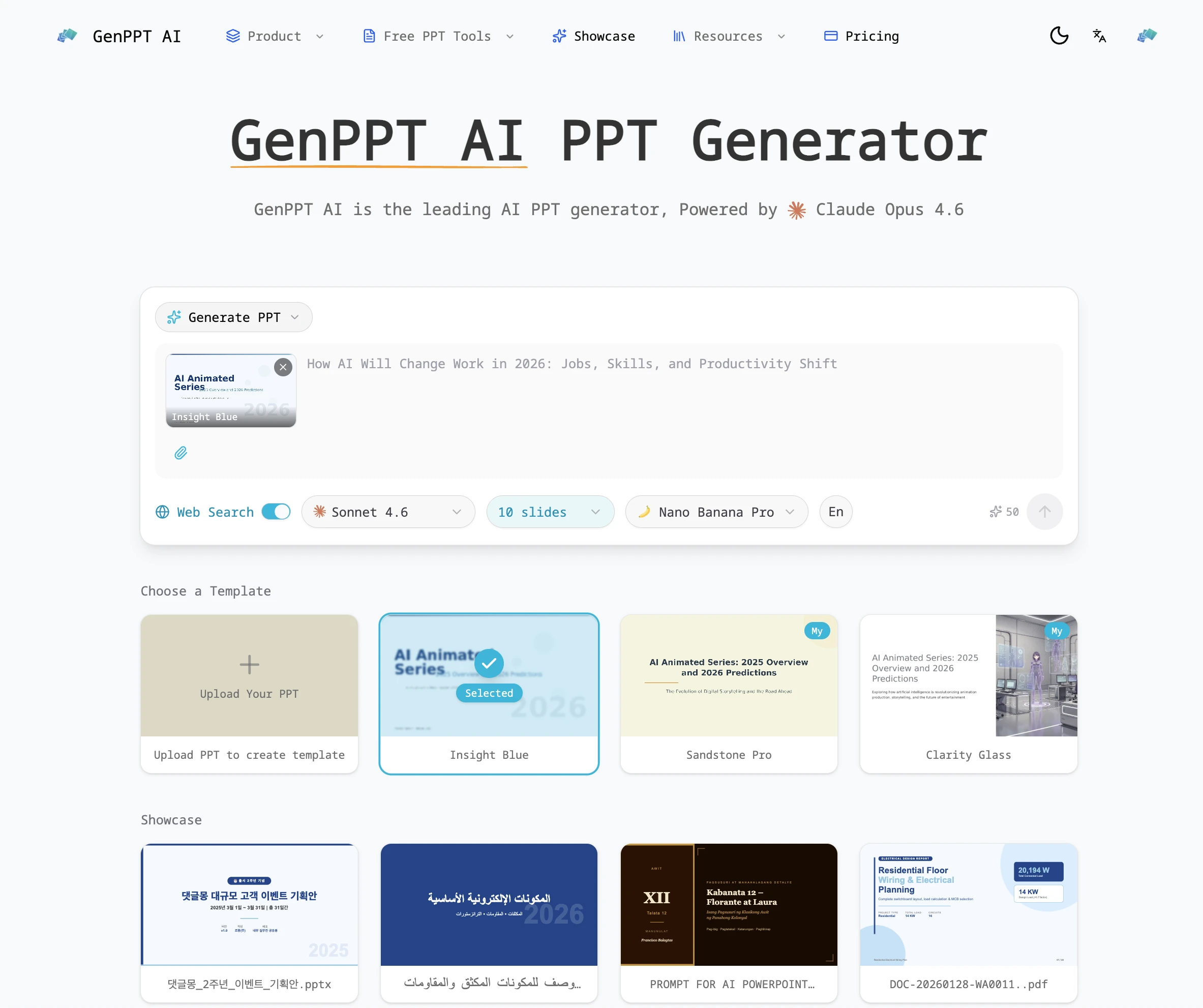
Screenshot of GenPPT AI, Turn briefs, documents and existing decks into editable slide drafts

What is GenPPT AI?

GenPPT AI is an animate powerpoint tool that turns briefs, documents and existing decks into editable slide drafts. GenPPT AI builds presentation drafts from briefs, documents, PDFs, YouTube links and existing decks, then adds redesign, speaker note and file conversion tools.

GenPPT AI is a browser based presentation builder that converts a written brief, a document or an existing deck into a slide draft. The company positions it as an AIPPT maker powered by Claude Opus 4.7, and the product pairs generation with redesign, conversion and file utility tools in a single workspace. The pitch is deliberately modest: the system organizes material and proposes structure, while the user supplies the message, verifies claims and decides what survives into the final file. In practice you describe the audience, the purpose and the facts that must remain accurate, then select a slide count, an output language and a rendering mode. Two modes exist and they behave differently. The AI Agent mode assembles layouts from editable objects, so text and elements can be reworked afterwards. The image mode produces full page pictures, which look polished but cannot be edited word by word in PowerPoint. Optional AI illustrations affect the credit estimate shown before you submit, and generation requires an account with sufficient credits. The surrounding toolkit is broader than generation. Source converters cover Word, plain text, Markdown, Excel, HTML, PDF and YouTube links. A beautify feature reinterprets an uploaded PowerPoint against a design request, and the reverse prompt tool extracts a reusable design prompt from a reference deck. Finishing tools handle PPT to PDF, JPG and Word conversion, compression, merging and speaker note generation. The published examples are honest about the process: the site walks through an actual five slide export with the brief and the finished pages side by side, flagging suggested roles as proposals rather than facts. GenPPT suits consultants, teachers, marketers and internal teams who start from existing material and want a structured first draft rather than a blank canvas. It competes with template libraries and other AI deck generators, and its differentiator is the workflow around the draft (conversion, redesign, cleanup) rather than raw visual output. Anyone needing pixel perfect object control should test the export in their own presentation software first.

How do you use GenPPT AI?

  1. 1Write a brief with audience, purpose and confirmed facts
    State who will read the deck, what they should understand and which details must stay accurate. Include a rough slide order if you have one, and upload only files you have permission to share.
  2. 2Set slide count, language and rendering mode
    Choose the available slide count, the presentation language (separate from the website language) and the rendering mode. Check the credit estimate before submitting, since optional AI illustrations change the cost.
  3. 3Review and edit the draft in the workspace
    Read every slide, remove statements the source does not support and fix anything that misses the audience. Save your edits and reload the workspace to confirm they held.
  4. 4Export and open the file in your presentation software
    Use the export menu to download PowerPoint or PDF, then check typography, line breaks, images and object editing in the app you will present from. Read the download dialog for account conditions.
  5. 5Convert or reshape the deck with the finishing tools
    Use the companion pages to redesign an existing deck, extract a design prompt, generate speaker notes or convert between PPT, PDF, JPG and Word formats.

Pros and cons

Pros

  • Generates a structured first draft from a written brief, so the deck starts with real source material rather than an empty slideAI
  • AI Agent mode produces layout elements that can be edited and rearranged after exportAI
  • Sixteen documented tools cover source conversion (Word, Excel, Markdown, HTML, PDF, YouTube) plus compression, merging and PDF or JPG exportAI
  • The site publishes actual example decks and briefs for side by side comparison instead of anonymized marketing screenshotsAI
  • Presentation language is chosen separately from the interface language, and the redesign case shows an English deck rebuilt in PortugueseAI

Cons

  • Generation is credit based and optional AI illustrations increase the cost, with no fixed price visible on the homepageAI
  • Download access carries its own account requirements separate from generation, so a draft is not automatically yours to exportAI
  • Image mode slides are flat pictures, which means text cannot be selected or edited once the file reaches PowerPointAI
  • Redesign is a reinterpretation rather than a lossless conversion, so original layouts and branding can shiftAI
  • The homepage cites an unusually specific underlying model and dated capture screenshots, but offers no detail on data retention for uploaded confidential decksAI

How much does GenPPT AI cost?

Pricing

The homepage confirms credit based generation: an account and sufficient credits are required, and optional AI features such as illustrations affect the estimate shown before generating. Download access has separate conditions. No specific prices or plan tiers appear on the homepage; the pricing page holds the current numbers.

Learn more

Features

Brief to deck generation in two modes (editable layout objects via AI Agent, or full page image slides), with selectable slide count, output language and credit estimate. Source converters cover Word, text, Markdown, Excel, HTML, PDF and YouTube. Also includes deck redesign from a design request, design prompt extraction, speaker note generation, PPT to PDF, JPG and Word conversion, PPTX compression and presentation merging.

Learn more

Frequently asked questions about GenPPT AI

  • How much does GenPPT AI cost?
    The homepage confirms credit based generation: an account and sufficient credits are required, and optional AI features such as illustrations affect the estimate shown before generating. Download access has separate conditions. No specific prices or plan tiers appear on the homepage; the pricing page holds the current numbers.
  • How do you use GenPPT AI?
    The walkthrough on this page covers 5 steps: 1. Write a brief with audience, purpose and confirmed facts 2. Set slide count, language and rendering mode 3. Review and edit the draft in the workspace 4. Export and open the file in your presentation software 5. Convert or reshape the deck with the finishing tools.
  • What platforms does GenPPT AI support?
    GenPPT AI is available on Web App.
  • What are the limitations of GenPPT AI?
    Generation is credit based and optional AI illustrations increase the cost, with no fixed price visible on the homepage. Download access carries its own account requirements separate from generation, so a draft is not automatically yours to export. Image mode slides are flat pictures, which means text cannot be selected or edited once the file reaches PowerPoint.