Herodot

Point your phone at a landmark and hear its story

Beginner
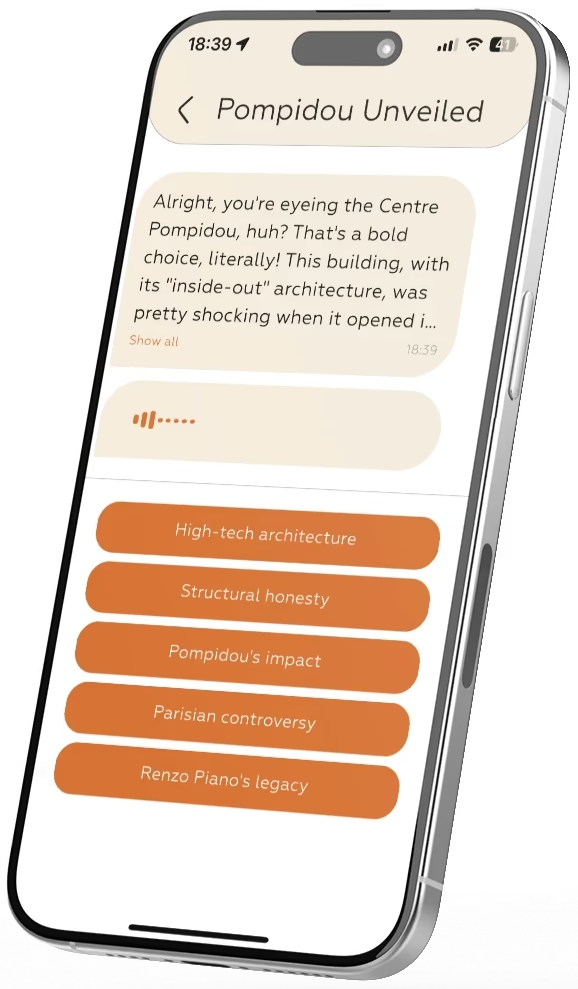
Screenshot of Herodot, Point your phone at a landmark and hear its story

What is Herodot?

Herodot is a phone-based AI audio guide that identifies landmarks, artworks and objects from a photo or an interactive map and narrates their history in more than 20 languages, with selectable narrator personas and offline downloads.

Herodot is a mobile travel companion that turns sightseeing into a self-paced audio experience. Point the phone camera at a landmark, a piece of art or any object of interest and the app generates a spoken guide on the spot, mixing historical background, cultural context and lighter trivia. An interactive map offers a second route into the same material, letting travelers move through a city, a museum or a cultural site and pull up stories as they walk rather than following a fixed itinerary. The product is aimed at independent travelers who dislike group tours and rigid schedules, plus museum visitors who want commentary on individual works without renting a headset. Narrator personas change the register of the content: a professional historian for depth, a local guide for anecdotal color, or a kid-friendly companion for younger listeners. Audio is offered in more than 20 languages, and the interface itself is localized across a similar spread of locales, so a visitor can hear a site explained in their own language. In practice the app works through the phone: download it from the App Store or Google Play, create an account, then either photograph a subject or browse the map. Guides can be downloaded ahead of time for offline listening, which matters for travelers avoiding roaming charges. The site also mentions virtual museum tours for exploring collections remotely, and a section for booking deals through verified local providers. Where it sits: heritage audio guides are usually tied to one city or one venue, and human guides cost far more per outing. Herodot competes on breadth (any object, anywhere) and flexibility, though it remains a phone-first product with no desktop or browser version, and the catalog of popular tours is thinner than what specialist operators maintain.

How do you use Herodot?

  1. 1Download the app and create an account
    Install Herodot from the App Store or Google Play, then register an account so guides and preferences are tied to your profile.
  2. 2Snap a photo of a landmark or artwork
    Open the camera in the app and frame the object in front of you. The image is matched and a narrated guide is generated around it.
  3. 3Or browse the interactive map
    Use the map view to see what is nearby and start an audio story for a point of interest instead of photographing it.
  4. 4Pick a guide persona and language
    Choose between a historian, a local guide or a kid-friendly narrator, and set your preferred language in the settings.
  5. 5Save guides for offline listening
    Download audio in advance before heading out, so walking tours keep working where mobile data is weak or roaming is expensive.
  6. 6Browse curated tours and local offers
    The popular tours section shows ready-made city itineraries for travelers who want a starting point rather than a blank map.

Pros and cons

Pros

  • Photo recognition works on almost any subject, not just famous monumentsAI
  • More than 20 languages for both audio and the app interfaceAI
  • Narrator personas let the same site suit history buffs or childrenAI
  • Guides can be downloaded in advance for offline useAI
  • Free tier covers core features without an upfront commitmentAI

Cons

  • Phone-only product, with no desktop or browser versionAI
  • Catalog of curated popular tours looks limited next to established operatorsAI
  • Accuracy depends on image recognition, so obscure or similar-looking objects may return weak resultsAI
  • No published price details for the premium tier on the homepageAI
  • Useful mainly with a charged phone and, for live lookups, a data connectionAI

How much does Herodot cost?

Pricing

The homepage states that the app is free to use, with flexible plans that include a free version carrying core features and premium options for unlimited access and exclusive content. No specific prices or subscription tiers are listed.

Learn more

Support

A contact page is available for questions, and the site collects reviews through Product Hunt, the App Store and Tripadvisor. No help centre or live chat is described.

Learn more

Features

Photo-based recognition of landmarks, artworks and objects; map-based audio tours; AI narration in more than 20 languages; selectable narrator personas including historian, local guide and kid-friendly; offline guide downloads; virtual museum tours; themed city tours; and booking of deals from verified local providers.

Learn more

Frequently asked questions about Herodot

  • How much does Herodot cost?
    The homepage states that the app is free to use, with flexible plans that include a free version carrying core features and premium options for unlimited access and exclusive content. No specific prices or subscription tiers are listed.
  • How do you use Herodot?
    The walkthrough on this page covers 6 steps: 1. Download the app and create an account 2. Snap a photo of a landmark or artwork 3. Or browse the interactive map 4. Pick a guide persona and language 5. Save guides for offline listening 6. Browse curated tours and local offers.
  • What platforms does Herodot support?
    Herodot is available on iOS and Android.
  • What are the limitations of Herodot?
    Phone-only product, with no desktop or browser version. Catalog of curated popular tours looks limited next to established operators. Accuracy depends on image recognition, so obscure or similar-looking objects may return weak results.

Status

StatusActive
Views0
Outbound clicks0
Added10/21/2026

Platforms

iOSAndroid

Pricing

FreemiumSubscription