Pricing
The homepage markets ICLight Studio as free to use, listing free access as one of its main selling points. No paid tiers, credit packs or usage caps are described on the page, and no subscription pricing is published.
Learn moreAI relighting that reshapes a photo's light from a text prompt
Own ICLight Studio? Verify ownership to get a dofollow link
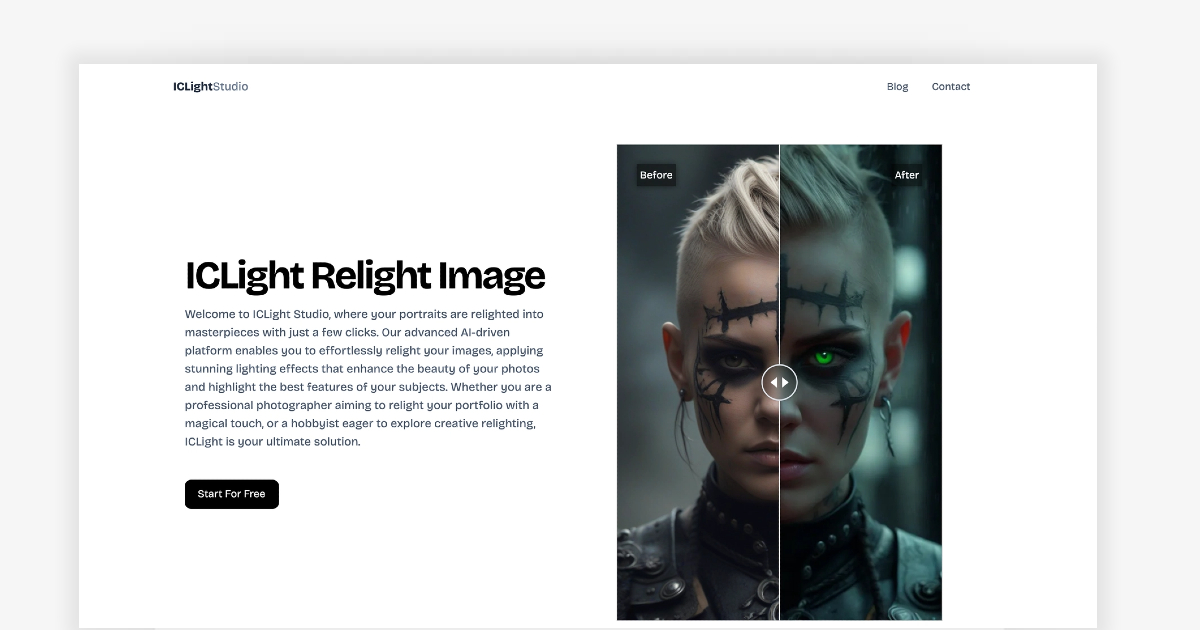
ICLight Studio is an image enhancer tool. A free, browser-based relighting tool that regenerates a photo's lighting from a natural language prompt or a curated preset, aimed at portrait photographers and content creators who want studio-style light without manual masking.
ICLight Studio is a browser-based photo relighting tool built around text prompts. A user uploads a picture, writes a plain-language description of the light they want, and the model generates a new version of the image with that lighting applied. The site frames the core capability as text-to-image enhancement: instead of moving sliders or masking regions, you describe the effect and let the AI interpret it. Results are presented side by side, with the original and the relit version shown as before and after. The tool is aimed at a wide spread of users rather than a single niche. Wedding and portrait photographers are the most obvious audience, since relighting a portrait can replace studio work and shorten post-processing. Content creators producing lifestyle and fashion images also fit, as do hobbyists who want a striking portrait edit without learning a full editing suite. The site explicitly positions itself as accessible to people with no photography background, and the interface is described as streamlined so that results arrive in minutes rather than after a long learning curve. In practice the workflow has four stated stages: upload a photo, describe the desired lighting in natural language, optionally adjust lighting parameters, and let the AI apply the effect. Beyond free-text prompting, ICLight Studio ships a set of professional presets curated by photographers, ranging from natural daylight to studio setups, which suits users who would rather pick a look than write a description. The relighting model is tuned for portraits in particular, with the site claiming it reads facial features to keep results natural. Where it fits among alternatives is as a focused, low-cost specialist. General image editors bundle dodging, curves and masked adjustments but require skill and time, while full generative image platforms offer broader creation features but less emphasis on relighting an existing photo. ICLight Studio concentrates on that single transformation and advertises itself as free, which makes it a practical first stop before committing to heavier desktop software. The trade-off is depth: it is a relighting utility, not a replacement for a complete retouching workflow.
The homepage markets ICLight Studio as free to use, listing free access as one of its main selling points. No paid tiers, credit packs or usage caps are described on the page, and no subscription pricing is published.
Learn moreSupport is limited to an on-site FAQ covering the relighting technology, the text-guided feature, suitable photos and users, and free access. No email, chat or documentation portal is listed.
Text-guided relighting from a natural language description, a curated library of professional lighting presets spanning daylight to studio setups, portrait-aware enhancement, optional parameter adjustment before rendering, before and after comparison, and a browser interface built for quick results.
 AI Angels400+ customizable AI girlfriends for NSFW chat, voice calls, and roleplay
 Candy AIExperience the future of companionship with AI friends who chat, role-play, and connect with you on a human level.
 ourdream.aiA vast AI roleplay platform with millions of characters for chat, images, video and voiceAI Angels400+ customizable AI girlfriends for NSFW chat, voice calls, and roleplayCandy AIExperience the future of companionship with AI friends who chat, role-play, and connect with you on a human level.ourdream.aiA vast AI roleplay platform with millions of characters for chat, images, video and voice