Image2Image AI

Describe an edit, pick a model, and turn an existing photo into a new concept.

Beginner
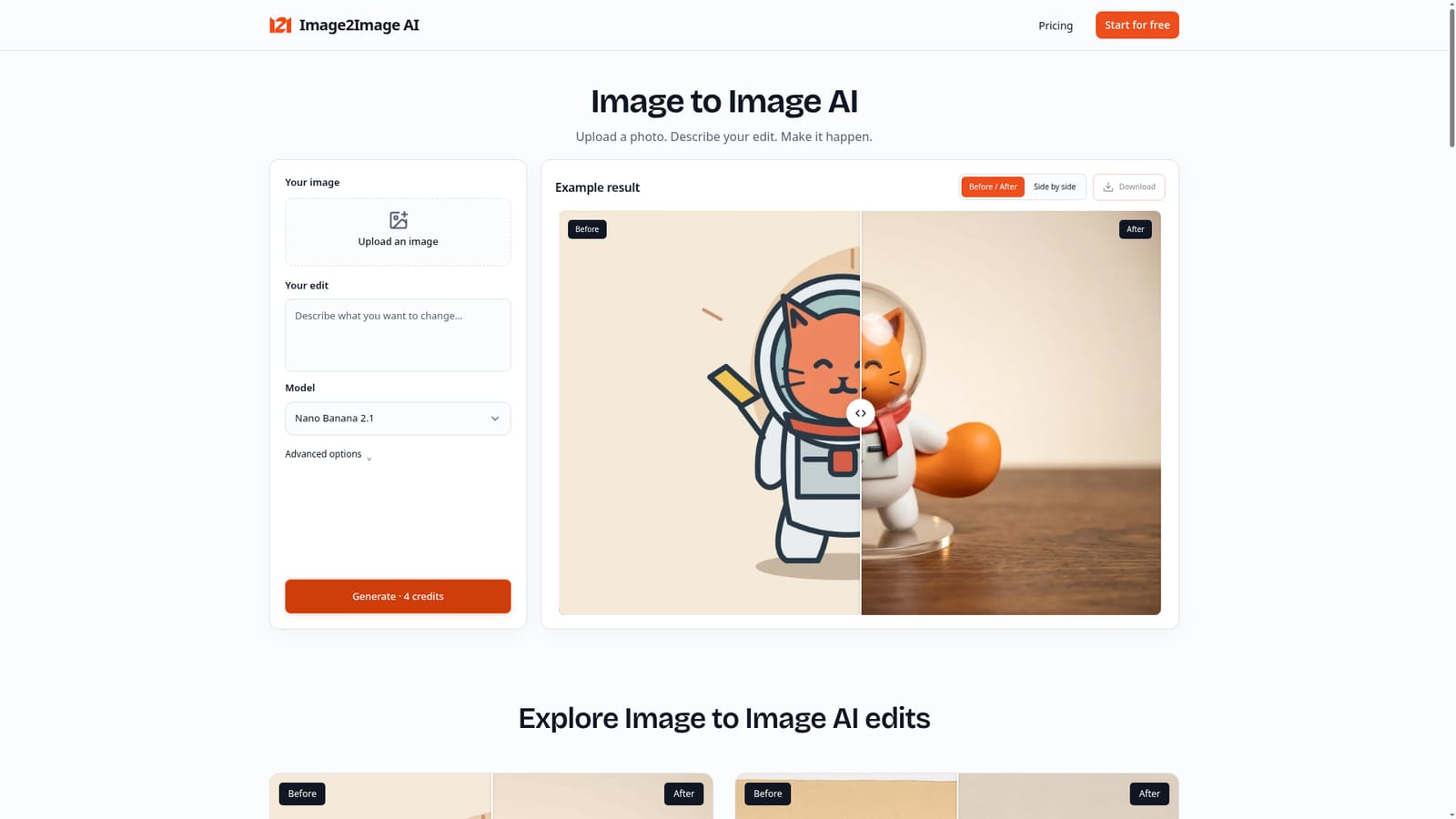
Screenshot of Image2Image AI, Describe an edit, pick a model, and turn an existing photo into a new concept

What is Image2Image AI?

Image2Image AI is an image editing tool. Image2Image AI reworks an uploaded photo, sketch or artwork into a new visual concept based on a written description, with model choice, reference images, and before and after comparison tools.

Image2Image AI is a browser based editor that reworks an existing photo, drawing or piece of artwork rather than generating an image from a blank prompt. A user uploads a source image, writes a description of the intended change, selects one of several available models, and the tool produces a new version built from that starting point. Output can be compared against the original through a slider or a side by side view before downloading. The tool is aimed at people who already have a visual starting point and want to explore a different direction for it: illustrators restyling artwork, hobbyists turning sketches into more finished scenes, and anyone experimenting with how an object or character might look in a new material such as yarn or resin. It also supports more applied creative work, including concept art and storyboard frames, product or prop mockups for presentations, and visuals for social posts or cards that get paired with separate text and layout work. In practice the workflow follows three steps: start with a clear source image, describe the change in plain language, then inspect the result before deciding whether to download it or adjust the description and try again. Reference images can be added to help steer style or material choices, and output can go up to 4K resolution depending on the model chosen. Results and uploads are kept private to the account rather than placed in a public gallery. Within the broader field of AI image tools, Image2Image AI sits closer to a transformation tool than a from scratch generator: it depends on an existing image for context rather than producing a scene purely from a text prompt, which distinguishes it from general text to image generators and from simple color or filter based photo editors.
How do you use Image2Image AI?

  1. 1Upload your source image
    Start with a photo, drawing or piece of artwork that has a clear subject. A well lit, unobstructed subject is easier to judge once the edit is generated.
    Image2Image AI — Upload your source image
  2. 2Choose a model and describe the edit
    Pick one of the available models, then write the change in plain language, such as a new material, setting or mood. Keep the first request focused on a single change.
  3. 3Add a reference image if needed
    Attach an additional reference to help steer a specific style or material; each reference adds to the credit cost of the generation.
  4. 4Generate and compare the result
    Run the edit, then use the before and after slider or side by side view to check details such as faces, text and edges against the original.
  5. 5Download or refine the version
    Download the result if it meets your needs, or adjust the description and generate again to explore another direction.
  6. 6Pick a plan that matches your usage
    Choose a monthly subscription for regular use or a one time credit pack for occasional edits; credit packs do not expire.

Pros and cons

Pros

  • Side by side and slider comparison makes it straightforward to judge exactly what an edit changedAI
  • One time credit packs let occasional users pay once without committing to a recurring subscriptionAI
  • Covers a range of use cases, from restyling photos to developing sketches and exploring new materialsAI
  • Failed or blocked edits do not consume credits, which limits wasted spend on unusable resultsAI
  • All eight models and output up to 4K are available even on the entry level Starter planAI

Cons

  • No ongoing free tier; regular use requires either a paid subscription or a one time credit purchaseAI
  • Homepage does not name the underlying models or processing partners handling image generationAI
  • No mention of an API, browser extension, or mobile apps, which limits integration into other workflowsAI
  • Subscription credits expire at the end of each billing period, so unused monthly allowance is lostAI
  • Turnaround times and per model resolution limits are not detailed on the homepageAI

How much does Image2Image AI cost?

Free trial

A 'Start for free' entry point appears on the homepage, but the page does not specify how many credits or what features the signup trial includes.

Learn more

Pricing

Three monthly subscriptions (Starter $9, Creator $19, Pro $39) include all eight models, output up to 4K and 200 to 1,200 monthly credits that expire each period. One time credit packs from $9 (160 credits) to $499 (5,600 credits) never expire and require no subscription.

Learn more

Support

Support is handled by email at support@image2imageai.net; the homepage recommends including the relevant job reference when reporting a recurring failed edit.

Features

Upload based image editing with a written edit description, choice of eight models, optional reference images, output up to 4K on supported models, a before and after slider or side by side comparison view, and private, downloadable results with commercial use allowed.

Frequently asked questions about Image2Image AI

  • How much does Image2Image AI cost?
    Three monthly subscriptions (Starter $9, Creator $19, Pro $39) include all eight models, output up to 4K and 200 to 1,200 monthly credits that expire each period. One time credit packs from $9 (160 credits) to $499 (5,600 credits) never expire and require no subscription.
  • Does Image2Image AI offer a free trial?
    A 'Start for free' entry point appears on the homepage, but the page does not specify how many credits or what features the signup trial includes.
  • How do you use Image2Image AI?
    The walkthrough on this page covers 6 steps: 1. Upload your source image 2. Choose a model and describe the edit 3. Add a reference image if needed 4. Generate and compare the result 5. Download or refine the version 6. Pick a plan that matches your usage.
  • What platforms does Image2Image AI support?
    Image2Image AI is available on Web App.
  • What are the limitations of Image2Image AI?
    No ongoing free tier; regular use requires either a paid subscription or a one time credit purchase. Homepage does not name the underlying models or processing partners handling image generation. No mention of an API, browser extension, or mobile apps, which limits integration into other workflows.

Status

StatusActive
Views0
Outbound clicks0
Added10/18/2026

Platforms

Web App

Pricing

SubscriptionPaidFree Trial