Imagefree.net

Text to PNG images in five aspect ratios, no account, no watermark.

Beginner
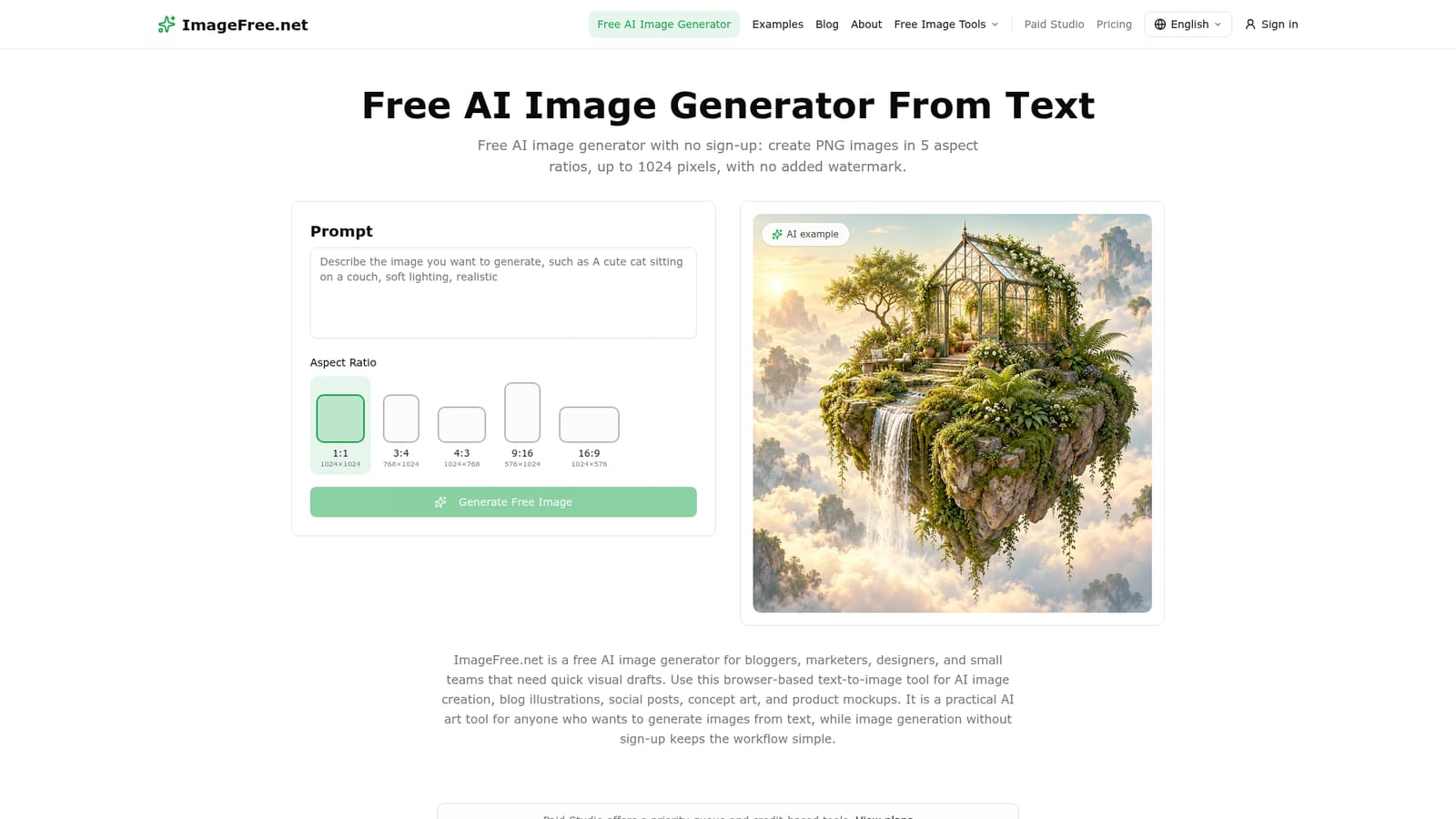
Screenshot of Imagefree.net, Text to PNG images in five aspect ratios, no account, no watermark

What is Imagefree.net?

Imagefree.net is a generative art tool. A no-sign-up AI image generator that turns text prompts into PNG files in five aspect ratios up to 1024 pixels, with no watermarks and no daily credit allowance. Fair-use limits apply instead of a paywall.

ImageFree.net is a browser-based text-to-image generator that skips the usual account wall. You write a prompt, pick one of five aspect ratios, and receive a PNG within seconds. There is no sign-up, no email confirmation, no credit balance and no watermark stamped on the output. The free tier is capped by fair-use rate limits, concurrent-task limits and queues rather than by a daily allowance, which means heavy use can slow down without a paywall appearing. The tool is aimed at bloggers, marketers, designers and small teams who need fast visual drafts: blog headers, social posts, concept art, product mockups. Output dimensions are modest by modern standards, topping out at 1024 pixels on the long edge, with square, portrait and landscape options (1024x1024, 768x1024, 1024x768, 576x1024, 1024x576). Style is controlled almost entirely through prompt wording, so terms like watercolor, cyberpunk, anime, 3D render or Studio Ghibli push results toward a look. The site publishes worked examples across photography, product imagery, illustration and nature, plus advice on leading with the core subject and adding lighting or camera references afterward. In practice the workflow is three moves: describe, choose dimensions, generate, then refine one variable at a time. Images are not automatically transparent, and the site points elsewhere for background removal. Free images are subject to deletion after a 24-hour retention period, and the site states it does not use prompts or images to train its own models. The license terms leave commercial use to applicable law and third-party rights, so anyone republishing output should read the license FAQ first. Among alternatives, ImageFree.net trades controls for speed. There is no visible model selector, upscaler, negative prompt field or image-to-image path, and the resolution ceiling rules it out of print work. What remains is a useful front door for quick, low-stakes visuals where signing up would cost more time than generating the image.

How do you use Imagefree.net?

  1. 1Open the generator
    Load the homepage in any modern browser. No account or login screen appears, so the prompt box is available immediately.
    Imagefree.net — Open the generator
  2. 2Write a detailed prompt
    Lead with the core subject, then add setting, style, lighting and detail. Specific wording such as golden hour or watercolor steers the output more reliably than vague requests.
  3. 3Pick an aspect ratio
    Select square, portrait or landscape to match the destination: 1024x1024 for social posts, 768x1024 for mobile, 1024x576 for banners.
  4. 4Generate and review
    Press generate and wait a few seconds. Rendering time varies with server load and prompt complexity, and queued requests may take longer at peak hours.
  5. 5Refine one variable at a time
    If the result misses, change a single element in the description, such as lighting or style reference, and regenerate. Repeat until the image fits.
  6. 6Download and check the license
    Save the PNG immediately, since free images may be deleted after 24 hours. Read the license page before any commercial use.
    Imagefree.net — Download and check the license

Pros and cons

Pros

  • No account, email or password required before generatingAI
  • No daily credit quota and no watermark on downloadsAI
  • Five aspect ratios cover square, portrait and landscape formatsAI
  • Detail and style are guided by prompt wording, with published examples to copyAI
  • Site states prompts and uploads are not used to train its own modelsAI

Cons

  • Output tops out at 1024 pixels, too small for print or large hero imagesAI
  • No model selector, negative prompt, upscaler or image-to-image controlsAI
  • Fair-use rate limits and queues can throttle heavy use without warningAI
  • Free images may be deleted after 24 hours, so downloads must be savedAI
  • Commercial use and copyright status are not guaranteed and depend on third-party rightsAI

How much does Imagefree.net cost?

Pricing

The site lists a single free plan at $0 with no sign-up, no daily credit allowance and no watermark. There are no paid tiers, credits or trials described on the homepage. Fair-use rate limits, concurrent-task limits and queues apply instead of billing.

Learn more

Support

Support is limited to a homepage FAQ covering pricing, limits, formats, speed, anime and photorealistic output, privacy and licensing. No help centre, chat or email channel is listed on the homepage.

Features

Text-to-image generation in a browser with no account. Five aspect ratios (1024x1024, 768x1024, 1024x768, 576x1024, 1024x576) downloaded as PNG. Style and detail are controlled through prompt wording, with published examples for photography, product, illustration and nature scenes. No watermark, no daily credit quota, fair-use limits and queues apply. Free images are subject to deletion after 24 hours.

Frequently asked questions about Imagefree.net

  • How much does Imagefree.net cost?
    The site lists a single free plan at $0 with no sign-up, no daily credit allowance and no watermark. There are no paid tiers, credits or trials described on the homepage. Fair-use rate limits, concurrent-task limits and queues apply instead of billing.
  • How do you use Imagefree.net?
    The walkthrough on this page covers 6 steps: 1. Open the generator 2. Write a detailed prompt 3. Pick an aspect ratio 4. Generate and review 5. Refine one variable at a time 6. Download and check the license.
  • What platforms does Imagefree.net support?
    Imagefree.net is available on Web App.
  • What are the limitations of Imagefree.net?
    Output tops out at 1024 pixels, too small for print or large hero images. No model selector, negative prompt, upscaler or image-to-image controls. Fair-use rate limits and queues can throttle heavy use without warning.

Status

StatusActive
Views0
Outbound clicks0
Added11/3/2026

Platforms

Web App

Pricing

Free