Linkjob

A stealth AI copilot that feeds live interview answers while staying invisible on screen.

Beginner
Screenshot of Linkjob, A stealth AI copilot that feeds live interview answers while staying invisible on screen

What is Linkjob?

Linkjob is a real time interview assistant that listens to live calls and delivers suggested answers through a hidden desktop overlay. It supports behavioral, coding and system design interviews, tailors responses to an uploaded resume and works across major meeting and assessment platforms.

Linkjob is a desktop assistant built for job interviews and online assessments. It sits on top of whatever meeting or testing platform the candidate is using, listens to the interviewer through the microphone, and pushes suggested answers to the candidate in real time. The company claims the tool stays hidden during screen sharing, in the Dock, in Activity Monitor and when switching tabs, and describes daily testing against meeting and assessment platforms to keep it that way. A phone based mode is offered as an alternative for interviews where desktop monitoring software is in use. The workflow is straightforward. The candidate installs the app, uploads a resume and target role details, then joins the interview as normal. Linkjob follows the conversation, drafts responses that lean on the candidate's own background, and offers help with behavioral questions, system design discussion and coding exercises. For coding tests, the tool can read a screenshot of the problem and return an answer. Answers are produced through multiple model providers including ChatGPT, Claude and Gemini, which the app presents as the engine behind its suggestions. Support extends beyond the live call. The site hosts a hub of guides and question banks covering specific assessment products and platforms, so users can rehearse formats such as HackerRank, CodeSignal and Codility before the real thing. The tool advertises support for 29 or more languages and is aimed at candidates across engineering, product, finance, marketing and analytics roles rather than developers alone. It competes with other real time interview copilots, and its main differentiator is a heavy emphasis on stealth features rather than on coaching or long term skill building. Platform coverage includes Zoom, Google Meet, Microsoft Teams, Webex, Lark, HackerRank, CodeSignal and Coderpad, with additional setup noted for the Zoom desktop app.

How do you use Linkjob?

  1. 1Download and install the desktop app
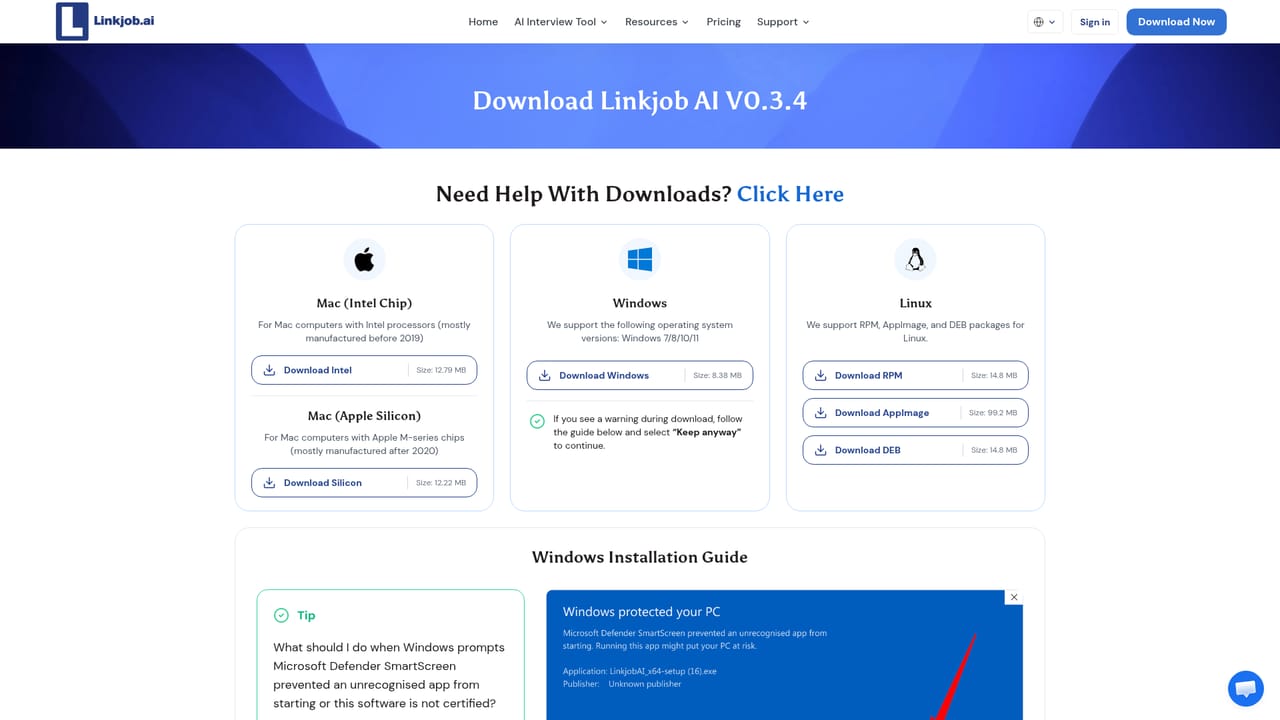
    Grab the installer from the downloads page and run it on your machine before an interview is scheduled, so setup is not rushed on the day.
    Linkjob — Download and install the desktop app
  2. 2Prepare for the Zoom desktop case
    If the interview runs on the Zoom desktop app rather than the browser, apply the special setting the site describes beforehand. Other platforms need no extra configuration.
  3. 3Load your resume and target role
    Add your resume and the job details inside the app so suggested answers reference your actual projects, skills and wording instead of generic examples.
  4. 4Study the platform guides for your assessment
    Work through the hub articles or question sets for the test you are facing, such as HackerRank or CodeSignal, to understand the expected format and timing.
    Linkjob — Study the platform guides for your assessment
  5. 5Run a practice session
    Join a mock call with the assistant active and check that audio capture, overlay placement and answer speed all behave as expected before the real interview.
  6. 6Choose a plan before the interview
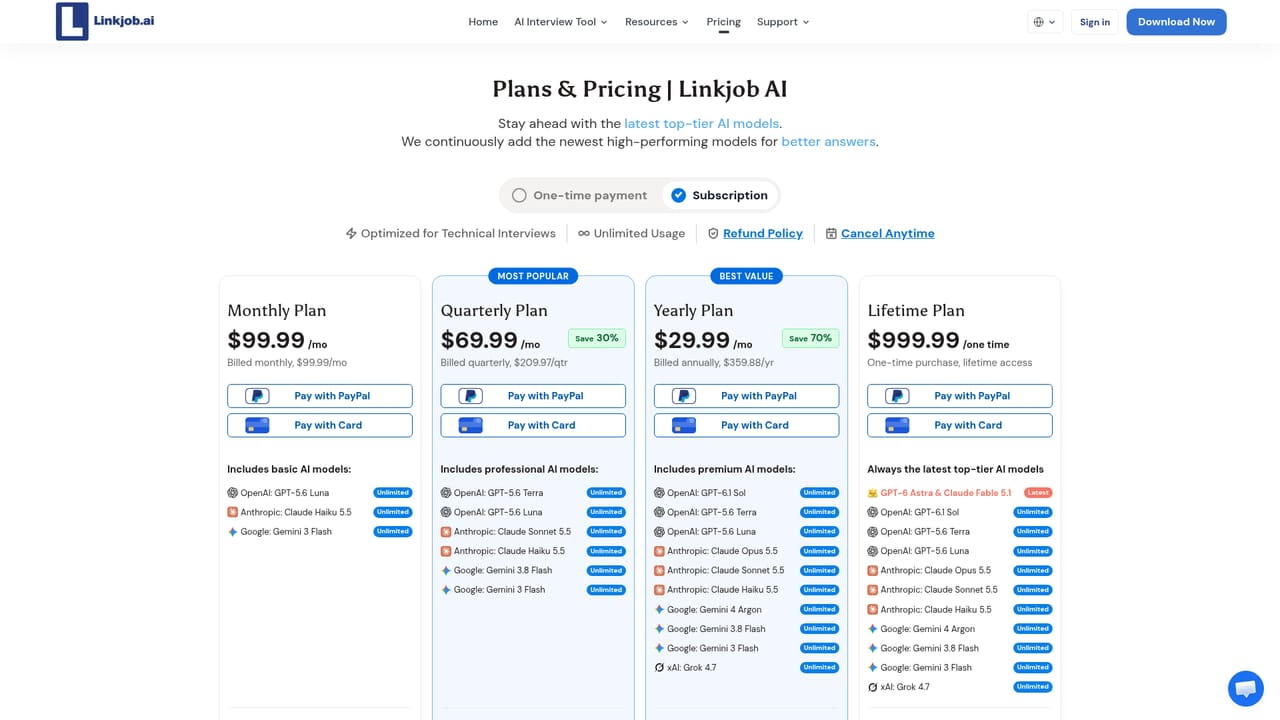
    Review the available plans and pick the one that covers your interview volume, since access to the live assistant depends on your subscription.
    Linkjob — Choose a plan before the interview

Pros and cons

Pros

  • Runs invisibly during screen sharing and leaves no visible process in Activity Monitor, according to the vendor.AI
  • Real time listening means answers appear as the interviewer speaks, including for unscripted follow-ups.AI
  • Resume upload shapes responses around the candidate's own experience, which reduces generic answers.AI
  • Covers behavioral, coding and system design formats in one app, with 29 or more languages supported.AI
  • Guides and question banks exist for specific assessment tools such as HackerRank, CodeSignal and Codility.AI

Cons

  • The core promise is concealment from employers and proctoring tools, which many hiring policies explicitly prohibit.AI
  • Detection claims rest on the vendor's own daily testing and cannot be independently verified by a buyer.AI
  • Interview performance depends on latency and transcription accuracy, and mistakes become visible to a live interviewer.AI
  • Relying on suggested answers during a call can undermine the depth expected in senior or highly technical rounds.AI
  • Pricing tiers are gated behind the vendor's plans page, so cost per interview is not clear from the homepage.AI

How much does Linkjob cost?

Features

Real time answers delivered through an overlay that the vendor says stays hidden on screen share, in the Dock, in Activity Monitor and during tab switches. Responses are tailored from an uploaded resume and target role, drawing on ChatGPT, Claude and Gemini. Handles behavioral, coding and system design rounds, reads coding test screenshots, supports 29 or more languages and works across Zoom, Google Meet, Teams, Webex, Lark, HackerRank, CodeSignal and Coderpad.

Learn more

Frequently asked questions about Linkjob

  • How do you use Linkjob?
    The walkthrough on this page covers 6 steps: 1. Download and install the desktop app 2. Prepare for the Zoom desktop case 3. Load your resume and target role 4. Study the platform guides for your assessment 5. Run a practice session 6. Choose a plan before the interview.
  • What platforms does Linkjob support?
    Linkjob is available on MacOS and Windows.
  • What are the limitations of Linkjob?
    The core promise is concealment from employers and proctoring tools, which many hiring policies explicitly prohibit. Detection claims rest on the vendor's own daily testing and cannot be independently verified by a buyer. Interview performance depends on latency and transcription accuracy, and mistakes become visible to a live interviewer.

Status

StatusActive
Views0
Outbound clicks0
Added10/21/2026

Platforms

MacOSWindows

Pricing

PaidSubscription