MangaMaker

Browser-based manga page maker with consistent characters

Beginner
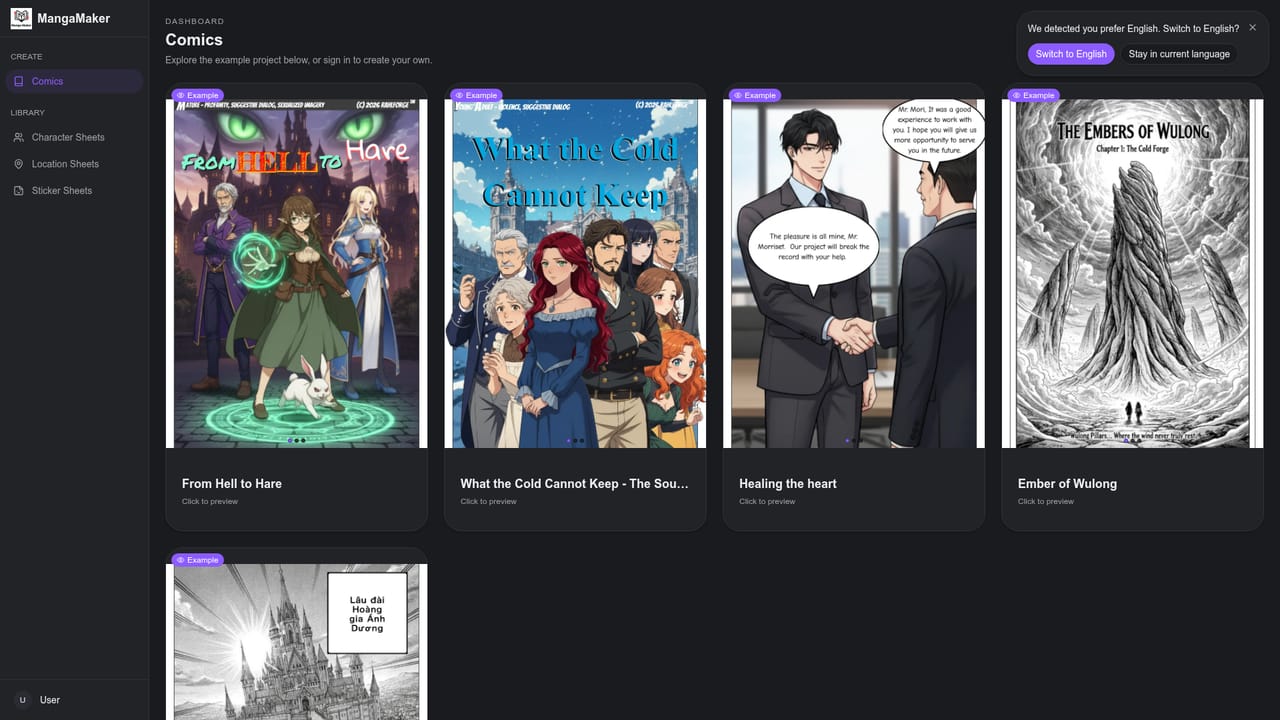
Screenshot of MangaMaker, Browser-based manga page maker with consistent characters

What is MangaMaker?

MangaMaker is a browser-based AI manga and comic maker that pairs a panel layout editor with image generation, reusable characters, speech bubbles and manga fonts, so non-artists can produce export-ready pages in minutes.

MangaMaker is a web-based manga and comic creator that combines a panel layout editor with AI image generation. The pitch is simple: describe a story, choose a page layout, and let the system produce characters and panel artwork, so people who cannot draw can still end up with finished manga pages. The site claims about five minutes per page, split across choosing a layout, generating art, and editing for export. The workflow starts with a layout. Users pick a preset grid or a 4-koma format, or draw their own panel breaks, then resize panels with snap-to-gutter guides. Generation can run per panel or as a batch for a whole page, with options to re-roll, upscale and fix details in place. The feature the site stresses most is character consistency: a character is defined once through a reference, kept in a library, and reused across panels, and a design change is said to propagate through the whole comic. The editor also supplies 10+ panel templates, 31 bubble styles and 28 manga fonts, along with vertical text and sound-effect lettering, and it offers style control across manga, comic and webtoon looks. Output goes to PNGs or print-friendly files, with safe margins for webtoon and print exports. The audience is broad: indie comic authors, webtoon artists, writers who want to turn scripts into chapters, social media creators making short strips, and hobbyists. A public gallery of read-only projects by real users shows the kind of multi-page work the tool produces, which helps buyers judge quality before signing up. Among alternatives, MangaMaker sits between general image generators, which leave layout and lettering to other software, and traditional illustration suites that assume drawing ability. Its advantage is keeping layout, generation, lettering and export in one browser workspace. The homepage says it is free to start with no credit card required, but it does not publish paid plan details, so heavier users should check limits inside the dashboard before committing a long project.
How do you use MangaMaker?

  1. 1Open the comics dashboard
    Start from the homepage and open the dashboard to create a new comic project. No credit card is required to begin.
    MangaMaker — Open the comics dashboard
  2. 2Choose a page layout
    Pick a preset grid or a 4-koma layout, or draw your own panel breaks. Resize panels with the snap-to-gutter guides and save favorite layouts for reuse.
  3. 3Describe the story and create characters
    Write the story once and let the tool create characters and panel prompts. Save each character to the library so the same look carries across panels.
  4. 4Generate and refine panels
    Generate panel by panel or batch a whole page. Re-roll, upscale or fix details until each panel reads the way you want.
  5. 5Add bubbles, text and effects
    Drop in speech and thought bubbles, manga fonts and sound effects. Adjust panel order, spacing and color grades.
  6. 6Export your page
    Export PNGs for web sharing or print-friendly files for publishing, using the safe margins built for webtoon and print.

Pros and cons

Pros

  • Character library keeps faces and outfits consistent across panels, the hardest problem in AI comicsAI
  • Layout, generation, lettering and export live in one browser editor, with no separate toolsAI
  • Manga-specific lettering: 31 bubble styles, 28 fonts, vertical text and sound effectsAI
  • Free to start with no credit card required, and a gallery of real projects to judge qualityAI
  • Exports PNGs or print-friendly files with safe margins for webtoon and printAI

Cons

  • Paid plan prices, credit limits and export restrictions are not stated on the homepageAI
  • Only a web app is mentioned, with no listed mobile or desktop apps and no offline useAI
  • AI panels still need re-rolling and detail fixes, so the five-minute-per-page claim is best caseAI
  • Output depends on generative models, so results may not match a human artist's style or fine controlAI
  • No public integrations, API or help center are listed beyond a changelogAI

How much does MangaMaker cost?

Free trial

Free to start with no credit card required, though the homepage gives no details on the limits of the free tier.

Learn more

Pricing

The homepage says the tool is free to start and no credit card is required. It does not list paid plan names, prices or usage limits.

Learn more

Features

Drag-and-drop canvas with 10+ panel templates, 31 bubble styles and 28 manga fonts. Text-to-manga art in 20+ styles, a reusable character library, batch page generation, re-roll and upscale tools, vertical text, and PNG or print exports.

Frequently asked questions about MangaMaker

  • How much does MangaMaker cost?
    The homepage says the tool is free to start and no credit card is required. It does not list paid plan names, prices or usage limits.
  • Does MangaMaker offer a free trial?
    Free to start with no credit card required, though the homepage gives no details on the limits of the free tier.
  • How do you use MangaMaker?
    The walkthrough on this page covers 6 steps: 1. Open the comics dashboard 2. Choose a page layout 3. Describe the story and create characters 4. Generate and refine panels 5. Add bubbles, text and effects 6. Export your page.
  • What platforms does MangaMaker support?
    MangaMaker is available on Web App.
  • What are the limitations of MangaMaker?
    Paid plan prices, credit limits and export restrictions are not stated on the homepage. Only a web app is mentioned, with no listed mobile or desktop apps and no offline use. AI panels still need re-rolling and detail fixes, so the five-minute-per-page claim is best case.

Status

StatusActive
Views0
Outbound clicks0
Added10/18/2026

Platforms

Web App

Pricing

Freemium