Free trial
Users get 2 free image generations per day plus the option to claim 3 additional credits through a daily sign-in check-in, with no stated time limit on the free tier itself.
Learn moreA fast, credit-based AI image generator built for consistent characters and crisp text.
Own Nano Banana Pro 3rd party? Verify ownership to get a dofollow link

Nano Banana Pro 3rd party is a credit-based AI image generator offering text-to-image and image-to-image workflows, built for character consistency, sharp text rendering, and 4K output across 10 aspect ratios.
Nano Banana Pro 3rd party is a web-based AI image generator built around Google's gemini 3 pro image preview model. It handles both text-to-image creation and image-to-image editing, letting users describe a scene from scratch or upload up to 10 reference photos to transform. The tool positions itself around three practical strengths: keeping a character's face and features consistent across multiple generated images, rendering readable text inside posters and graphics, and producing high-resolution output up to 4K. The product is aimed at creators, designers, marketers, and small teams who need a steady stream of visual assets without managing a full design pipeline. Typical use cases shown on the site include character sheets for storyboards, ecommerce poster campaigns, social media graphics, and portrait-style edits. A built-in model comparison tool lets users run the same prompt across Nano Banana, Nano Banana 2, and Nano Banana Pro to judge which tier delivers the layout, label accuracy, and typography a project needs before spending credits. In practice, a session starts by choosing text-to-image or image-to-image mode, optionally uploading reference images, writing a prompt of up to 5,000 characters, and picking from 10 aspect ratios (1:1 to 21:9) and a resolution. Generation takes roughly 3 to 10 seconds, and every output carries SynthID watermarking for provenance; paid plans remove the visible watermark. Credits are consumed per image and vary by model and resolution, with Nano Banana Pro costing more credits than the base Nano Banana or Nano Banana 2 models. Compared with general-purpose image generators, Nano Banana Pro differentiates itself through its emphasis on character continuity across a series of images and its text-rendering accuracy, which matters for poster and logo work. It sits alongside sibling models (Nano Banana 2, Nano Banana 2 Lite, GPT Image 2, Seedream 5.0) on the same platform, giving users a way to switch models for cost or quality trade-offs without leaving the interface.
Users get 2 free image generations per day plus the option to claim 3 additional credits through a daily sign-in check-in, with no stated time limit on the free tier itself.
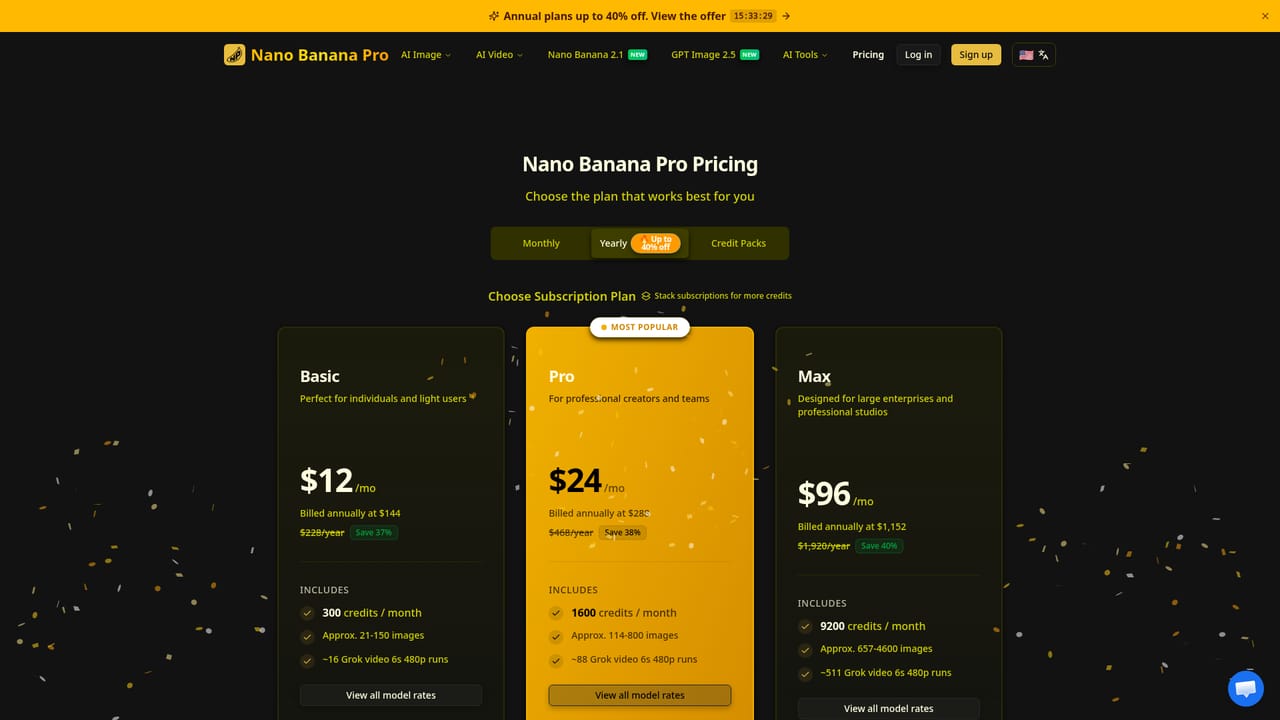
Learn moreFree usage includes 2 generations daily plus check-in credits. Paid subscriptions start at Basic ($12/mo, 300 credits), Pro ($24/mo, 1600 credits), and Max ($96/mo, 9200 credits), billed annually with per-model credit rates that vary by resolution.
Learn moreSupport is available through a contact page and email; the site also lists an about page and FAQ section covering model differences, file requirements, and watermarking.
Learn moreCore features include character consistency across multi-image sets, image-to-image editing via Nano Banana Edit with up to 10 reference uploads, high-fidelity text rendering, 10 selectable aspect ratios, 4K resolution output, and generation times of roughly 3 to 10 seconds.


