NoteitHub

Turn ChatGPT conversations into to-do lists, journals and Notion pages.

Beginner
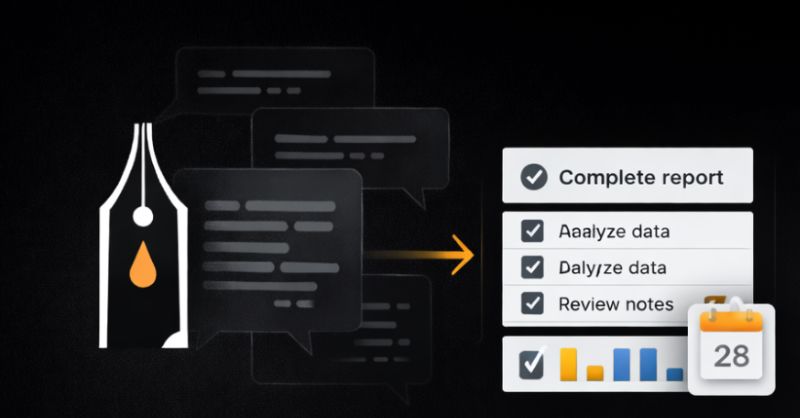
Screenshot of NoteitHub, Turn ChatGPT conversations into to-do lists, journals and Notion pages

What is NoteitHub?

NoteitHub is an AI summarizer tool that turns ChatGPT conversations into to-do lists, journals and Notion pages. A ChatGPT app that converts AI conversations into evolving to-do lists, journals and reminders, with an optional Notion sync on the Pro plan.

NoteitHub is a layer that sits on top of ChatGPT and rescues the useful output of a session before it sinks into chat history. Instead of scrolling back through a long thread to find the decision you made or the steps you agreed on, you connect the app inside ChatGPT and it summarizes the conversation into a structured entry: a title, a summary, tags, a goal and a set of tasks. Those tasks live in a list that keeps evolving. Return to the same topic weeks later and new items are appended to the existing list rather than starting a fresh plan. The product is aimed at people who think out loud with AI every day. Founders use it to stop re-running the same pricing, onboarding and marketing planning chats each week. Students turn explanations into a study journal with review steps attached. Developers keep debugging sessions as searchable notes so an old fix is not rediscovered from scratch. Marketers push campaign plans into calendars and checklists. The common thread is repeat work on the same subject, where context loss costs real time. In practice the setup is short. You add NoteitHub from ChatGPT's Apps and Connectors settings, create a to-do list, and from there save or journalize conversations one at a time. Tasks can carry reminders and sync to a calendar, and Pro adds a single Notion connection so saved chats land in your own pages and databases. Free tools on the site let you test the to-do and knowledge graph generation on pasted text without signing in. Against alternatives, NoteitHub is narrower than Notion, which remains the better general knowledge base, and it is more persistent than a plain ChatGPT checklist that dies with the thread. It is also tied to the ChatGPT ecosystem: the workflow only makes sense if ChatGPT is where you already work.

How do you use NoteitHub?

  1. 1Install NoteitHub inside ChatGPT
    Open ChatGPT Settings, go to Apps and Connectors, and select NoteitHub from the list to connect it to your account.
  2. 2Create your first to-do list
    Start a todos list from the dashboard, which becomes the container that future conversations on the same topic will feed into.
  3. 3Turn a conversation into tasks
    In a ChatGPT thread, ask NoteitHub to summarize the chat and generate tasks, then review the cards it produces before saving.
  4. 4Journalize and tag the session
    Save the conversation as a journal entry with a title, summary and tags so the decisions and reasoning stay findable later.
  5. 5Add reminders and calendar blocks
    Attach reminders to individual tasks or push the plan into calendar time blocks so the list becomes an actual schedule.
  6. 6Connect Notion for saved pages
    On the Pro plan, link Notion from the dashboard so saved chats and tasks write straight into your chosen pages and databases.

Pros and cons

Pros

  • Tasks persist across sessions, so revisiting a topic appends to the existing list instead of starting overAI
  • Saved entries capture a title, summary, tags and goal, which makes past decisions searchableAI
  • Reminders and calendar sync give generated advice a place in an actual scheduleAI
  • Free tier covers core to-do and journal tools for light useAI
  • Browser-based free tools let you test to-do generation before connecting anythingAI

Cons

  • Heavily dependent on ChatGPT: little value if you use other assistantsAI
  • Notion sync is limited to one integration and sits behind the Pro planAI
  • Credits are capped at 7 on Free and 35 on Plus, which will be tight for daily usersAI
  • No native mobile or desktop apps listed, so access runs through the web and ChatGPTAI
  • Pricing pages show time-limited discounts, which makes the real long-term cost harder to judgeAI

How much does NoteitHub cost?

Pricing

Free at $0 per month with 7 credits, 1 reminder and community support. Plus lists at $4.99 per month (from $8.99) with 35 credits, 5 reminders and email support. Pro lists at $8.99 per month (from $18.99) with 300 credits, 50 reminders, priority support, early app access and one integration for Notion. Discounts are shown as time limited.

Learn more

Support

Free accounts get community support, Plus adds email support, and Pro adds priority support plus early access to the ChatGPT app. No dedicated help centre is listed beyond the FAQ guides on the homepage.

Integrations

The Pro plan includes one integration that updates Notion pages and databases from ChatGPT; the landing page also displays Google Calendar, Slack, Trello, Asana, Jira, GitHub, Google Docs and Gmail logos, though the source only confirms Notion as a plan feature.

Learn more

Features

Converts ChatGPT conversations into structured to-do lists that are updated when the same topic returns. Each chat can be journalized with a title, summary, tags and goal. Use cases cover project plans, meeting action items, SOPs and checklists, decision history, study plans, calendars and reminders. Pro adds a single Notion integration for writing to pages and databases, plus early access to the ChatGPT app.

Learn more

Frequently asked questions about NoteitHub

  • How much does NoteitHub cost?
    Free at $0 per month with 7 credits, 1 reminder and community support. Plus lists at $4.99 per month (from $8.99) with 35 credits, 5 reminders and email support. Pro lists at $8.99 per month (from $18.99) with 300 credits, 50 reminders, priority support, early app access and one integration for Notion. Discounts are shown as time limited.
  • How do you use NoteitHub?
    The walkthrough on this page covers 6 steps: 1. Install NoteitHub inside ChatGPT 2. Create your first to-do list 3. Turn a conversation into tasks 4. Journalize and tag the session 5. Add reminders and calendar blocks 6. Connect Notion for saved pages.
  • What platforms does NoteitHub support?
    NoteitHub is available on Web App.
  • What does NoteitHub integrate with?
    The Pro plan includes one integration that updates Notion pages and databases from ChatGPT; the landing page also displays Google Calendar, Slack, Trello, Asana, Jira, GitHub, Google Docs and Gmail logos, though the source only confirms Notion as a plan feature.
  • What are the limitations of NoteitHub?
    Heavily dependent on ChatGPT: little value if you use other assistants. Notion sync is limited to one integration and sits behind the Pro plan. Credits are capped at 7 on Free and 35 on Plus, which will be tight for daily users.

Status

StatusActive
Views0
Outbound clicks0
Added10/21/2026

Platforms

Web App

Pricing

FreeFreemiumSubscription