
PixVerse R1

Step into generated worlds you can shape live, second by second

Beginner
Screenshot of PixVerse R1, Step into generated worlds you can shape live, second by second

What is PixVerse R1?

PixVerse R1 is a generative video tool. An interactive world model you play through in the browser: pick a preset character or scene from the gallery, then influence an evolving story with live audiovisual responses. Best for narrative prototyping and explorative play.

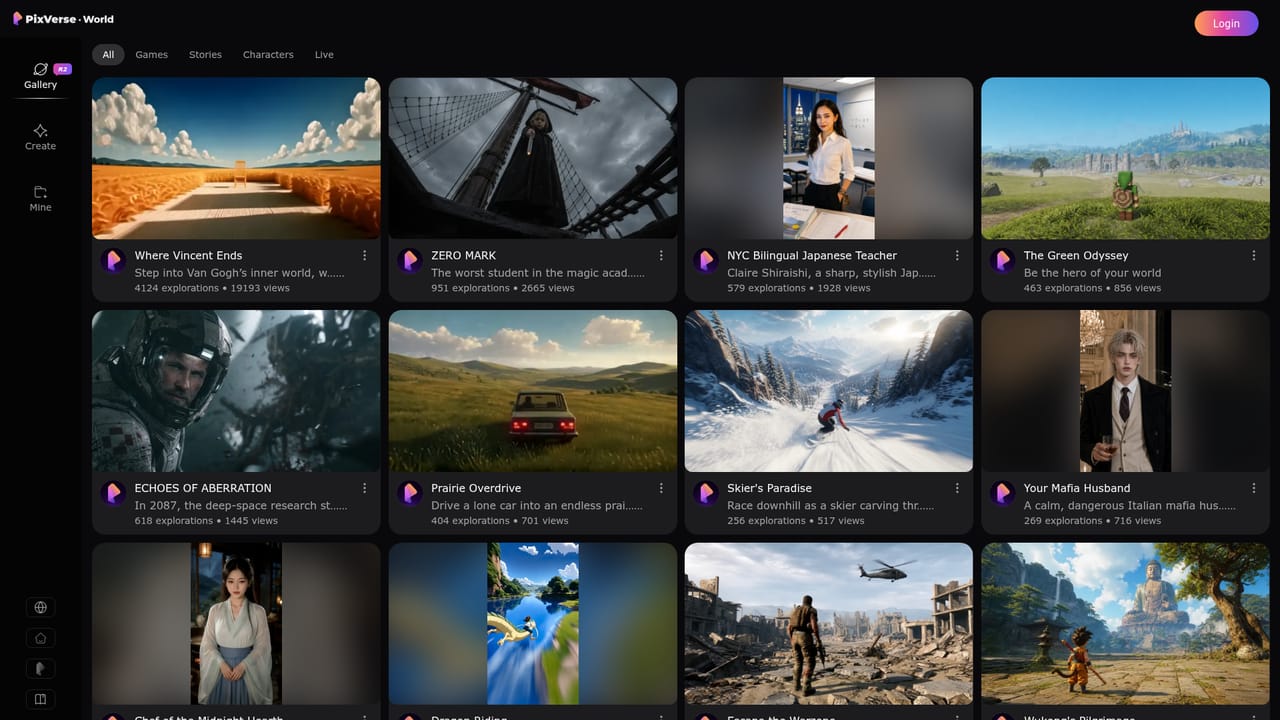
PixVerse R1 is an interactive world model built on top of PixVerse technology, presented on the world.pixverse.video site as a place to step into worlds you can shape. Rather than requesting a single clip and waiting for a render, you join a live experience where characters, scenes and story beats respond to your input as they unfold. The system combines multimodal understanding, long-horizon context modeling and responsive audiovisual generation in one model: it reads each interaction, keeps a coherent world state, and keeps producing what happens next. The gallery is the practical entry point. Each card opens a preset world or character, such as Chef of the Midnight Hearth, Your Mafia Husband, NYC Bilingual Japanese Teacher, or the more action-oriented ECHOES OF ABERRATION, ZERO MARK, Escape the Warzone and Dragon Riding. A Play Now link on the homepage drops you directly into a featured world, so you can sample the format before browsing the wider catalog. Once inside, the interaction loop is conversational and exploratory: you influence an evolving scene and watch the model carry the world forward in real time with sound and visuals together. The tool suits creators prototyping story-driven concepts, game and narrative designers testing character presence, and anyone who wants to explore generated media as a live activity rather than a file. It sits at the opposite end of the spectrum from prompt-to-clip generators: those favor controlled, short, repeatable output, while PixVerse R1 favors continuity and improvisation. A browser is all you need, which keeps the barrier to entry low. Pricing tiers, export options beyond the live stream, and any third-party integrations are not stated on the homepage, so those should be confirmed before committing to a paid plan.

How do you use PixVerse R1?

  1. 1Open the homepage
    Visit world.pixverse.video to see the featured worlds and read how the underlying model maintains a world state across interactions.
    PixVerse R1 — Open the homepage
  2. 2Jump into a featured world
    Use the Play Now button to launch a highlighted preset experience directly from the homepage and see how live generation feels.
  3. 3Browse the gallery
    Open the gallery to scan more live experiences, characters and story worlds than the homepage showcases.
    PixVerse R1 — Browse the gallery
  4. 4Pick a character or scene
    Select a card such as Chef of the Midnight Hearth or Dragon Riding, then start the experience from its preset page.
  5. 5Interact and observe
    Shape the scene as it unfolds, noting how the model keeps characters and events coherent between your inputs.
  6. 6Read the model write-up
    Follow the Learn More link to the PixVerse blog for technical background on long-horizon context and audiovisual generation.

Pros and cons

Pros

  • Live, input-driven worlds instead of fixed short clipsAI
  • Character presets cover distinct tones, from cozy chef stories to sci-fi and actionAI
  • Combines video and audio generation in one continuous streamAI
  • Runs in the browser with a direct Play Now entry pointAI
  • Gallery makes it easy to browse many preset experiences quicklyAI

Cons

  • Site text mixes PixVerse R2 branding with the R1 name, which is confusingAI
  • No pricing, export, or licensing detail visible on the homepageAI
  • Creative control looks preset-first, so custom world building is unprovenAI
  • Real-time generation quality and stability cannot be judged from marketing copyAI
  • Limited public documentation beyond a single blog linkAI

How much does PixVerse R1 cost?

Features

Real-time interactive video generation with responsive audiovisual output, multimodal understanding of user input, long-horizon context modeling for coherent world state, expressive character presets, and a browsable gallery of live experiences.

Frequently asked questions about PixVerse R1

  • How do you use PixVerse R1?
    The walkthrough on this page covers 6 steps: 1. Open the homepage 2. Jump into a featured world 3. Browse the gallery 4. Pick a character or scene 5. Interact and observe 6. Read the model write-up.
  • What platforms does PixVerse R1 support?
    PixVerse R1 is available on Web App.
  • What are the limitations of PixVerse R1?
    Site text mixes PixVerse R2 branding with the R1 name, which is confusing. No pricing, export, or licensing detail visible on the homepage. Creative control looks preset-first, so custom world building is unproven.

Status

StatusActive
Views0
Outbound clicks0
Added10/21/2026

Platforms

Web App

Pricing

Free