Free trial
A 3-day free trial of the Agent plan is offered, and you can cancel anytime.
Learn moreApprove your AI agents' permission requests from your phone in one tap
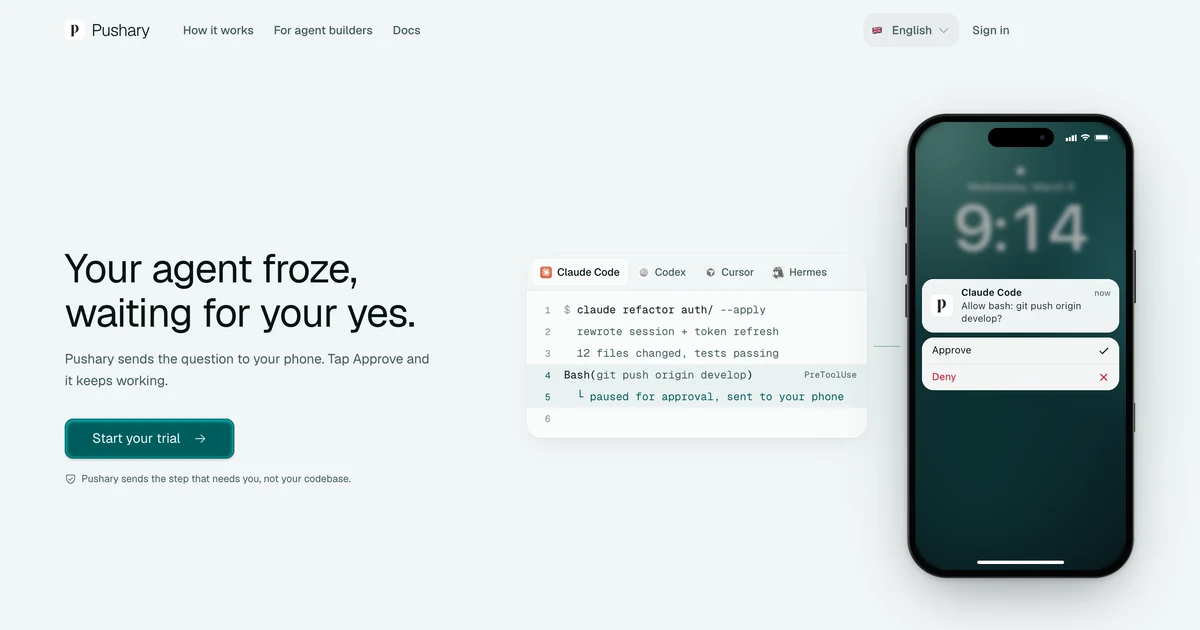
Pushary is a developer tool. Pushary routes AI agent permission requests to your phone, Mac notch, Slack or web app so Claude Code, Codex, Cursor, Hermes and MCP agents keep working. Rules auto-approve safe steps, escalate risky ones, and log every decision.
Pushary is a control panel for AI coding agents that deals with the moment an agent stops and waits for permission. Instead of leaving a terminal session frozen until its owner returns to the desk, it sends the question to an iPhone or Android phone, the Mac notch, Slack or a web app. The person taps approve or deny, the answer goes back to the agent, and the task resumes. Every answer is saved to an audit trail, which gives a single record of who decided what across all agents. The product is aimed at developers who hand long tasks to Claude Code, Codex, Cursor, Hermes, Gemini CLI, Antigravity CLI, OpenCode or any MCP-compatible agent. Setup is one terminal command, npx pushary@latest setup, which finds the agents installed on the machine, connects them and pairs a phone through a QR link. A Mac app can do the same without a terminal. On Windows and Linux, desk approvals stay in the terminal and the phone takes over when the user is away. Rules are the central idea. Rather than approving everything blindly, users define policy once: low-risk, reversible steps such as reading, linting or testing run on their own, while deleting, deploying, spending money or anything irreversible is escalated to the phone. Each step has a wait time, and if nobody answers, the rule decides whether to deny or hand control back to the terminal. Agents can ask yes/no, multiple-choice or free-text questions. The control panel shows which agents are active, which one is waiting, and a ledger of recent decisions. Pushary sits between blanket auto-approve modes and Anthropic's Remote Control. Remote Control is bundled with paid Claude plans and covers Claude Code only, while Pushary targets people who run several agents, use API keys or cloud providers, or want one rule set and one history. Someone who uses only Claude Code through claude.ai may not need it. Task titles and transcript sync can be disabled separately for privacy.
A 3-day free trial of the Agent plan is offered, and you can cancel anytime.
Learn moreAgent plan is $9.99 a month after a 3-day free trial, with 5,000 notifications a month (about 160 a day) covering every agent. Agent Pro is $19.99 a month with unlimited notifications and budgets for one person. Team adds people and routing.
Learn moreSetup guides for each supported agent are published in the docs, and the Mac app can configure agents without a terminal.
Works with Claude Code, Codex, Cursor, Hermes, Antigravity CLI, Gemini CLI, VS Code, OpenCode, Windsurf and any MCP-compatible agent. Delivers to iPhone, Android, Mac, Slack and a web app.
Learn morePhone, Mac notch, Slack and web delivery of agent approvals; one-tap approve or deny; per-tool auto-approve and escalation rules; timeout fallbacks; confirm, select and input question types; agent control panel; decision ledger and audit trail.
Learn more AI Angels400+ customizable AI girlfriends for NSFW chat, voice calls, and roleplay
 Candy AIExperience the future of companionship with AI friends who chat, role-play, and connect with you on a human level.
 ourdream.aiA vast AI roleplay platform with millions of characters for chat, images, video and voiceAI Angels400+ customizable AI girlfriends for NSFW chat, voice calls, and roleplayCandy AIExperience the future of companionship with AI friends who chat, role-play, and connect with you on a human level.ourdream.aiA vast AI roleplay platform with millions of characters for chat, images, video and voice


