Scholantic

An academic editor that researches, cites, and reviews alongside you

Beginner
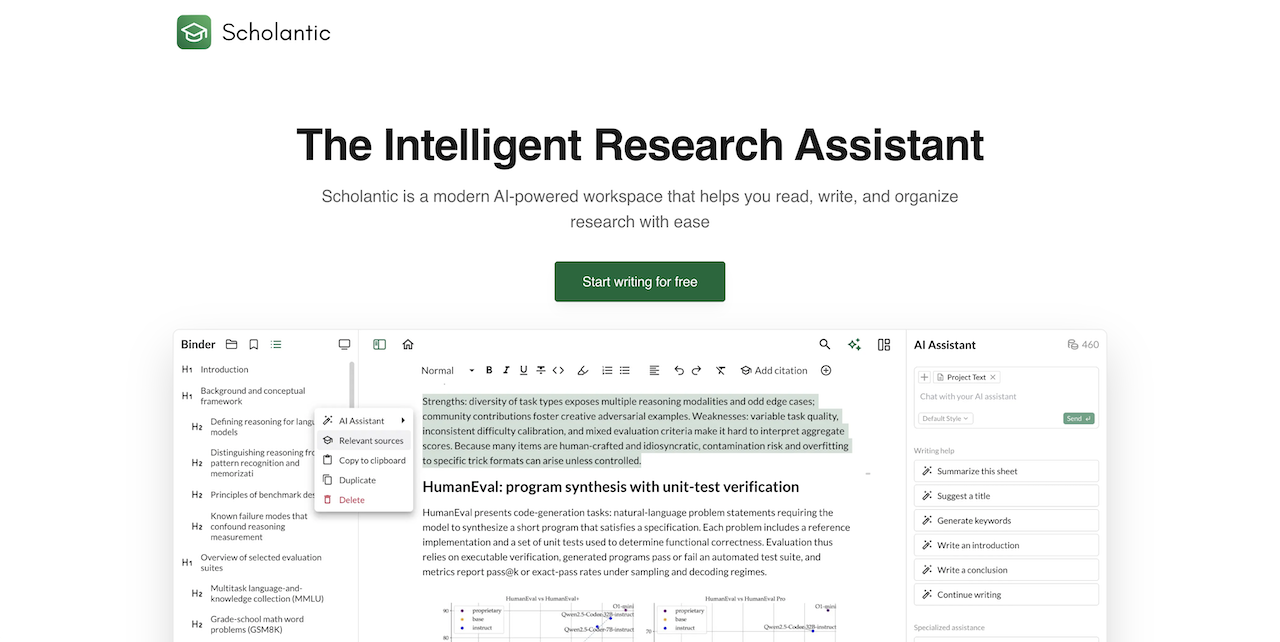
Screenshot of Scholantic, An academic editor that researches, cites, and reviews alongside you

What is Scholantic?

Scholantic is an AI assisted academic writing workspace with a distraction free editor, source discovery, one click bibliographies in five citation styles, deep research summaries and an AI peer review pass. A free tier offers five AI uses daily; Pro at $18 per month adds unlimited assistance and full PDF, Word and Markdown export.

Scholantic is a browser based writing workspace built around the demands of academic papers rather than general purpose drafting. Its centerpiece is a distraction free editor with markdown shortcuts, adjustable themes, an academic aware grammar and spell checker, and automatic snapshots so any revision can be restored. A side notebook holds source annotations and rough ideas next to the main document without crowding it. The AI layer is where the product diverges from a plain word processor. An assistant tuned for scholarly conventions handles brainstorming, outline generation, introductions, rephrasing, counterargument exploration and passage translation inside the document. A deep research function takes a topic and returns a synthesized overview instead of a list of links, while an AI peer review pass scores argument strength, clarity and structure before submission. Users can also feed earlier papers to the assistant so generated text follows their own style, or specify a tone directly. Citations are treated as a first class feature. Papers can be found through in app search, added by DOI or from any webpage, and turned into a bibliography in APA, MLA, Chicago, Harvard or IEEE. Export covers PDF, Word and Markdown with pre-set margins, fonts and heading styles, so the file arrives submission ready. The company states it runs a mix of third party models (OpenAI GPT-5 and Claude Sonnet 4.5 among them) alongside in house models, and that customer data is not used for training. The audience is students, doctoral candidates, academics and professional researchers who write long form work with references. Compared with reference managers bolted onto Word, Scholantic keeps citation, drafting and review in one tab, though the ecosystem is narrower: it is a web app with no desktop client, and the free tier caps AI assistance at five uses per day.

How do you use Scholantic?

  1. 1Create a free account
    Register from the homepage to reach the app workspace. The Basic plan starts immediately with unlimited documents and five AI assistant uses per day.
  2. 2Set up your document
    Open a new document in the distraction free editor and pick a theme. Markdown shortcuts handle headings and structure while you draft.
  3. 3Gather sources and citations
    Search for papers inside the app or add a source by DOI or webpage URL. Scholantic then inserts in text citations and builds the bibliography in your chosen style.
  4. 4Draft with the AI assistant
    Ask the chat to brainstorm, outline or draft an introduction, or use inline tools to rephrase and translate. Optional style training from earlier papers keeps the voice consistent.
  5. 5Review before submission
    Run the AI peer review to check argument strength, clarity and structure, then restore an earlier snapshot if a revision goes wrong.
  6. 6Export in your required format
    Choose PDF, Word or Markdown with formatting preset for APA, MLA or Chicago. Full export requires the Pro plan; Basic offers partial txt export.

Pros and cons

Pros

  • Editing, citation management and AI review live in a single browser workspace instead of separate toolsAI
  • Bibliographies generate automatically in APA, MLA, Chicago, Harvard and IEEE from a DOI or webpageAI
  • Version history with manual checkpoints makes heavy revision safeAI
  • The AI can be trained on earlier papers so output tracks the writer's own styleAI
  • Exports arrive with preconfigured formatting for common submission stylesAI

Cons

  • Free plan limits AI assistance to five uses per day, which runs out fast during heavy draftingAI
  • Full export to PDF, Word and Markdown sits behind the paid plan, so free users can only partially export to txtAI
  • Available only as a web app, with no desktop, mobile or offline client listedAI
  • No native integration with reference libraries such as Zotero or Mendeley is describedAI
  • The homepage gives little detail on model limits or how deep research sources are vettedAI

How much does Scholantic cost?

Pricing

Two tiers. Basic is free and includes five AI assistant uses per day, unlimited documents, source recommendations, writing goals and partial txt export. Pro costs $18 per month and adds unlimited AI assistance, unlimited citations, deep research, personalized writing styles, full PDF, Word and Markdown export, early access and priority support.

Learn more

Support

Priority support is listed as a Pro plan benefit. No separate help centre or documentation page is described on the homepage.

Features

Distraction free markdown editor with themes, academic grammar and spell check, automatic version history and manual checkpoints, side by side research notebook, in app source search, DOI and webpage citation capture, one click bibliographies in APA, MLA, Chicago, Harvard and IEEE, AI chat, deep research synthesis, AI peer review, style training from previous papers, and PDF, Word and Markdown export with preset formatting.

Frequently asked questions about Scholantic

  • How much does Scholantic cost?
    Two tiers. Basic is free and includes five AI assistant uses per day, unlimited documents, source recommendations, writing goals and partial txt export. Pro costs $18 per month and adds unlimited AI assistance, unlimited citations, deep research, personalized writing styles, full PDF, Word and Markdown export, early access and priority support.
  • How do you use Scholantic?
    The walkthrough on this page covers 6 steps: 1. Create a free account 2. Set up your document 3. Gather sources and citations 4. Draft with the AI assistant 5. Review before submission 6. Export in your required format.
  • What platforms does Scholantic support?
    Scholantic is available on Web App.
  • What are the limitations of Scholantic?
    Free plan limits AI assistance to five uses per day, which runs out fast during heavy drafting. Full export to PDF, Word and Markdown sits behind the paid plan, so free users can only partially export to txt. Available only as a web app, with no desktop, mobile or offline client listed.

Status

StatusActive
Views0
Outbound clicks0
Added10/21/2026

Platforms

Web App

Pricing

FreemiumSubscription