Free trial
A free account with limited features is available so new users can try the service before committing to a paid plan.
Learn moreTurn text into lifelike voiceovers with over 800 voices.

Speech Now is an AI narration tool that turns text into lifelike voiceovers with over 800 voices. Speech Now converts scripts into downloadable voiceover audio using a library of over 800 voices and languages, with exports in MP3, WAV, OGG and WEBM.
Speech Now is a text-to-speech service built for people who need voiceover audio without booking a studio or a narrator. The workflow is deliberately simple: paste or type your script, pick a voice and language from a library the site describes as more than 800 options, preview the read, then export the finished audio as MP3, WAV, OGG or WEBM. That covers the common jobs, from a YouTube explainer and a Facebook ad spot to an audio version of an ebook, a PDF or a training document. The site frames the product around conversion and comprehension rather than novelty. Its pitch is that video without a solid voiceover does not hold attention, and it groups voices by job: serious tones for sales videos, female voices for training and demo content, and a broad spread for educational material. All generated voices are described as free of copyright restrictions, so the audio can be reused in commercial projects indefinitely. Because the exports are standard audio formats, the files drop into any editor, and the site lists common video and audio tools such as iMovie, Ableton, After Effects, Camtasia, Pro Tools, Filmora and Final Cut Pro as natural destinations. In practice Speech Now competes with the large voice platforms on price and simplicity rather than on studio-grade voice cloning or fine emotional control. The homepage does not promise custom voice models, granular pronunciation editing or a developer API, so teams that need those should look elsewhere. The audience is closer to solo creators, small marketing teams, course builders and accessibility-minded publishers who want a lot of characters for a modest monthly fee and do not want to learn a complex editor. A free account with limited features is offered so the voice library can be tested before paying. The paid tier is a flat monthly subscription rather than a per-character meter, which suits people producing steadily. Buyers should confirm voice quality on their own scripts first, since the value of any TTS tool rests on how natural the selected voices sound in context.
A free account with limited features is available so new users can try the service before committing to a paid plan.
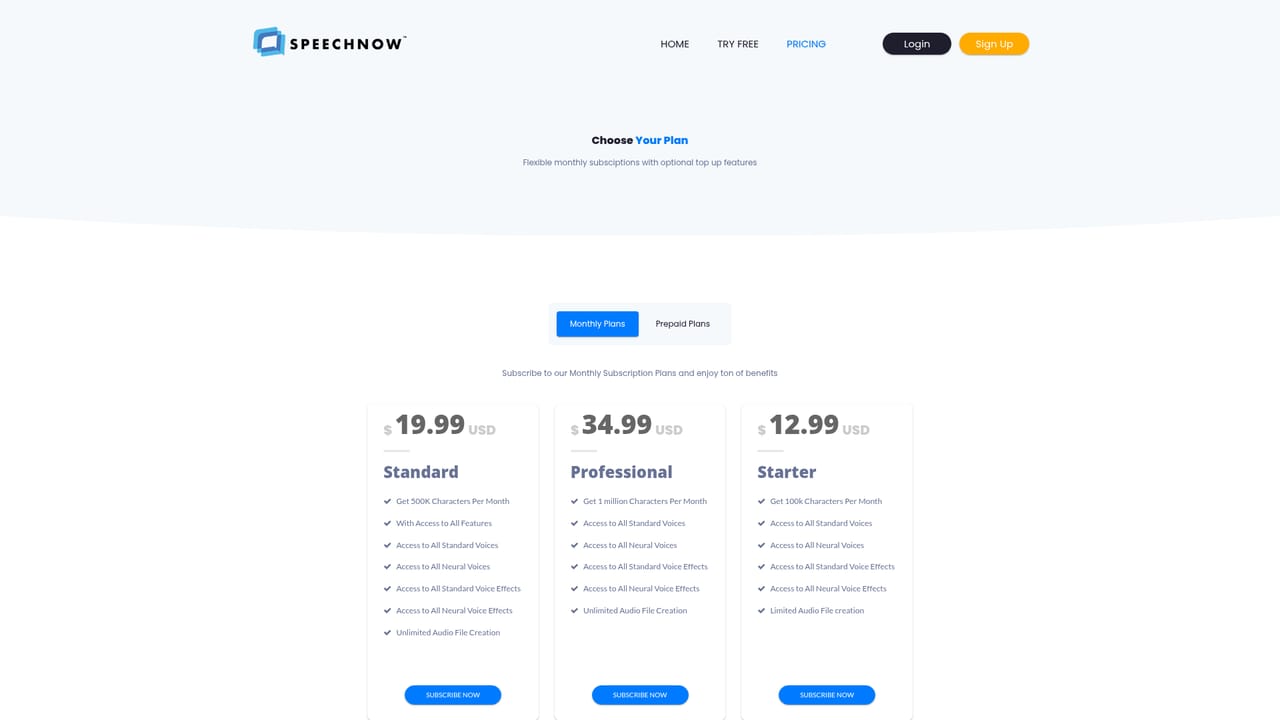
Learn moreOne paid plan is listed: Premium at $12.99 billed monthly, including 1 million characters per month, access to all standard and neural voices and voice effects, and unlimited audio file creation. A free account with limited features is also offered.
Learn moreSupport is available by email at support@speechnow.co. No live chat, phone or help centre is mentioned on the homepage.
Learn moreNo native integrations are described. Exported audio files work with common editors such as iMovie, Ableton, After Effects, Camtasia, Pro Tools, Filmora and Final Cut Pro.
Text to speech with a library of over 800 voices and languages; standard and neural voices plus voice effects; export to MP3, WAV, OGG and WEBM; unlimited audio file creation on the paid plan; voices described as copyright free for commercial use; output compatible with common video and audio editors.
 AI Angels400+ customizable AI girlfriends for NSFW chat, voice calls, and roleplay
 Candy AIExperience the future of companionship with AI friends who chat, role-play, and connect with you on a human level.
 ourdream.aiA vast AI roleplay platform with millions of characters for chat, images, video and voiceAI Angels400+ customizable AI girlfriends for NSFW chat, voice calls, and roleplayCandy AIExperience the future of companionship with AI friends who chat, role-play, and connect with you on a human level.ourdream.aiA vast AI roleplay platform with millions of characters for chat, images, video and voice


