Textgptp5

Turn a text prompt into runnable p5.js generative sketches.

Beginner
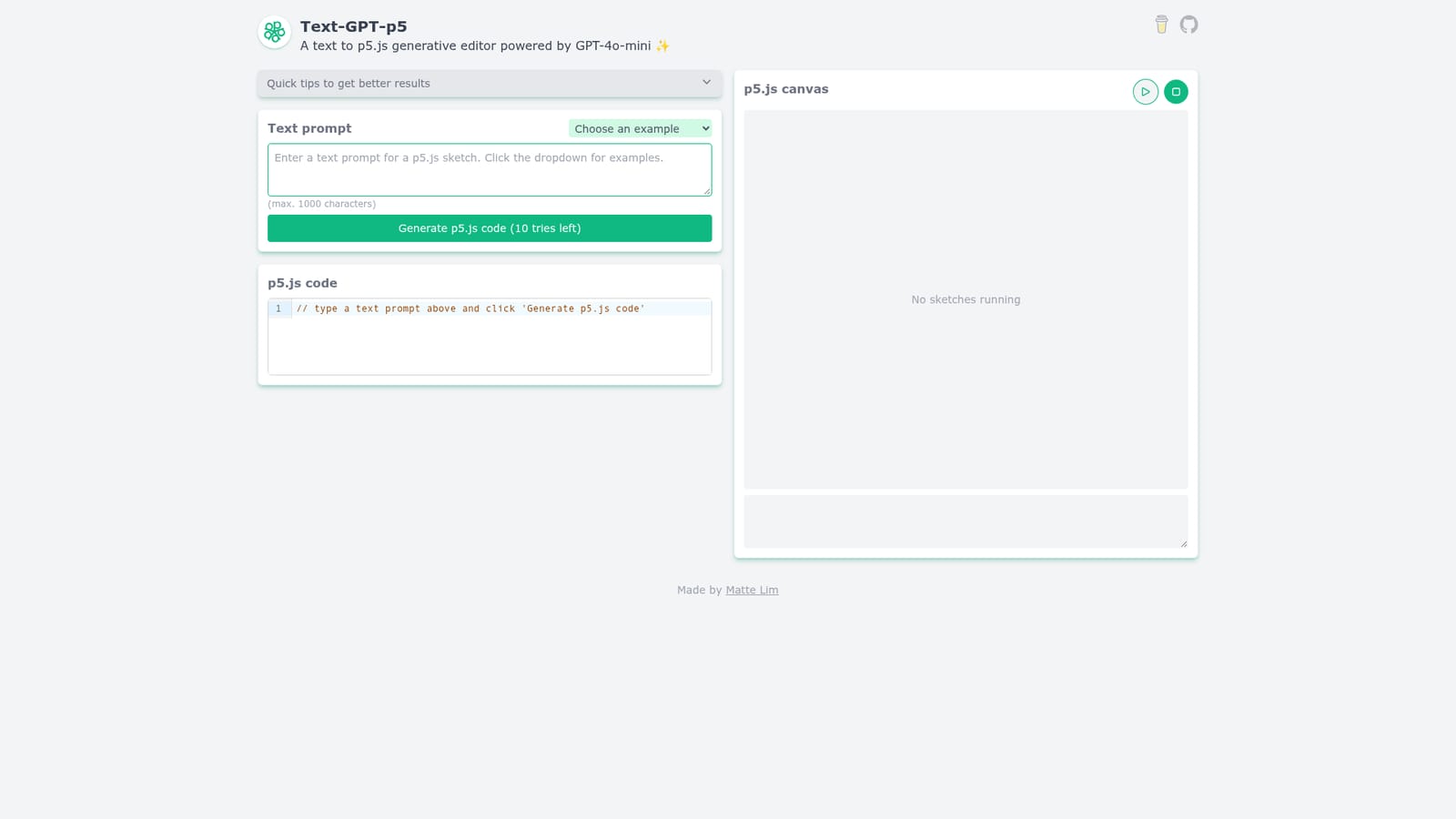
Screenshot of Textgptp5, Turn a text prompt into runnable p5.js generative sketches

What is Textgptp5?

Textgptp5 is a code visualization tool that turns a text prompt into runnable p5.js generative sketches. Text-GPT-p5 turns short text prompts into p5.js sketches and renders them in a browser canvas. Built-in examples cover game of life, flocking, 3D forms and click driven animations, with an editable code panel and a limited number of generations per session.

Text-GPT-p5 is a small web tool that converts natural language prompts into p5.js code and runs the result in a live canvas. You type what you want to see, it asks GPT to draft the sketch, and the editor panel shows the generated code with syntax highlighting next to a preview area. The homepage ships with a set of example prompts covering Conway's Game of Life, 2D flocking, 3D forms panning, radial lines on click, gravity balls, bouncing balls, color noise static and zen ripples. Choosing one fills the prompt box, which helps first time users see the range of outputs the generator can target. In practice the page is divided into three stacked panels: the prompt field, the code editor and the p5.js canvas. Each generation consumes one attempt, and the interface tracks the remaining tries with a counter (10 to start). If a sketch does not behave as expected, you can edit the code directly in the editor and rerun it without prompting again, which makes the tool closer to a lightweight sketch pad than a finished IDE. The homepage also includes a short list of quick tips for better results, so the workflow assumes some iteration. It is aimed at creative coders, students learning p5.js and anyone who wants a starting point for a generative animation rather than a blank editor. The output is p5.js, so it inherits that library's drawing model and can be copy pasted into a local project or the p5 web editor. Compared with general purpose code chat tools, Text-GPT-p5 is narrower: no file management, no library installation and no multi file projects. That narrowness is the selling point, since the browser preview closes the loop between prompt and visible result. The counter limit means the tool is best suited to quick experiments. Nothing on the homepage describes saved history, sharing, export or accounts, so treat generated sketches as throwaway drafts unless you copy the code out. For teams or classroom use, check how many generations a session allows before relying on it.

How do you use Textgptp5?

  1. 1Open the generator
    Go to text-gpt-p5.vercel.app. The page loads with three panels: the text prompt, the code editor and the canvas.
    Textgptp5 — Open the generator
  2. 2Read the quick tips
    The top of the page lists short tips for better prompts. Reviewing them first helps you phrase requests the model handles well.
  3. 3Pick an example prompt
    Use the example dropdown to load a ready made prompt such as 2D flocking or Conway's Game of Life, then adjust the wording in the prompt field.
  4. 4Generate the p5.js code
    Click Generate p5.js code. The counter above the button drops by one and the resulting sketch appears in the code panel.
  5. 5Run and edit the sketch
    The canvas panel shows the running sketch. Edit the code directly in the editor to correct behaviour, then rerun without spending another generation.

Pros and cons

Pros

  • Prompt to canvas loop is immediate, so you can judge a sketch without leaving the pageAI
  • Editable code panel lets you fix or extend generated p5.js by handAI
  • Built-in examples (flocking, game of life, 3D forms) give a clear starting pointAI
  • No setup or library install required, it runs in the browserAI
  • Output uses a well documented creative coding library that is easy to reuseAI

Cons

  • Generation count is capped (10 tries shown), which runs out quickly during iterationAI
  • No visible way to save, export or share sketches, so work is lost on reloadAI
  • Only p5.js is targeted, no support for other creative coding frameworksAI
  • No documented pricing, account or support channel on the homepageAI

How much does Textgptp5 cost?

Features

Text prompt to p5.js code generation with a live canvas preview, a syntax highlighted editable code panel, eight built-in example prompts (flocking, 3D forms, gravity balls, zen ripples and others), a per session generation counter and short prompt writing tips on the homepage.

Frequently asked questions about Textgptp5

  • How do you use Textgptp5?
    The walkthrough on this page covers 5 steps: 1. Open the generator 2. Read the quick tips 3. Pick an example prompt 4. Generate the p5.js code 5. Run and edit the sketch.
  • What platforms does Textgptp5 support?
    Textgptp5 is available on Web App.
  • What are the limitations of Textgptp5?
    Generation count is capped (10 tries shown), which runs out quickly during iteration. No visible way to save, export or share sketches, so work is lost on reload. Only p5.js is targeted, no support for other creative coding frameworks.

Status

StatusActive
Views0
Outbound clicks0
Added10/21/2026

Platforms

Web App

Pricing

Free