Free trial
A free entry point is advertised: creating a booking page is described as free and requires no credit card. The homepage does not state how long any paid trial lasts.
Learn moreScheduling software that sells your services before the call happens

Timetics.ai is a communication tool. Timetics AI turns booking pages into sales surfaces: packages, pricing, payments and deposits sit alongside scheduling, with availability rules, coupons, multi-location management, analytics and an AI agent for reschedules and refunds.
Timetics AI is a booking and scheduling platform built around a commercial premise that most calendar tools ignore: the sale is largely decided before the meeting starts. Instead of a bare time-slot picker, each booking page is a small storefront. Visitors see your service packages, prices, durations and positioning, then choose a slot and pay or leave a deposit at checkout. The booking page builder uses drag-and-drop blocks, so a page can be assembled visually without code. The product extends past the calendar itself. Availability rules cover working hours, breaks and booking limits, while clients can reschedule or cancel through simple controls. Service businesses can add optional extras during booking as an upsell, run coupon codes, manage several branches from one account, and keep track of bookings, revenue and performance through analytics and reports. Payments can be taken in full or partially at the point of booking, and recurring bookings can repeat daily, weekly or monthly. Workspaces keep multiple brands, teams or client accounts separated behind one dashboard, with role management controlling what admins and staff can reach. An AI agent handles requests such as setting a slot, sending a reminder, issuing a refund or rescheduling. The tool suits consultants, coaches, agencies and service operators who price their time and want enquiries to arrive informed. Education providers, internal teams and workspace-based agencies are also targeted. In practice it competes with Calendly and similar schedulers, differing mainly in the emphasis on packages, pricing and payment rather than pure time coordination. Team scheduling with round-robin distribution is listed as coming soon, which matters for buyers who need load balancing across staff today. The homepage does not publish plan prices, so cost has to be checked on the pricing page before committing.
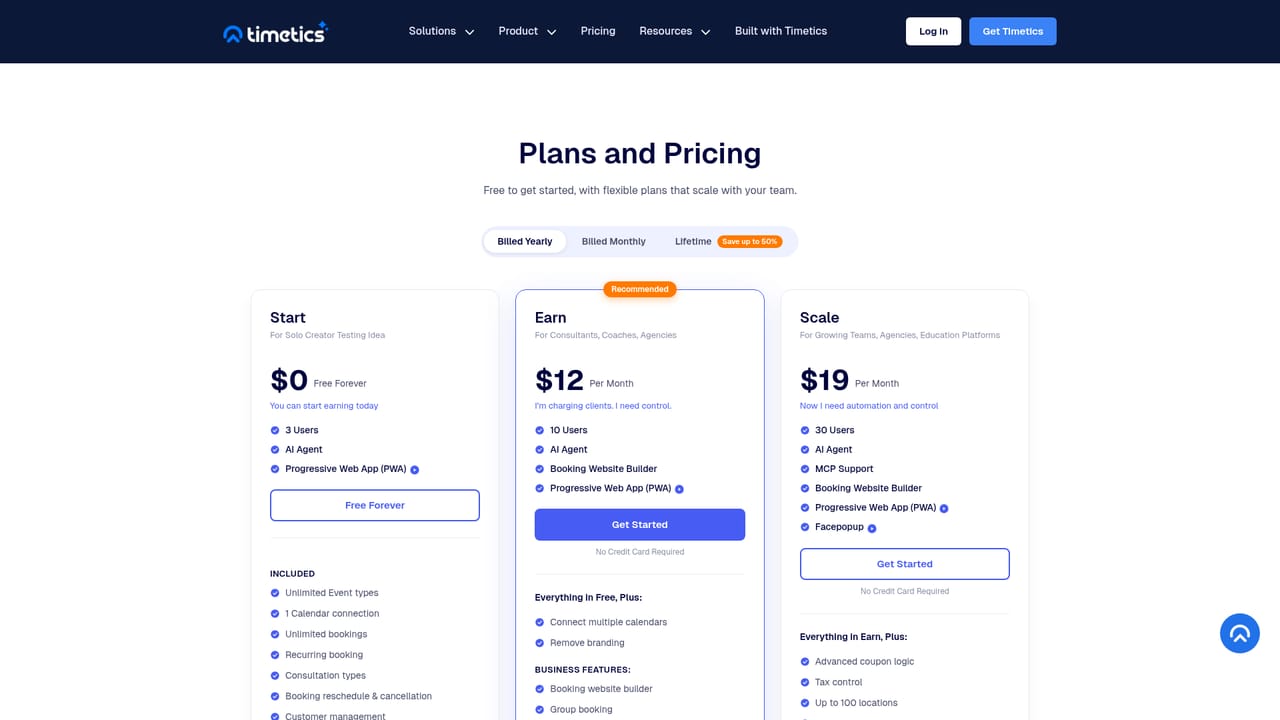

A free entry point is advertised: creating a booking page is described as free and requires no credit card. The homepage does not state how long any paid trial lasts.
Learn moreThe homepage links to a pricing page and offers a free booking page with no credit card required, but it does not list plan tiers, price points or feature limits. Specific costs have to be checked on the pricing page.
Learn moreThe homepage confirms PayPal as a checkout option. No other calendar, video or CRM integrations are named, so compatibility with existing tools should be confirmed directly.
Booking page builder with drag-and-drop blocks, service packages with pricing and durations, full or partial payment at booking, coupons, recurring bookings, extra services as upsells, multi-location management, role management, analytics and reports, workflows for reminders and follow-ups, an AI agent for slots, reminders, refunds and reschedules, plus isolated workspaces.
Learn more AI Angels400+ customizable AI girlfriends for NSFW chat, voice calls, and roleplay
 Candy AIExperience the future of companionship with AI friends who chat, role-play, and connect with you on a human level.
 ourdream.aiA vast AI roleplay platform with millions of characters for chat, images, video and voiceAI Angels400+ customizable AI girlfriends for NSFW chat, voice calls, and roleplayCandy AIExperience the future of companionship with AI friends who chat, role-play, and connect with you on a human level.ourdream.aiA vast AI roleplay platform with millions of characters for chat, images, video and voice


