Together Link

Run open models inside the coding agent you already use

Intermediate
Screenshot of Together Link, Run open models inside the coding agent you already use

What is Together Link?

Together Link is a free, open-source command line tool that connects coding agents such as Claude Code, Codex and OpenCode to open models on Together AI, with automatic routing and a cost receipt for every session.

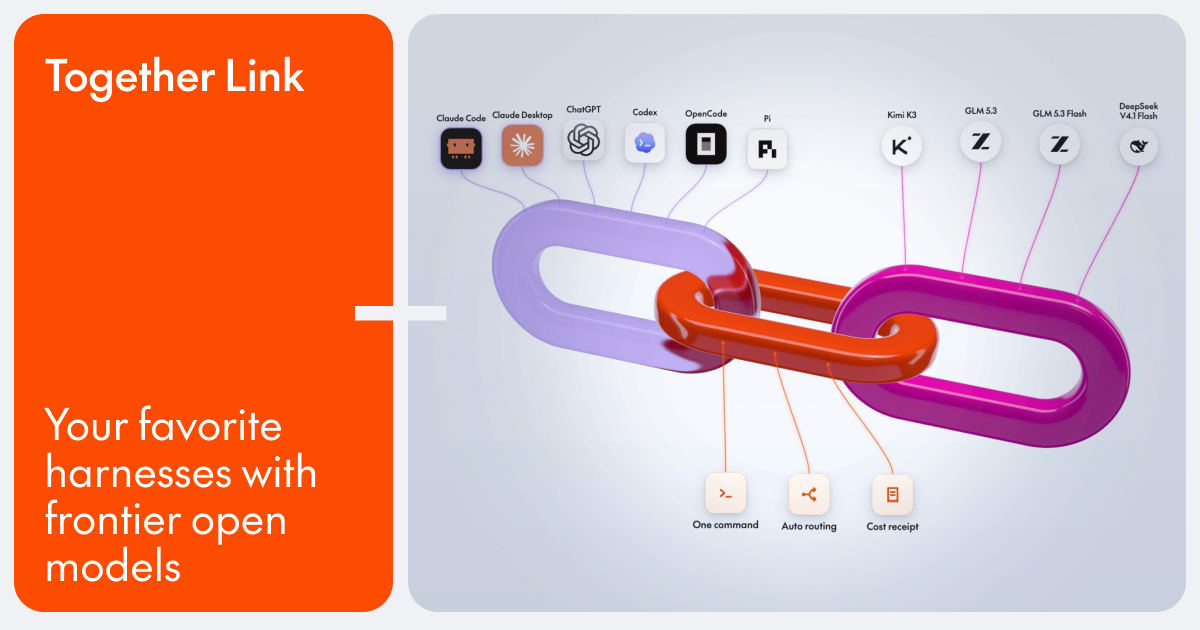
Together Link is a free, open-source tool from Together AI that points an existing coding agent at open-weight models hosted on Together's platform. Rather than asking developers to adopt a new editor or a new agent, it sits between the harness they already use and the model provider. Supported harnesses include Claude Code, Claude Desktop, Codex, ChatGPT Desktop, OpenCode and Pi. The product is in beta, and its model lineup covers Kimi K3, GLM 5.3, MiniMax M3 and DeepSeek V4.1 Flash. In practice, setup is one install command followed by a configure step that stores a Together AI API key. Each agent then launches through its own command, such as togetherlink claude. Terminal agents receive settings that last only for the session, while the desktop apps run on separate, reversible profiles, so logins, history and config files stay where they were and a single off command restores the original setup. The default model choice is Auto Router, which reads the first task of a session and sends quick work to a low-cost model and harder problems to a more capable one. Models can also be picked by hand from the agent's own model menu. When a session ends, a receipt prints token and dollar totals, and a usage report covers the last seven days of spend. The audience is developers and engineering teams whose agent bills have grown with daily use and who want cheaper models without giving up a familiar workflow. Together states that moving everyday coding work to open models cuts spending by more than half, which is a vendor figure rather than an independent measurement. Compared with wiring up a generic router or swapping provider keys by hand, the pitch here is narrow: keep the harness, add routing and cost visibility. It requires macOS or Linux and a Together AI API key, and usage is billed per token at Together's rates, so it suits people comfortable with terminal commands more than newcomers to coding agents.
How do you use Together Link?

  1. 1Get a Together AI API key
    Create a Together AI account and generate an API key. Confirm you are on macOS or Linux with a supported coding agent installed.
  2. 2Run the install command
    Paste the one-line install command from the Together Link page into a terminal to install the togetherlink tool.
  3. 3Add your key with configure
    Run togetherlink configure and enter your Together AI API key so the gateway can bill model usage to your account.
  4. 4Launch your agent through Together Link
    Start your harness with its command, such as togetherlink claude. Leave the model on Auto or choose a specific open model from the agent's model menu.
  5. 5Review the receipt and switch back
    Read the token and dollar totals printed when the session ends, then check the usage report. Use the matching off command to return to your original setup.

Pros and cons

Pros

  • Works inside harnesses developers already use, so logins, settings and history stay in placeAI
  • Auto Router sends quick tasks to a cheap model and harder ones to a stronger modelAI
  • Every proxied session prints token and dollar totals, plus a seven-day usage reportAI
  • Reversible setup: terminal agents get session-only settings and desktop apps use separate profilesAI
  • The tool itself is free and open source, with pay-per-token model billing onlyAI

Cons

  • Still in beta, so behavior and the model lineup may changeAI
  • Limited to macOS and Linux; Windows is not listed as supportedAI
  • Requires a Together AI account and API key, tying usage to one providerAI
  • The savings claim of over 50% is a vendor figure and depends on your workloadAI
  • Some agents need minimum versions (OpenCode 2+, Pi 0.80.8+), and web search needs an optional Exa keyAI

How much does Together Link cost?

Pricing

The tool is free and open source. You pay only for model usage at Together AI's per-token rates, listed as $3.00 in and $15.00 out for Kimi K3, $1.40 and $4.40 for GLM 5.3, and $0.30 and $1.20 for MiniMax M3 and DeepSeek V4.1 Flash.

Learn more

Support

Documentation lives at docs.together.ai, and the site notes that the docs can be read by your agent directly. No other support channels are stated on the page.

Learn more

Integrations

Works with Claude Code, Claude Desktop, Codex, ChatGPT Desktop, OpenCode (version 2+) and Pi (version 0.80.8+). Web search in Claude Code is available through an optional Exa key. Models are served by Together AI.

Learn more

Features

Auto Router with per-session routing, manual model selection from the agent's menu, one-command setup across six agents, a token and dollar receipt for each session, a seven-day usage report, and reversible profiles that leave existing configs untouched.

Learn more

Frequently asked questions about Together Link

  • How much does Together Link cost?
    The tool is free and open source. You pay only for model usage at Together AI's per-token rates, listed as $3.00 in and $15.00 out for Kimi K3, $1.40 and $4.40 for GLM 5.3, and $0.30 and $1.20 for MiniMax M3 and DeepSeek V4.1 Flash.
  • How do you use Together Link?
    The walkthrough on this page covers 5 steps: 1. Get a Together AI API key 2. Run the install command 3. Add your key with configure 4. Launch your agent through Together Link 5. Review the receipt and switch back.
  • What platforms does Together Link support?
    Together Link is available on MacOS and Linux.
  • What does Together Link integrate with?
    Works with Claude Code, Claude Desktop, Codex, ChatGPT Desktop, OpenCode (version 2+) and Pi (version 0.80.8+). Web search in Claude Code is available through an optional Exa key. Models are served by Together AI.
  • What are the limitations of Together Link?
    Still in beta, so behavior and the model lineup may change. Limited to macOS and Linux; Windows is not listed as supported. Requires a Together AI account and API key, tying usage to one provider.

Status

StatusActive
Views0
Outbound clicks0
Added11/18/2026

Platforms

MacOSLinux

Pricing

FreePaid